ResultTableData class is used to handle each table value for the result table.
The class can be called from ResultTable class.
.
More...
Public Member Functions | |
| double | GetAngle (int row) |
| Returns the angle in the specified row as a real number for models with rotation motion. More... | |
| String | GetAngleUnit () |
| Returns the unit of the angle as a string for models with rotation motion. More... | |
| String | GetColName (int col) |
| Returns the name of the column as a string. More... | |
| int | GetCols () |
| Returns the number of columns in the result table as an integer. More... | |
| String | GetComponent () |
| Returns the name of the components (x, y, z) or complex numbers (real, imaginary) as a string. More... | |
| double | GetDistance (int row) |
| Returns the distance in the specified row as a real number for models with translation motion. More... | |
| String | GetDistanceUnit () |
| Returns the unit of distance as a string for models with translation motion. More... | |
| String | GetName () |
| Returns the name of the result table as a string. More... | |
| String | GetRowName (int row) |
| Returns the name of the row as a string. More... | |
| int | GetRows () |
| Returns the number of rows in the result table as an integer. More... | |
| int | GetStep (int row) |
| Returns the number of steps in the specified row as a real number. More... | |
| double | GetTime (int row) |
| Returns the time in the specified row as a real number. More... | |
| String | GetTimeUnit () |
| Returns the unit of time as a string. More... | |
| double | GetValue (int row, Variant &val) |
| Returns the value in the specified cell as a real number. A column is specified by an index or name. More... | |
| String | GetValueUnit () |
| Returns the unit for physical amounts as a string. More... | |
| bool | IsValid () |
| Returns True if an object is valid. More... | |
| bool | IsValidStep (int step) |
| Returns whether or not the specified number of steps is valid. More... | |
| void | SetComponent (String &name) |
| Specifies the components (x, y, z) or complex numbers (real, imaginary) for a result. More... | |
| void | WriteAllComponents (String &filename, String &type, int step) |
| Exports all components for the data with the specified step number to a file. More... | |
| void | WriteSingleStep (String &filename, String &type, int step) |
| Exports the data of the specified step number to a file. More... | |
| void | WriteSummary (String &filename, String &summarytype, int fromstep, int tostep) |
| Exports all the data accumulated in the results table to the file. More... | |
| void | WriteTable (String &filename, String &type) |
| Exports the data to a file. More... | |
Detailed Description
ResultTableData class is used to handle each table value for the result table.
The class can be called from ResultTable class.
.
Example of creating the class object:
Member Function Documentation
| double ResultTableData::GetAngle | ( | int | row | ) |
Returns the angle in the specified row as a real number for models with rotation motion.
- Parameters
-
row Row number
- Returns
- Angle in the row of the result table
| String ResultTableData::GetAngleUnit | ( | ) |
Returns the unit of the angle as a string for models with rotation motion.
- Returns
- Unit of the angle
| String ResultTableData::GetColName | ( | int | col | ) |
Returns the name of the column as a string.
- Parameters
-
col Column number
- Returns
- Name of the column in the result table
| int ResultTableData::GetCols | ( | ) |
Returns the number of columns in the result table as an integer.
- Returns
- Number of columns in the result table
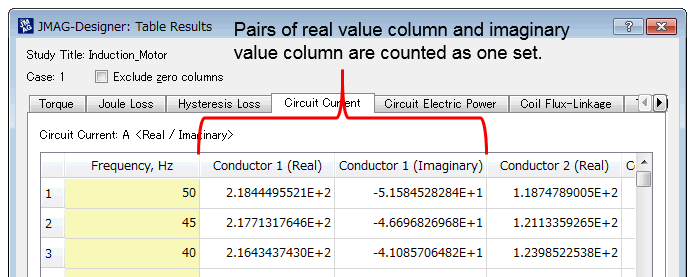
In the case of the frequency response analysis result table, the combination of the real part and the imaginary part is counted as one column.
| String ResultTableData::GetComponent | ( | ) |
Returns the name of the components (x, y, z) or complex numbers (real, imaginary) as a string.
- Returns
- Component or complex number namex : x-componenty : y-componentz : z-componentReal : Real partImaginary : Imaginary part
| double ResultTableData::GetDistance | ( | int | row | ) |
Returns the distance in the specified row as a real number for models with translation motion.
- Parameters
-
row Row number
- Returns
- Distance
| String ResultTableData::GetDistanceUnit | ( | ) |
Returns the unit of distance as a string for models with translation motion.
- Returns
- Unit of distance
| String ResultTableData::GetName | ( | ) |
Returns the name of the result table as a string.
- Returns
- Result table name
| String ResultTableData::GetRowName | ( | int | row | ) |
Returns the name of the row as a string.
- Parameters
-
row Row number
- Returns
- Name of the row in the result table
| int ResultTableData::GetRows | ( | ) |
Returns the number of rows in the result table as an integer.
- Returns
- Number of rows in the result table
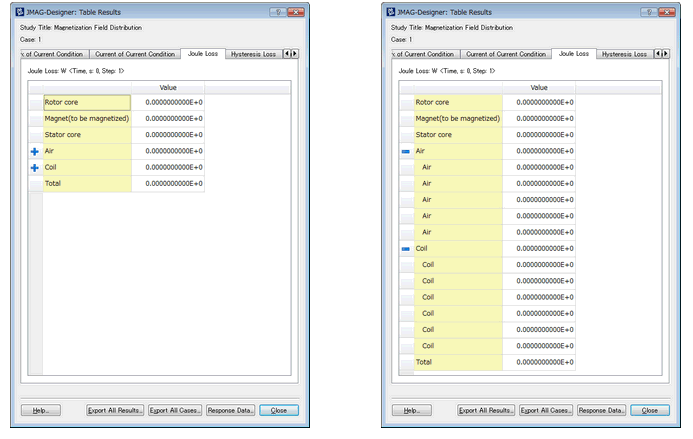
In the static analysis result table, the number of rows with all parts expanded is obtained. For example, the right figure and the left figure in the figure below are the same table, but the number of rows in the right figure is obtained.
| int ResultTableData::GetStep | ( | int | row | ) |
Returns the number of steps in the specified row as a real number.
- Parameters
-
row Row number
- Returns
- Number of steps in the row of the result table
| double ResultTableData::GetTime | ( | int | row | ) |
Returns the time in the specified row as a real number.
- Parameters
-
row Row number
- Returns
- Time in the row of the result table
| String ResultTableData::GetTimeUnit | ( | ) |
Returns the unit of time as a string.
- Returns
- Unit of time
| double ResultTableData::GetValue | ( | int | row, |
| Variant & | val | ||
| ) |
Returns the value in the specified cell as a real number. A column is specified by an index or name.
- Parameters
-
row Row number val Column index or Column name
- Returns
- Value in the cell
| String ResultTableData::GetValueUnit | ( | ) |
Returns the unit for physical amounts as a string.
- Returns
- Unit for physical amounts
| bool ResultTableData::IsValid | ( | ) |
Returns True if an object is valid.
- Returns
- Whether or not the ResultTableData object is valid
| bool ResultTableData::IsValidStep | ( | int | step | ) |
Returns whether or not the specified number of steps is valid.
- Parameters
-
step Number of steps
- Returns
- Valid or not
| void ResultTableData::SetComponent | ( | String & | name | ) |
Specifies the components (x, y, z) or complex numbers (real, imaginary) for a result.
- Parameters
-
name Component or complex number namex : x-componenty : y-componentz : z-componentReal : Real partImaginary : Imaginary part
This function affects objects that are defined with the "Set" function (in this case, tables).
Define the target table with the "Set" function before using this function.
For more information, see the example in ResultTable::SetXYZComponent .
| void ResultTableData::WriteAllComponents | ( | String & | filename, |
| String & | type, | ||
| int | step | ||
| ) |
Exports all components for the data with the specified step number to a file.
- Parameters
-
filename File path type step Step number
| void ResultTableData::WriteSingleStep | ( | String & | filename, |
| String & | type, | ||
| int | step | ||
| ) |
Exports the data of the specified step number to a file.
- Parameters
-
filename File path type step Step number
| void ResultTableData::WriteSummary | ( | String & | filename, |
| String & | summarytype, | ||
| int | fromstep, | ||
| int | tostep | ||
| ) |
Exports all the data accumulated in the results table to the file.
- Parameters
-
filename File name of destination folder summarytype Accumulation methodAverage : Average valueRMS : RMS (root mean square)Maximum : Maximum valueMinimum : Minimum valueSum : Total sumfromstep Number of start steps tostep Number of end steps
| void ResultTableData::WriteTable | ( | String & | filename, |
| String & | type | ||
| ) |
Exports the data to a file.
- Parameters
-
filename File path type
The file format to be output is determined by the specified extension.
- ***.txt >>> Text file (tab-delimited)
- ***.csv >>> CSV file (comma-delimited)
- ***.htm or ***.html >>> HTML file
- Extension not specified >>> Text file (tab-delimited)