GeomViewController Class
The commands in the GeomViewController class are described below.
.
More...
Public Member Functions | |
| void | Fit () |
| Adjusts the size of the model to fit in the window. | |
| void | Hiddenline () |
| Hides a line. More... | |
| void | HideAllElement () |
| Hides all elements. | |
| void | HideSelectElement () |
| Hides selected elements or selected items elements. | |
| void | Iso () |
| Displays the model in the isometric view. | |
| void | Pan (double deltax, double deltay) |
| Pans the display. More... | |
| void | Roll (double degree) |
| Rotates the viewpoint of the model on the fixed plane. More... | |
| void | Rotate (double degree_x, double degree_y) |
| Rotates the viewpoint by the specified angle. More... | |
| void | SelectAtBoxDlg (double min_x, double min_y, double min_z, double max_x, double max_y, double max_z, bool vis_item=true, int filter=0) |
| Selects object by specifying two points from a parallelepiped or rectangle area. More... | |
| void | SelectAtCircleDlg (double center_x, double center_y, double center_z, double center_axis_x, double center_axis_y, double center_axis_z, double x_axis_x, double x_axis_y, double x_axis_z, double outer, double inner, double start, double end, bool is_height, double top, double bottom, bool vis_item=true, int filter=0) |
| Specifies an area of circle (or sector, cylinder) and selects the objects included in that area. More... | |
| void | SelectAtCoordinateDlg (double x, double y, double z, bool vis_item=true, int filter=0) |
| Specifies a coordinate and selects the target that exists in the position. More... | |
| void | SelectByCirclePixelPos (int x1, int y1, int x2, int y2, int type) |
| Selects by circle using the pixel coordinate system. More... | |
| void | SelectByCircleWorldPos (double x1, double y1, double z1, double x2, double y2, double z2, int type) |
| Uses geometry obtained from converting a sphere in a world coordinate system to a pixel coordinate system to select a range. More... | |
| void | SelectByPolylinePixelPos (String array &pos, int type) |
| Selects a polygon region using the pixel coordinate system. More... | |
| void | SelectByPolylineWorldPos (String array &pos, int type) |
| Selects an area using a geometry obtained from the projection of a polyhedron in the world coordinate system onto the pixel coordinate system. More... | |
| void | SelectByRectanglePixelPos (int x1, int y1, int x2, int y2, int type) |
| Selects a rectangle by using the pixel coordinate system. More... | |
| void | SelectByRectangleWorldPos (double x1, double y1, double z1, double x2, double y2, double z2, int type) |
| Selects an area using a geometry obtained from a parallelepiped based on the world coordinate system that is projected onto the pixel coordinate system. More... | |
| void | SelectPixelPos (int x, int y, int type) |
| Selects a coordinate using the pixel coordinate system. More... | |
| void | SelectWorldPos (double x, double y, double z, int type) |
| Selects a position using a value obtained from a coordinate value based on the world coordinate system that is projected onto the pixel coordinate system. More... | |
| void | SetCamera (double pos_x, double pos_y, double pos_z, double tar_x, double tar_y, double tar_z, double up_x, double up_y, double up_z, double width, double height) |
| Specifies camera position. More... | |
| void | SetDisplayTarget (Variant var) |
| Specifies the display target. More... | |
| void | SetExtendedSelection (bool status) |
| Specifies the surface selection. More... | |
| void | SetSelectionFilter (Variant var) |
| Specifies the selection filter. More... | |
| void | SetSelectionType (Variant var) |
| Specifies the selection type. More... | |
| void | SetSightThrough (bool status) |
| Specifies the sight through. More... | |
| void | SetViewWindowSize (int width, int height) |
| Specifies the size of active window. More... | |
| void | Shaded () |
| Displays the model in the shading view. More... | |
| void | ShowAllElement () |
| Show all elements. | |
| void | ShowOnlySelectElement () |
| Shows only selected elements or selected items elements. | |
| void | Wireframe () |
| Displays the model in the wireframe view. More... | |
| void | Xy () |
| Displays the model viewed from the XY plane. | |
| void | Xz () |
| Displays the model viewed from the XZ plane. | |
| void | Yx () |
| Displays the model viewed from the YX plane. | |
| void | Yz () |
| Displays the model viewed from the YZ plane. | |
| void | Zoom (double zoomfactor) |
| Zooms in and out the model. More... | |
| void | Zx () |
| Displays the model viewed from the ZX plane. | |
| void | Zy () |
| Displays the model viewed from the ZY plane. | |
Detailed Description
GeomViewController Class
The commands in the GeomViewController class are described below.
.
The GeomViewController class includes the commands for the following operation.
- Modifies view point in the Geometry Editor window
- Modifies the display size of the assembly
Modifies the display size of the assembly
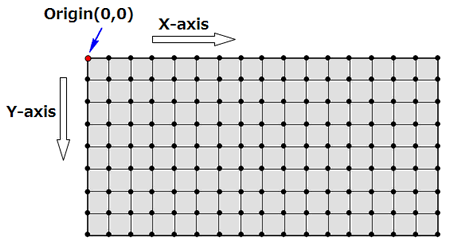
- Pixel coordinate system
The coordinate system regarding the display is a 2D plane and the position is shown in pixels. The upper left corner of the display is the origin (0, 0) where positions on the right are defined as the X-axis and the positions on the bottom are defined as the Y-axis.
- World coordinate system
Coordinate system shown in the display in 3D. The origin point and the definition of axis (X-axis, Y-axis, Z-axis) are the same as the entire global coordinate system of JMAG-Designer.
Member Function Documentation
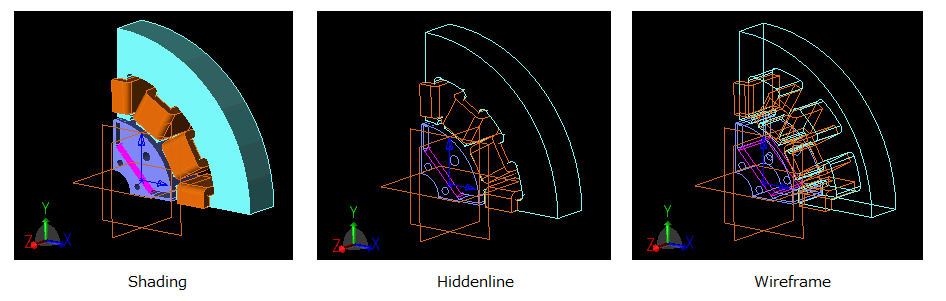
| void GeomViewController::Hiddenline | ( | ) |
Hides a line.
| void GeomViewController::Pan | ( | double | deltax, |
| double | deltay | ||
| ) |
Pans the display.
- Parameters
-
deltax Displacement in the horizontal direction deltay Displacement in the vertical direction
| void GeomViewController::Roll | ( | double | degree | ) |
Rotates the viewpoint of the model on the fixed plane.
- Parameters
-
degree Angle
| void GeomViewController::Rotate | ( | double | degree_x, |
| double | degree_y | ||
| ) |
Rotates the viewpoint by the specified angle.
- Parameters
-
degree_x Angle from the X-axis degree_y Angle from the Y-axis
| void GeomViewController::SelectAtBoxDlg | ( | double | min_x, |
| double | min_y, | ||
| double | min_z, | ||
| double | max_x, | ||
| double | max_y, | ||
| double | max_z, | ||
| bool | vis_item = true, |
||
| int | filter = 0 |
||
| ) |
Selects object by specifying two points from a parallelepiped or rectangle area.
- Parameters
-
min_x X-coordinate of first point in a rectangle selection min_y Y-coordinate of first point in a rectangle selection min_z Z-coordinate of first point in a rectangle selection max_x X-coordinate of second point in a rectangle selection max_y Y-coordinate of second point in a rectangle selection max_z Z-coordinate of second point in a rectangle selection vis_item True=on : Select only visible targetsFalse=off : Select visible or non-visible targetsfilter Type of geometry to be selectedNOFILTER = 0 : Do not use filter (selects everything in the position) *DefaultVERTEX = 1 : PointEDGE = 2 : Edge, Reference lineFACE = 4 : FaceLUMP = 8 : PartREGION_VERTEX = 16 : Region vertexREGION_EDGE = 32 : Region edgeREGION = 64 : RegionPLANE = 128 : Reference PlanePOINT = 256 : Reference point
The selected entities need to be located in the Geometry Editor graphics window.
When a selected entity is not located in the graphics window, use the 'Fit' in the GeomViewController class to modify the position of the selected entity so that it is located in the graphics window.
| void GeomViewController::SelectAtCircleDlg | ( | double | center_x, |
| double | center_y, | ||
| double | center_z, | ||
| double | center_axis_x, | ||
| double | center_axis_y, | ||
| double | center_axis_z, | ||
| double | x_axis_x, | ||
| double | x_axis_y, | ||
| double | x_axis_z, | ||
| double | outer, | ||
| double | inner, | ||
| double | start, | ||
| double | end, | ||
| bool | is_height, | ||
| double | top, | ||
| double | bottom, | ||
| bool | vis_item = true, |
||
| int | filter = 0 |
||
| ) |
Specifies an area of circle (or sector, cylinder) and selects the objects included in that area.
- Parameters
-
center_x X-coordinate of center point center_y Y-coordinate of center point center_z Z-coordinate of center point center_axis_x X-component of center axis center_axis_y Y-component of center axis center_axis_z Z-component of center axis x_axis_x X-component of x-axis x_axis_y Y-component of x-axis x_axis_z Z-component of x-axis outer External radius inner Internal radius start Start angle end End angle is_height True=on : Specify heightFalse=off : Do not specify heighttop Top bottom Bottom vis_item True=on : Select only visible targetsFalse=off : Select visible or non-visible targetsfilter Type of geometry to be selectedNOFILTER = 0 : Do not use filter (selects everything in the position) *DefaultVERTEX = 1 : PointEDGE = 2 : Edge, Reference lineFACE = 4 : FaceLUMP = 8 : PartREGION_VERTEX = 16 : Region vertexREGION_EDGE = 32 : Region edgeREGION = 64 : RegionPLANE = 128 : Reference PlanePOINT = 256 : Reference point
The selected entities need to be located in the Geometry Editor graphics window.
When a selected entity is not located in the graphics window, use the 'Fit' in the GeomViewController class to modify the position of the selected entity so that it is located in the graphics window.
| void GeomViewController::SelectAtCoordinateDlg | ( | double | x, |
| double | y, | ||
| double | z, | ||
| bool | vis_item = true, |
||
| int | filter = 0 |
||
| ) |
Specifies a coordinate and selects the target that exists in the position.
- Parameters
-
x X-coordinate of target y Y-coordinate of target z Z-coordinate of target vis_item True=on : Select only visible targetsFalse=off : Select visible or non-visible targetsfilter Type of geometry to be selectedNOFILTER = 0 : Do not use filter (selects everything in the position) *DefaultVERTEX = 1 : PointEDGE = 2 : Edge, Reference lineFACE = 4 : FaceLUMP = 8 : PartREGION_VERTEX = 16 : Region vertexREGION_EDGE = 32 : Region edgeREGION = 64 : RegionPLANE = 128 : Reference PlanePOINT = 256 : Reference point
The filter setting is valid when the selected target is a geometry.
A constant sum can be specified in the filter (multiple geometry type can be selected).
This command is created based on the [Select at Coordinate] dialog box where it is not equivalent as the filter function in the [Select at Coordinate] dialog box.
The selected entities need to be located in the Geometry Editor graphics window.
When a selected entity is not located in the graphics window, use the 'Fit' in the GeomViewController class to modify the position of the selected entity so that it is located in the graphics window.
| void GeomViewController::SelectByCirclePixelPos | ( | int | x1, |
| int | y1, | ||
| int | x2, | ||
| int | y2, | ||
| int | type | ||
| ) |
Selects by circle using the pixel coordinate system.
- Parameters
-
x1 X-coordinate of first point (center point of circle) in a circle. y1 Y-coordinate of first point (center point of circle) of a circle. x2 X-coordinate of second point (point on circle) of a circle y2 Y-coordinate of second point (point on circle) of a circle type 0x01:Shift0x02:Control0x03:Shift&Control
The window for Geometry Editor needs to be displayed before running this command.
“Type” is one of the operations using the keyboard.
- Multiple selections can be made by holding down the Shift key and selecting.
- Selections that have already been made are cleared and selections that have not been made are selected by holding down the Ctrl key and selecting.
- The same operations while holding down the Ctrl key and selecting occur as when holding down the Shift and Ctrl keys at the same time and selecting.
The selected entities need to be located in the Geometry Editor graphics window.
When a selected entity is not located in the graphics window, use the 'Fit' in the GeomViewController class to modify the position of the selected entity so that it is located in the graphics window. Specify the 'Fit' command in the GeomViewController class to modify the position, when the object is outside the display area of the work plane.
| void GeomViewController::SelectByCircleWorldPos | ( | double | x1, |
| double | y1, | ||
| double | z1, | ||
| double | x2, | ||
| double | y2, | ||
| double | z2, | ||
| int | type | ||
| ) |
Uses geometry obtained from converting a sphere in a world coordinate system to a pixel coordinate system to select a range.
- Parameters
-
x1 X-coordinate of first point (center point of sphere) in a sphere y1 Y-coordinate of first point (center point of sphere) in a sphere z1 Z-coordinate of first point (center point of sphere) in a sphere x2 X-coordinate of second point (point on sphere) of a sphere y2 Y-coordinate of second point (point on sphere) of a sphere z2 Z-coordinate of second point (point on sphere) of a sphere type 0x01:Shift0x02:Control0x03:Shift&Control
The window for Geometry Editor needs to be displayed before running this command.
“Type” is one of the operations using the keyboard.
- Multiple selections can be made by holding down the Shift key and selecting.
- Selections that have already been made are cleared and selections that have not been made are selected by holding down the Ctrl key and selecting.
- The same operations while holding down the Ctrl key and selecting occur as when holding down the Shift and Ctrl keys at the same time and selecting.
The selected entities need to be located in the Geometry Editor graphics window.
When a selected entity is not located in the graphics window, use the 'Fit' in the GeomViewController class to modify the position of the selected entity so that it is located in the graphics window.
| void GeomViewController::SelectByPolylinePixelPos | ( | String array & | pos, |
| int | type | ||
| ) |
Selects a polygon region using the pixel coordinate system.
- Parameters
-
pos Table (array of 2 rows) of vertex coordinate for a polygon region (x, y) type 0x01:Shift0x02:Control0x03:Shift&Control
The window for Geometry Editor needs to be displayed before running this command.
“Type” is one of the operations using the keyboard.
- Multiple selections can be made by holding down the Shift key and selecting.
- Selections that have already been made are cleared and selections that have not been made are selected by holding down the Ctrl key and selecting.
- The same operations while holding down the Ctrl key and selecting occur as when holding down the Shift and Ctrl keys at the same time and selecting.
The selected entities need to be located in the Geometry Editor graphics window.
When a selected entity is not located in the graphics window, use the 'Fit' in the GeomViewController class to modify the position of the selected entity so that it is located in the graphics window.
| void GeomViewController::SelectByPolylineWorldPos | ( | String array & | pos, |
| int | type | ||
| ) |
Selects an area using a geometry obtained from the projection of a polyhedron in the world coordinate system onto the pixel coordinate system.
- Parameters
-
pos Table (array of 3 rows) of vertex coordinates (x, y, z) for a polygon type 0x01:Shift0x02:Control0x03:Shift&Control
The window for Geometry Editor needs to be displayed before running this command.
“Type” is one of the operations using the keyboard.
- Multiple selections can be made by holding down the Shift key and selecting.
- Selections that have already been made are cleared and selections that have not been made are selected by holding down the Ctrl key and selecting.
- The same operations while holding down the Ctrl key and selecting occur as when holding down the Shift and Ctrl keys at the same time and selecting.
The selected entities need to be located in the Geometry Editor graphics window.
When a selected entity is not located in the graphics window, use the 'Fit' in the GeomViewController class to modify the position of the selected entity so that it is located in the graphics window.
| void GeomViewController::SelectByRectanglePixelPos | ( | int | x1, |
| int | y1, | ||
| int | x2, | ||
| int | y2, | ||
| int | type | ||
| ) |
Selects a rectangle by using the pixel coordinate system.
- Parameters
-
x1 X-coordinate of first point in a rectangle selection y1 Y-coordinate of first point in a rectangle selection x2 X-coordinate of second point (diagonal corner of the first point) in a rectangle selection y2 Y-coordinate of second point (diagonal corner of the first point) in a rectangle selection type 0x01:Shift0x02:Control0x03:Shift&Control
The window for Geometry Editor needs to be displayed before running this command.
“Type” is one of the operations using the keyboard.
- Multiple selections can be made by holding down the Shift key and selecting.
- Selections that have already been made are cleared and selections that have not been made are selected by holding down the Ctrl key and selecting.
- The same operations while holding down the Ctrl key and selecting occur as when holding down the Shift and Ctrl keys at the same time and selecting.
The selected entities need to be located in the Geometry Editor graphics window.
When a selected entity is not located in the graphics window, use the 'Fit' in the GeomViewController class to modify the position of the selected entity so that it is located in the graphics window.
| void GeomViewController::SelectByRectangleWorldPos | ( | double | x1, |
| double | y1, | ||
| double | z1, | ||
| double | x2, | ||
| double | y2, | ||
| double | z2, | ||
| int | type | ||
| ) |
Selects an area using a geometry obtained from a parallelepiped based on the world coordinate system that is projected onto the pixel coordinate system.
- Parameters
-
x1 X-coordinate of first point in a parallelepiped y1 Y-coordinate of first point in a parallelepiped z1 Z-coordinate of first point in a parallelepiped x2 X-coordinate of second point in a parallelepiped y2 Y-coordinate of second point in a parallelepiped z2 Z-coordinate of second point in a parallelepiped type 0x01:Shift0x02:Control0x03:Shift&Control
The window for Geometry Editor needs to be displayed before running this command.
“Type” is one of the operations using the keyboard.
- Multiple selections can be made by holding down the Shift key and selecting.
- Selections that have already been made are cleared and selections that have not been made are selected by holding down the Ctrl key and selecting.
- The same operations while holding down the Ctrl key and selecting occur as when holding down the Shift and Ctrl keys at the same time and selecting.
The selected entities need to be located in the Geometry Editor graphics window.
When a selected entity is not located in the graphics window, use the 'Fit' in the GeomViewController class to modify the position of the selected entity so that it is located in the graphics window.
| void GeomViewController::SelectPixelPos | ( | int | x, |
| int | y, | ||
| int | type | ||
| ) |
Selects a coordinate using the pixel coordinate system.
- Parameters
-
x X-coordinate of target y Y-coordinate of target type 0x01:Shift0x02:Control0x03:Shift&Control
The window for Geometry Editor needs to be displayed before running this command.
“Type” is one of the operations using the keyboard.
- Multiple selections can be made by holding down the Shift key and selecting.
- Selections that have already been made are cleared and selections that have not been made are selected by holding down the Ctrl key and selecting.
- The same operations while holding down the Ctrl key and selecting occur as when holding down the Shift and Ctrl keys at the same time and selecting.
The selected entities need to be located in the Geometry Editor graphics window.
When a selected entity is not located in the graphics window, use the 'Fit' in the GeomViewController class to modify the position of the selected entity so that it is located in the graphics window.
| void GeomViewController::SelectWorldPos | ( | double | x, |
| double | y, | ||
| double | z, | ||
| int | type | ||
| ) |
Selects a position using a value obtained from a coordinate value based on the world coordinate system that is projected onto the pixel coordinate system.
- Parameters
-
x X-coordinate of target y Y-coordinate of target z Z-coordinate of target type 0x01:Shift0x02:Control0x03:Shift&Control
The window for Geometry Editor needs to be displayed before running this command.
“Type” is one of the operations using the keyboard.
- Multiple selections can be made by holding down the Shift key and selecting.
- Selections that have already been made are cleared and selections that have not been made are selected by holding down the Ctrl key and selecting.
- The same operations while holding down the Ctrl key and selecting occur as when holding down the Shift and Ctrl keys at the same time and selecting.
The selected entities need to be located in the Geometry Editor graphics window.
When a selected entity is not located in the graphics window, use the 'Fit' in the GeomViewController class to modify the position of the selected entity so that it is located in the graphics window.
| void GeomViewController::SetCamera | ( | double | pos_x, |
| double | pos_y, | ||
| double | pos_z, | ||
| double | tar_x, | ||
| double | tar_y, | ||
| double | tar_z, | ||
| double | up_x, | ||
| double | up_y, | ||
| double | up_z, | ||
| double | width, | ||
| double | height | ||
| ) |
Specifies camera position.
- Parameters
-
pos_x X-coordinate of camera position pos_y Y-coordinate of camera position pos_z Z-coordinate of camera position tar_x X-coordinate for shooting camera tar_y Y-coordinate for shooting camera tar_z Z-coordinate for shooting camera up_x X-component for upper direction of shooting area up_y Y-component for upper direction of shooting area up_z Z-component for upper direction of shooting area width Width for area of shooting camera height Height for area of shooting camera
| void GeomViewController::SetDisplayTarget | ( | Variant | var | ) |
Specifies the display target.
- Parameters
-
var Solid : 0x01Mesh : 0x02MeshOutline : 0x06SolidMesh : 0x03
| void GeomViewController::SetExtendedSelection | ( | bool | status | ) |
Specifies the surface selection.
- Parameters
-
status True : Surface selection is set to OnFalse : Surface selection is set to Off
| void GeomViewController::SetSelectionFilter | ( | Variant | var | ) |
Specifies the selection filter.
- Parameters
-
var 0x03 = BasicGeometry : Basic geometry selection filter0x04 = Constraint : Constraint selection filter0x08 = Region : Region selection filter
A constant sum can be specified in the ‘var’ (multiple filter types can be selected).
Example : [Basic Geometry Select Filter] (3) and [Region Select Filter] (8) is enabled
| void GeomViewController::SetSelectionType | ( | Variant | var | ) |
Specifies the selection type.
- Parameters
-
var Solid : 0Element : 1ElementFace : 2ElementEdge : 3Node : 4MeshBlock : 5
| void GeomViewController::SetSightThrough | ( | bool | status | ) |
Specifies the sight through.
- Parameters
-
status True=on : Sight through is set to OnFalse=off : Sight through is set to Off
| void GeomViewController::SetViewWindowSize | ( | int | width, |
| int | height | ||
| ) |
Specifies the size of active window.
- Parameters
-
width width height height
Open the Geometry Editor window before running this command.
| void GeomViewController::Shaded | ( | ) |
Displays the model in the shading view.
For an example of shading view, see here.
| void GeomViewController::Wireframe | ( | ) |
Displays the model in the wireframe view.
For an example of wireframe view, see here.
| void GeomViewController::Zoom | ( | double | zoomfactor | ) |
Zooms in and out the model.
- Parameters
-
zoomfactor Scaling factor