DesignTable class is used to a create design parameter table for a parametric analysis.
The class can be called from Study or AnalysisGroup class.
.
More...
Public Member Functions | |
| void | AddCadParameter (String ¶meterName) |
| Adds parameters of the CAD model as design variables. More... | |
| void | AddCadParameterVariableName (String ¶meterName, String &variableName=String()) |
| Adds parameters of the CAD model as design variables (Specified by variable name). More... | |
| void | AddCadParameterVariableNames (StringList ¶meterNames, StringList &variableNames=StringList()) |
| Adds parameters of multiple CAD models as design variables (Specified by variable name). More... | |
| void | AddCase () |
| Adds a parametric case. | |
| void | AddCaseGroup (String &name, String &indices) |
| Adds a new case group with the specified indices. If a group with the specified name already exists, the indices are added to the existing group. More... | |
| void | AddCases (int numCases) |
| Adds parametric cases that are specified as arguments. More... | |
| void | AddCasesToGroup (Variant &nameOrIndex, String &indices) |
| Adds cases to an existing case group. More... | |
| void | AddCircuitComponentProperty (Variant &component, String &propName) |
| Adds circuit component parameters as design variables. More... | |
| void | AddConditionProperty (Variant &condition, String &propName) |
| Add the parameters of the condition as design variables. More... | |
| void | AddEquation (String ¶meterName) |
| Adds a parametric equation. More... | |
| void | AddEquationParameter (String &equationName, String ¶meterName) |
| Assigns a variable to a parametric equation. More... | |
| void | AddMeasurementVariable (String ¶meterName) |
| Adds a measurement variable. More... | |
| void | AddParameter (String ¶meterName) |
| Adds parameters as design variables. More... | |
| void | AddParameterVariableName (String ¶meterName, String &variableName=String()) |
| Adds parameters for conditions and materials as design variables (Specified by variable name). More... | |
| void | AddParameterVariableNames (StringList ¶meterNames, StringList &variableNames=StringList()) |
| Adds parameters for multiple conditions and materials as design variables (Specified by variable name). More... | |
| Variant | AllParameterNames () |
| Returns a list of parameters added to a design parameter table. More... | |
| Variant | CaseGroupIndices (Variant &nameOrIndex) |
| Returns a list of the case indices in the case group. More... | |
| String | CaseGroupName (int index) |
| Returns the name of the case group with the specified index. More... | |
| void | Export (String &filename) |
| Exports a list of cases to a file (*.csv, *.txt, *.html). This command corresponds to the export function in the [Design Table] dialog. More... | |
| void | ExportEquation (String &filename, StringList ¶meterNameList) |
| Exports a parametric equation to a file (*.xml). This command corresponds to the export function in the [Equations] dialog. More... | |
| String | GetCaseLabelFormat () |
| Returns the case label format. More... | |
| String | GetDisplayName (Variant &indexOrName) |
| Returns the display name of a parameter. More... | |
| ParametricEquation * | GetEquation (Variant &indexOrName) |
| Returns a parametric equation object by specifying its name or index. More... | |
| String | GetLabel (int caseIndex) |
| Returns the label for the case ID. More... | |
| MeasurementVariable * | GetMeasurementVariable (Variant &val) |
| Returns measurement variable object by specifying name or index. More... | |
| int | GetParameterIndex (String ¶meterName) |
| Returns the index of a parameter by specifying its name. More... | |
| int | GetParameterOrder (Variant &indexOrName) |
| Returns the parameter display order. More... | |
| int | GetParameterWidth (Variant &indexOrName) |
| Returns the display width of a parameter. More... | |
| Variant | GetRelatedParameterNames (String &equationName) |
| Returns a list of parameter name added to a design parameter table by specifying name of parametric equation. More... | |
| DataSet * | GetTableValue (int caseIndex, int parameterIndex) |
| Returns the DataSet object from a case and parameter of the index. More... | |
| Variant | GetValue (int caseIndex, int parameterIndex) |
| Returns the value for the specified case and index of the parameter. More... | |
| String | GetVariableName (Variant &indexOrName) |
| Specifies a variable name for a parameter. More... | |
| bool | GetVisibleParameter (Variant &indexOrName) |
| Returns whether a parameter is displayed or hidden. More... | |
| bool | HasEquation (String &equationName) |
| Returns if the equation exists by specifying its name. More... | |
| void | Import (String &filename) |
| Imports a list of cases from a file (*.csv, *.txt). This command corresponds to the export function in the [Design Table] dialog. More... | |
| void | ImportEquation (String &filename) |
| Imports a parametric equation to a file (*.xml). This command corresponds to the import function in the [Equations] dialog. More... | |
| bool | IsActive (int caseIndex) |
| Returns status of specified case. More... | |
| bool | IsCadParameter (int index) |
| Returns whether or not the specified parameter corresponds to a dimension parameter. More... | |
| bool | IsInGroup () |
| Returns the status of whether an analysis group is being used. More... | |
| bool | IsMaterialItem (int index) |
| Returns whether or not the specified parameter corresponds to a material parameter. More... | |
| bool | IsValid () |
| Returns True if an object is valid. More... | |
| int | NumCaseGroups () |
| Returns the number of case groups. More... | |
| int | NumCases () |
| Returns the number of cases. More... | |
| int | NumMeasurementVariables () |
| Returns the number of measurement variables. More... | |
| int | NumParameters () |
| Returns the number of parameters. More... | |
| String | ParameterName (int index) |
| Returns the name of the parameter. More... | |
| String | ParameterTypeName (int index) |
| Returns the parameter type. More... | |
| void | RemoveCase (int caseIndex) |
| Removes a case. More... | |
| void | RemoveCaseGroup (Variant &nameOrIndex) |
| Removes a case group from the design table. More... | |
| void | RemoveCases (String array &caseIndexes) |
| Removes multiple cases. More... | |
| void | RemoveCasesFromGroup (Variant &nameOrIndex, String &indices) |
| Removes cases from an existing case group. More... | |
| void | RemoveEquation (Variant &indexOrName) |
| Removes a parametric equation. More... | |
| void | RemoveEquationParameter (String &equationName, String ¶meterName) |
| Removes a variable assigned to a parametric equation. More... | |
| void | RemoveMeasurementVariable (Variant &val) |
| Deletes the measurement variable by specifying name or index. More... | |
| void | RemoveParameter (Variant &indexOrName) |
| Removes a CAD parameter. More... | |
| void | RenameCaseGroup (Variant &nameOrIndex, String &newName) |
| Renames a case group. More... | |
| void | SetActive (int caseIndex, int active) |
| Switches the status of a case (switching settings for a check box in the [Design Table] dialog). More... | |
| void | SetCaseLabelFormat (String &label) |
| Specifies the format of a case label. More... | |
| void | SetDisplayName (String ¶meterName, String &displayName) |
| Specifies the display name for a parameter. More... | |
| void | SetLabel (int caseIndex, String &label) |
| Specifies the name of the case index. More... | |
| void | SetParameterOrder (Variant &indexOrName, int order) |
| Specifies the display order of a parameter. More... | |
| void | SetParameterWidth (Variant &indexOrName, int width) |
| Specifies the display width parameters. More... | |
| void | SetTableValue (int caseIndex, int parameterIndex, DataSet *data) |
| Specifies a DataSet object to a case and parameter of the index. More... | |
| void | SetValue (int caseIndex, int parameterIndex, Variant &value) |
| Specifies the case and parameter index and sets the value of that parameter. More... | |
| void | SetValues (int caseIndex, String array ¶meterIndices, String array &values) |
| Specifies the case and parameter index and sets the value of that parameter. More... | |
| void | SetVariableName (String ¶meterName, String &variableName) |
| Specifies a variable name for a parameter. More... | |
| void | SetVisibleParameter (Variant &indexOrName, bool isShown) |
| Displays/hides a parameter. More... | |
Detailed Description
DesignTable class is used to a create design parameter table for a parametric analysis.
The class can be called from Study or AnalysisGroup class.
.
Example of obtaining the class object:
Member Function Documentation
| void DesignTable::AddCadParameter | ( | String & | parameterName | ) |
Adds parameters of the CAD model as design variables.
- Parameters
-
parameterName Parameter name for a CAD model
| void DesignTable::AddCadParameterVariableName | ( | String & | parameterName, |
| String & | variableName = String() |
||
| ) |
Adds parameters of the CAD model as design variables (Specified by variable name).
- Parameters
-
parameterName Parameter name of CAD model variableName Variable name
| void DesignTable::AddCadParameterVariableNames | ( | StringList & | parameterNames, |
| StringList & | variableNames = StringList() |
||
| ) |
Adds parameters of multiple CAD models as design variables (Specified by variable name).
- Parameters
-
parameterNames List of CAD model parameter names variableNamed List of variable names
| void DesignTable::AddCaseGroup | ( | String & | name, |
| String & | indices | ||
| ) |
Adds a new case group with the specified indices. If a group with the specified name already exists, the indices are added to the existing group.
- Parameters
-
name Name of the case group indices A string containing a comma separated list of case indices
| void DesignTable::AddCases | ( | int | numCases | ) |
Adds parametric cases that are specified as arguments.
- Parameters
-
numCases Number of cases to be added
| void DesignTable::AddCasesToGroup | ( | Variant & | nameOrIndex, |
| String & | indices | ||
| ) |
Adds cases to an existing case group.
- Parameters
-
nameOrIndex Name or index of the group indices A string containing a comma separated list of case indices
| void DesignTable::AddCircuitComponentProperty | ( | Variant & | component, |
| String & | propName | ||
| ) |
Adds circuit component parameters as design variables.
- Parameters
-
component Circuit component title or index propName Parameter name of a circuit component
For possible names specified in propName, see Properties and Flags for the Circuit Settings .
| void DesignTable::AddConditionProperty | ( | Variant & | condition, |
| String & | propName | ||
| ) |
Add the parameters of the condition as design variables.
- Parameters
-
condition Title or index of the condition propName Parameter name of condition
For possible names specified in propName, see Properties and Flags for Condition Settings .
| void DesignTable::AddEquation | ( | String & | parameterName | ) |
Adds a parametric equation.
- Parameters
-
parameterName Name of the parametric equation
| void DesignTable::AddEquationParameter | ( | String & | equationName, |
| String & | parameterName | ||
| ) |
Assigns a variable to a parametric equation.
- Parameters
-
equationName Name of the parametric equation parameterName Assigned parameter name
| void DesignTable::AddMeasurementVariable | ( | String & | parameterName | ) |
Adds a measurement variable.
- Parameters
-
measurement Variable name
| void DesignTable::AddParameter | ( | String & | parameterName | ) |
Adds parameters as design variables.
- Parameters
-
parameterName Parameter name
| void DesignTable::AddParameterVariableName | ( | String & | parameterName, |
| String & | variableName = String() |
||
| ) |
Adds parameters for conditions and materials as design variables (Specified by variable name).
- Parameters
-
parameterName Parameter name variableName Variable name
| void DesignTable::AddParameterVariableNames | ( | StringList & | parameterNames, |
| StringList & | variableNames = StringList() |
||
| ) |
Adds parameters for multiple conditions and materials as design variables (Specified by variable name).
- Parameters
-
parameterNames Parameter name list variableNames Variable name list
| Variant DesignTable::AllParameterNames | ( | ) |
Returns a list of parameters added to a design parameter table.
- Returns
- Design parameter table
| Variant DesignTable::CaseGroupIndices | ( | Variant & | nameOrIndex | ) |
Returns a list of the case indices in the case group.
- Parameters
-
nameOrIndex Name or index of the case group
- Returns
- List of the case indices
| String DesignTable::CaseGroupName | ( | int | index | ) |
Returns the name of the case group with the specified index.
- Parameters
-
index Index of case group
- Returns
- Case group name
| void DesignTable::Export | ( | String & | filename | ) |
Exports a list of cases to a file (*.csv, *.txt, *.html). This command corresponds to the export function in the [Design Table] dialog.
- Parameters
-
filename File path for exporting
| void DesignTable::ExportEquation | ( | String & | filename, |
| StringList & | parameterNameList | ||
| ) |
Exports a parametric equation to a file (*.xml). This command corresponds to the export function in the [Equations] dialog.
- Parameters
-
filename Path of the file to export parameterNameList Name of the parametric equation to be exported
| String DesignTable::GetCaseLabelFormat | ( | ) |
Returns the case label format.
- Returns
- Case label format
| String DesignTable::GetDisplayName | ( | Variant & | indexOrName | ) |
Returns the display name of a parameter.
- Parameters
-
parameterName Name or index of the parameter
- Returns
- Display name
| ParametricEquation * DesignTable::GetEquation | ( | Variant & | indexOrName | ) |
Returns a parametric equation object by specifying its name or index.
- Parameters
-
indexOrName Name or index of the parametric equation
- Returns
- ParametricEquation object
| String DesignTable::GetLabel | ( | int | caseIndex | ) |
Returns the label for the case ID.
- Parameters
-
caseIndex Case ID
- Returns
- Case label
The caseIndex is numbered from 0.
| MeasurementVariable * DesignTable::GetMeasurementVariable | ( | Variant & | val | ) |
Returns measurement variable object by specifying name or index.
- Parameters
-
val measurement Name or index of the measurement variable
- Returns
- MeasurementVariable object
| int DesignTable::GetParameterIndex | ( | String & | parameterName | ) |
Returns the index of a parameter by specifying its name.
- Parameters
-
parameterName Parameter name obtained by ParameterName() or variable name
- Returns
- Index of parameter
The following is an example of using this function. In this example, the index of variable lm is obtained.
| int DesignTable::GetParameterOrder | ( | Variant & | indexOrName | ) |
Returns the parameter display order.
- Parameters
-
indexOrName Name or index of the parameter
- Returns
- display order
| int DesignTable::GetParameterWidth | ( | Variant & | indexOrName | ) |
Returns the display width of a parameter.
- Parameters
-
indexOrName Name or index of the parameter
- Returns
- width
| Variant DesignTable::GetRelatedParameterNames | ( | String & | equationName | ) |
Returns a list of parameter name added to a design parameter table by specifying name of parametric equation.
- Parameters
-
equationName Name of the parametric equation
- Returns
- List of parameter name
| DataSet * DesignTable::GetTableValue | ( | int | caseIndex, |
| int | parameterIndex | ||
| ) |
| Variant DesignTable::GetValue | ( | int | caseIndex, |
| int | parameterIndex | ||
| ) |
Returns the value for the specified case and index of the parameter.
- Parameters
-
numCases Case parameterIndex Parameter
- Returns
- Value of the specified case or parameters
The caseIndex is numbered from zero.
| String DesignTable::GetVariableName | ( | Variant & | indexOrName | ) |
Specifies a variable name for a parameter.
- Parameters
-
parameterName Name or index of the parameter
- Returns
- Variable name
| bool DesignTable::GetVisibleParameter | ( | Variant & | indexOrName | ) |
Returns whether a parameter is displayed or hidden.
- Parameters
-
indexOrName Name or index of the parameter
- Returns
- Displayed/hidden
| bool DesignTable::HasEquation | ( | String & | equationName | ) |
Returns if the equation exists by specifying its name.
- Parameters
-
equationName Name of the parametric equation
- Returns
- Whether or not a equation is exist
| void DesignTable::Import | ( | String & | filename | ) |
Imports a list of cases from a file (*.csv, *.txt). This command corresponds to the export function in the [Design Table] dialog.
- Parameters
-
filename File path for importing
| void DesignTable::ImportEquation | ( | String & | filename | ) |
Imports a parametric equation to a file (*.xml). This command corresponds to the import function in the [Equations] dialog.
- Parameters
-
filename Path of the file to import
| bool DesignTable::IsActive | ( | int | caseIndex | ) |
Returns status of specified case.
- Parameters
-
caseIndex Index of case
- Returns
- Whether or not a check box for a case is selected
The caseIndex is numbered from 0.
| bool DesignTable::IsCadParameter | ( | int | index | ) |
Returns whether or not the specified parameter corresponds to a dimension parameter.
- Parameters
-
index Parameter index
- Returns
- Whether or not a dimension parameter is specified
The dimension parameters for this command are sorted in [CAD Parameters], under the treeview for the [Select Parametric Parameters] dialog.
| bool DesignTable::IsInGroup | ( | ) |
Returns the status of whether an analysis group is being used.
- Returns
- Whether or not an analysis group is being used.
| bool DesignTable::IsMaterialItem | ( | int | index | ) |
Returns whether or not the specified parameter corresponds to a material parameter.
- Parameters
-
index Parameter index
- Returns
- Whether or not a material parameter is set
The material parameters for this command are sorted in [Materials], under the treeview for the [Select Parametric Parameters] dialog.
| bool DesignTable::IsValid | ( | ) |
Returns True if an object is valid.
- Returns
- Whether or not the DesignTable objects in the list are valid
| int DesignTable::NumCaseGroups | ( | ) |
Returns the number of case groups.
- Returns
- Number of cases groups
| int DesignTable::NumCases | ( | ) |
Returns the number of cases.
- Returns
- Number of cases
| int DesignTable::NumMeasurementVariables | ( | ) |
Returns the number of measurement variables.
- Returns
- Number of measurement variables
| int DesignTable::NumParameters | ( | ) |
Returns the number of parameters.
- Returns
- Number of parameters
| String DesignTable::ParameterName | ( | int | index | ) |
Returns the name of the parameter.
- Parameters
-
index Index of the parameter
- Returns
- Parameter name
| String DesignTable::ParameterTypeName | ( | int | index | ) |
Returns the parameter type.
- Parameters
-
index Parameter index
- Returns
- Parameter type
CAD parameter:
Other parameter:Flag: Integer number or optionsRealBool: Check box
Flag: Options or check boxIntegerRealPoint: 3 component type such as coordinate value and vector direction. But when the each coordinate value (x, y, z) or component of vector is specified as "param", the parameter type is "Real".EquationString: String such as file path(blank): Other type than those above, such as point sequence
| void DesignTable::RemoveCase | ( | int | caseIndex | ) |
Removes a case.
- Parameters
-
caseIndex Index of the case
The caseIndex is numbered from zero.
| void DesignTable::RemoveCaseGroup | ( | Variant & | nameOrIndex | ) |
Removes a case group from the design table.
- Parameters
-
nameOrIndex Name or index of the group
| void DesignTable::RemoveCases | ( | String array & | indexes | ) |
Removes multiple cases.
- Parameters
-
indexes List of the case indexes
The case index in the list is numbered from zero.
| void DesignTable::RemoveCasesFromGroup | ( | Variant & | nameOrIndex, |
| String & | indices | ||
| ) |
Removes cases from an existing case group.
- Parameters
-
nameOrIndex Name or index of the group indices A string containing a comma separated list of case indices
| void DesignTable::RemoveEquation | ( | Variant & | indexOrName | ) |
Removes a parametric equation.
- Parameters
-
indexOrName Name or index of the parametric equation
| void DesignTable::RemoveEquationParameter | ( | String & | equationName, |
| String & | parameterName | ||
| ) |
Removes a variable assigned to a parametric equation.
- Parameters
-
equationName Name of the parametric equation parameterName Parameter name
| void DesignTable::RemoveMeasurementVariable | ( | Variant & | val | ) |
Deletes the measurement variable by specifying name or index.
- Parameters
-
val Name or index of the measurement variable
| void DesignTable::RemoveParameter | ( | Variant & | indexOrName | ) |
Removes a CAD parameter.
- Parameters
-
indexOrName Name or index of the CAD parameter
| void DesignTable::RenameCaseGroup | ( | Variant & | nameOrIndex, |
| String & | newName | ||
| ) |
Renames a case group.
- Parameters
-
nameOrIndex Name or index of the group newName New name for the group
| void DesignTable::SetActive | ( | int | caseIndex, |
| int | active | ||
| ) |
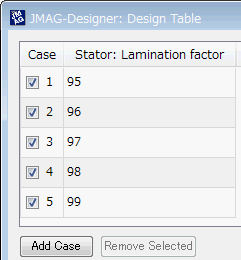
Switches the status of a case (switching settings for a check box in the [Design Table] dialog).
- Parameters
-
caseIndex Name or index of the parametric equation active 0=off : Clears check box1=on : Selects check box
The SetActive command selects or clears a check box in the [Design Table] dialog.
The [Design Table] can be selected from the menu that is displayed by right-clicking on a case control in the treeview, and then selecting [Show Cases].
Note the following when using SetActive.
- The check box for each case is selected as default.
- The caseIndex is numbered from zero.
The following are examples of using this command.
Enter the following command to clear the check box for case number 3
| void DesignTable::SetCaseLabelFormat | ( | String & | label | ) |
Specifies the format of a case label.
- Parameters
-
label Case label format
| void DesignTable::SetDisplayName | ( | String & | parameterName, |
| String & | displayName | ||
| ) |
Specifies the display name for a parameter.
- Parameters
-
parameterName Parameter name displayName Display name
| void DesignTable::SetLabel | ( | int | caseIndex, |
| String & | label | ||
| ) |
Specifies the name of the case index.
- Parameters
-
caseIndex Case index label Label name
The caseIndex is numbered from 0.
| void DesignTable::SetParameterOrder | ( | Variant & | indexOrName, |
| int | order | ||
| ) |
Specifies the display order of a parameter.
- Parameters
-
indexOrName Name or index of the parameter order Display order
| void DesignTable::SetParameterWidth | ( | Variant & | indexOrName, |
| int | width | ||
| ) |
Specifies the display width parameters.
- Parameters
-
indexOrName Name or index of the parameter width width
| void DesignTable::SetTableValue | ( | int | caseIndex, |
| int | parameterIndex, | ||
| DataSet * | data | ||
| ) |
| void DesignTable::SetValue | ( | int | caseIndex, |
| int | parameterIndex, | ||
| Variant & | value | ||
| ) |
Specifies the case and parameter index and sets the value of that parameter.
- Parameters
-
numCases Case parameterIndex Parameter value Value
The caseIndex is numbered starting from zero.
Specify the following values as 'value' when specifying magnetization patterns in a magnet using the 'SetValue' command of the DesignTable class.
| Value | Description |
|---|---|
| 1 | Parallel anisotropic |
| 2 | Radial anisotropic |
| 3 | Spherical anisotropic |
| 4 | Parallel pattern (circular direction) |
| 5 | Radial pattern (circular direction) |
| 6 | Polar anisotropic (circular direction) |
| 7 | Axis pattern (circular direction) |
| 8 | Parallel pattern (rectilinear) |
| 9 | Polar pattern (rectilinear) |
| 0 | Specifies magnetization direction for each element |
| 21 | Circumferential anisotropic |
| void DesignTable::SetValues | ( | int | caseIndex, |
| String array & | parameterIndices, | ||
| String array & | values | ||
| ) |
Specifies the case and parameter index and sets the value of that parameter.
- Parameters
-
numCases Case parameterIndices Parameter index list values Value list
The caseIndex is numbered starting from zero.
Specify the following values as 'value' when specifying magnetization patterns in a magnet using the SetValues() command of the DesignTable class.
| Value | Description |
|---|---|
| 1 | Parallel anisotropic |
| 2 | Radial anisotropic |
| 3 | Spherical anisotropic |
| 4 | Parallel pattern (circular direction) |
| 5 | Radial pattern (circular direction) |
| 6 | Polar anisotropic (circular direction) |
| 7 | Axis pattern (circular direction) |
| 8 | Parallel pattern (rectilinear) |
| 9 | Polar pattern (rectilinear) |
| 0 | Specifies magnetization direction for each element |
| 21 | Circumferential anisotropic |
| void DesignTable::SetVariableName | ( | String & | parameterName, |
| String & | variableName | ||
| ) |
Specifies a variable name for a parameter.
- Parameters
-
parameterName Parameter name variableName Variable name
| void DesignTable::SetVisibleParameter | ( | Variant & | indexOrName, |
| bool | isShown | ||
| ) |
Displays/hides a parameter.
- Parameters
-
indexOrName Name or index of the parameter isShown Displayed/hidden