Model class is used to specify a model.
The class can be called from Application class.
.
More...
Public Member Functions | |
| void | AddEquation (String ¶meterName) |
| Adds a parametric equation. More... | |
| void | ApplyAnalysisTemplate (String &path, StringList &partnames, StringList &setnames, bool renameParts=false, bool renameSets=false, bool onlyAddExistedSets=false, StringList &refnames=StringList(), bool renameRefs=false, bool onlyAddExistedRefs=false, StringList &equationnames=StringList()) |
| Specifies the analysis template of the tool box and link the template with the CAD model. (includes set). More... | |
| void | ChangeCadLinkToGeometryEditor () |
| Switches CAD link to Geometry Editor. | |
| void | CheckFolderResults (String &source) |
| Loads result files (*.jplot) in the specified folder. More... | |
| void | CheckForNewResults () |
| Loads results that have not yet been loaded for all studies in a model. | |
| void | CleanupOldPartSettings () |
| Removes saved information for missing parts. | |
| void | ClearMeshGroupSettingAllStudies () |
| Clears the settings of a mesh group. | |
| void | CloseCadLink () |
| Closes the link to the CAD system. | |
| double | ConvertValueFromSI (String &unitName, double value) |
| Converts value from SI unit to specified unit. More... | |
| double | ConvertValueToSI (String &unitName, double value) |
| Converts value from specified unit to SI unit. More... | |
| Study * | CopyStudy (Study *study) |
| Returns a Study object by copying the specified Study object. More... | |
| Selection * | Create2DSelection () |
| Creates a Selection object based on 2D model. More... | |
| void | CreateAnalysisTemplate (String &title, String &tooltip, String array &studyList, String &folder=String(), double version=1.0 *kProjectFileVersion) |
| Creates an analysis template from the selected studies. More... | |
| AnalysisTemplateControl * | CreateAnalysisTemplateControl (String &filepath) |
| Creates an AnalysisTemplateControl object. More... | |
| Selection * | CreateSelection () |
| Creates a Selection object. More... | |
| Study * | CreateStudy (String &typeName, String &name) |
| Creates a study. More... | |
| void | DeleteMeshCache () |
| Deletes the mesh cache. | |
| void | DeleteStudy (Variant &var) |
| Deletes a study. More... | |
| Study * | DuplicateStudy (Variant &var, bool copyPoint=true) |
| Duplicates the study by specifying a name or index. More... | |
| Study * | DuplicateStudyName (Variant &var, String &name, bool copyPoint=true) |
| Duplicates the study by specifying a name or index. More... | |
| Study * | DuplicateStudyWithCases (Variant &var, String &name, String array &caseList, String &children=String(), bool copyPoint=true) |
| Duplicates the study by specifying a name or index. In this function, the name of the study to be created and the case to be duplicated can be specified. More... | |
| Study * | DuplicateStudyWithType (Variant &var, String &type, String &name=String(), bool copyPoint=true) |
| Duplicates the study by specifying a name or index. In this function, the name and type of the study to be created can be specified. More... | |
| void | ExportAnalysisParameters (String &filename, bool openCadLink) |
| Exports Analysis Parameter items to designated file. More... | |
| void | ExportAnalysisTemplate (String &filepath) |
| Exports a template file (*.jtmpl). More... | |
| void | ExportSelectedAnalysisTemplate (String &filepath, String array &studyList, double version=1.0 *kProjectFileVersion) |
| Exports a template file (*.jtmpl) including the selected study. More... | |
| void | ExtendTo3DMesh (double length, int divisions, int studyIndex, bool copyStudies=true) |
| Extends 2D region models to a 3D model. More... | |
| void | ExtendTo3DSolid (double length, bool mergeSameSurface=true) |
| Extends 2D region models to a 3D model. More... | |
| ResultViewItemList * | GetAllCasesResultViewItemList () |
| Returns result view list for all cases. More... | |
| String | GetColor (Variant &var) |
| Returns the color of the specified part by specifying the name or ID. More... | |
| CoordinateSystemList * | GetCoordinateSystemList () |
| Returns a CoordinateSystemList object. More... | |
| String | GetCurrentUnit (String &unitGroupName) |
| Returns the key for the current used unit for a unit group. More... | |
| String | GetCurrentUnitCaption (String &unitGroupName) |
| Returns the name of the current used unit for a unit group. More... | |
| CutList * | GetCutList () |
| Returns a CutList object. More... | |
| String | GetDescription () |
| Returns the description. More... | |
| int | GetDimension () |
| Returns the model dimension. More... | |
| Point * | GetEdgeEndPosition (int edgeId) |
| Returns the end point of an edge. More... | |
| Point * | GetEdgeMidPosition (int edgeId) |
| Returns the center point of an edge. More... | |
| Point * | GetEdgeStartPosition (int edgeId) |
| Returns the start point of an edge. More... | |
| ParametricEquation * | GetEquation (Variant &indexOrName) |
| Returns a parametric equation object by specifying its name or index. More... | |
| double | GetFaceArea (int faceId) |
| Returns the area of the specified face. More... | |
| Point * | GetFaceCentroidPosition (int faceId) |
| Returns the centroid of a face. More... | |
| Point * | GetFaceNormalVector (int faceId) |
| Returns the normal vector of the specified face. More... | |
| String | GetFilename () |
| Returns the file name of the model. More... | |
| GroupList * | GetGroupList () |
| Returns a GroupList object. More... | |
| ModelCentering * | GetModelCentering () |
| Returns the ModelCentering object. More... | |
| String | GetName () |
| Returns the name of the model as a string. More... | |
| ParameterSettingStatus * | GetParameterSettingStatus () |
| Returns a ParameterSettingStatus object to specify the display status of the analysis parameter list. More... | |
| Part * | GetPart (Variant &var) |
| Returns the Part object by specifying an index or name. More... | |
| Part * | GetPartByIndex (int index) |
| Returns the Part object by specifying a index. More... | |
| Part * | GetPartByPosition (Point *p) |
| Returns the Part object that exists on the position of the specified Point object. More... | |
| Variant | GetPartIDs () |
| Returns the part ID list. More... | |
| String | GetPartName (int partId) |
| Returns a part name by specifying the part ID. More... | |
| ReferenceTargetList * | GetReferenceTargetList () |
| Returns the reference target list. More... | |
| ResultViewItemList * | GetResultViewItemList () |
| Returns result view list. More... | |
| SetList * | GetSetList () |
| Returns the set list. More... | |
| Study * | GetStudy (Variant &var) |
| Returns a Study object by specifying a name or index. More... | |
| Variant | GetStudyTypeNames () |
| Returns the study type list. More... | |
| double | GetTransparency (Variant &var) |
| Returns the transparency of a part by specifying the name or ID. More... | |
| Point * | GetVertexPosition (int vertexId) |
| Returns the position information. More... | |
| bool | HasCadLink () |
| Returns True as a return value if the model can be linked to a CAD system. More... | |
| void | ImportAnalysisTemplate (String &filepath, StringList &partnames) |
| Imports an analysis template (*.jtmpl) and links the template to a CAD model. More... | |
| void | ImportAnalysisTemplateAuto (String &filepath, StringList &partnames, StringList &setnames) |
| Imports an analysis template (*.jtmpl) and links template and CAD model (includes set). More... | |
| void | ImportAnalysisTemplateMultiParts (String &filepath, StringList &partnames, StringList &setnames, bool renameParts=false, bool renameSets=false, bool onlyAddExistedSets=false, StringList &refnames=StringList(), bool renameRefs=false, bool onlyAddExistedRefs=false, StringList &equationnames=StringList()) |
| Imports an analysis template (*.jtmpl) and links with CAD model (includes set). More... | |
| bool | IsCadLinkOpen () |
| Returns True as a return value if a link to a CAD system is established. More... | |
| bool | IsPartSuppressed (Variant &part) |
| Returns the suppressed state of the part. More... | |
| bool | IsUpdatedModelAvailable () |
| Returns True as a return value if a model can be updated. More... | |
| bool | IsValid () |
| Returns True if an object is valid. More... | |
| double | MeasureDistance (String &fromType, Variant &fromID, String &toType, Variant &toID) |
| Measures the distance between specified entities. More... | |
| double | MeasureDistanceFrom (double x, double y, double z, String &toType, Variant &toID) |
| Measures the distance between specified coordinates (x, y, z) and an entity. More... | |
| double | MeasureDistanceFromPoint (Point *p, String &toType, Variant &toID) |
| Measures the distance between the specified Point object and an entity. More... | |
| double | MeasurePointVertexAngle (double x, double y, double z, Variant &fromID, Variant &toID) |
| Measures the angle of the specified center point and two points. More... | |
| double | MeasureVertexAngle (Variant &fromID, Variant ¢erID, Variant &toID) |
| Measures the angle of the three specified points. More... | |
| int | NumParts () |
| Returns the number of parts as an integer. More... | |
| int | NumStudies () |
| Returns the number of studies in the model as an integer. More... | |
| void | RemoveEquation (Variant &indexOrName) |
| Removes a parametric equation. More... | |
| void | ReplaceCadModel () |
| Replaces the existing model with a model on the CAD software if a link to a CAD system is established. | |
| void | ReplaceCadModelFromFile (String &filepath) |
| Replaces the existing model with a model from the specified file if the existing model is from a CAD file. More... | |
| void | RestoreCadLink (bool askForSave=true) |
| Restores the link to a CAD system. | |
| void | RestoreCadLinkWithFilePath (String &filepath) |
| Restores the link to a CAD system by specifying the file path. More... | |
| void | RunAllStudies () |
| Runs the all studies of a model in the foreground. Other operations cannot be run in JMAG-Designer while it is running an analysis in the foreground. | |
| void | RunSelectStudies (String array &studylist) |
| void | SetColor (Variant &var, String &color) |
| Returns the color of the part by specifying the part ID or part name. More... | |
| void | SetDescription (String &description) |
| Adds description of the model. More... | |
| void | SetGroupVisibility (Variant &var, bool visibility) |
| Displays or hides the part group. More... | |
| void | SetModelCentering (ModelCentering *centering) |
| Performs model centering by specify the ModelCentering object. More... | |
| void | SetName (String &name) |
| Specifies a model name. More... | |
| void | SetPartName (Variant &var, String &name) |
| Specifies a part name by specifying the part ID. More... | |
| void | SetStudyOrder (Variant &val, int position) |
| Changes the order of studies. More... | |
| void | SetTransparency (Variant &var, double trans) |
| Specifies the degree of transparency of the part. More... | |
| void | SetUnitCollection (Variant &var) |
| Applies the unit system from a specified unit name or ID. More... | |
| void | SetUnitsFromSystem () |
| Applies the unit system from the [Preference] dialog. | |
| void | SetVisibility (Variant &var, bool visibility) |
| Displays or hides a part. More... | |
| void | SortPartsById () |
| Sorts the treeview of parts so the ID of parts will be in ascending order. | |
| void | SortPartsByName () |
| Sorts the treeview of parts so the part names will be in ascending order. | |
| void | SuppressPart (Variant &part, int state) |
| Specifies suppression to part. More... | |
| Model * | UpdateCadModel (bool copyStudies=true) |
| Updates a CAD model. More... | |
| Model * | UpdateCadModelFromFile (String &filepath, bool copyStudies=true) |
| Updates a CAD model from a file. More... | |
| void | WriteModelOutlineJsonFile (String &filename, int divisions) |
| Since this is an internal function, it is not officially supported. More... | |
Detailed Description
Model class is used to specify a model.
The class can be called from Application class.
.
Example of calling the class object:
Member Function Documentation
| void Model::AddEquation | ( | String & | parameterName | ) |
Adds a parametric equation.
- Parameters
-
parameterName Name of the parametric equation
| void Model::ApplyAnalysisTemplate | ( | String & | path, |
| StringList & | partnames, | ||
| StringList & | setnames, | ||
| bool | renameParts = false, |
||
| bool | renameSets = false, |
||
| bool | onlyAddExistedSets = false, |
||
| StringList & | refnames = StringList(), |
||
| bool | renameRefs = false, |
||
| bool | onlyAddExistedRefs = false, |
||
| StringList & | equationnames = StringList() |
||
| ) |
Specifies the analysis template of the tool box and link the template with the CAD model. (includes set).
- Parameters
-
path Path of Analysis Template in Toolbox partnames Name or index of the table defined with a link between parts in a template and CAD model setnames Name or index of the table defined with a link between sets in a template and CAD model renameParts True=1 : Rename part name to match part name of templateFalse=0 : Do not rename part name to match templaterenameSets True=1 : Rename set name to match templateFalse=0 : Do not rename set name to match templateonlyAddExistedSets True=1 : only add sets existed in modelFalse=0 : add empty sets if they are not existed in modelrefnames Name or index of the table defined with a link between refrence targets in a template and CAD model renameRefs True=1 : Rename reference target name to match templateFalse=0 : Do not rename reference target name to match templateonlyAddExistedRefs True=1 : only add reference targets existed in modelFalse=0 : add empty reference targets if they are not existed in modelequationnames Name or index of the table defined with a link between equations in a template and CAD model
- partnames
- Specify the following format when setting tables with the partnames above.
The 2nd and 5th index is used when there are multiple parts with the same name.1: Set name of a template (or group part name)2: Part index of a template (or part group index)4: Part name (or part group name) of a CAD model that a template is applied5: Part index (or part group index) of a CAD model that a template is applied6: Part type (0: part, 1: part group) of a CAD model that a template is appliedThe following commands repeat the number of parts (or number of part group)
- 0 is specified when there are no multiple parts with same name.
- Numbers higher than 0 are specified when there are multiple parts with the same name.
For example, 0, 1, and 2 are specified for the indexes of each part when there are three parts with the same name
- This script can link in group status as long as a type is specified.
Specify “0” for parts and “1” for part group.
- 0 is specified when there are no multiple parts with same name.
- setnames
- Specify the following format when setting tables with the set names above.
The 2nd and 5th index is used when there are multiple parts with same name.1: Set name of a template2: Set index of a template4: Set name of a CAD model that a template is applied5: Set index of a CAD model that a template is applied.The following repeats the number of sets
- 0 is specified when there are no multiple parts with same name.
- Numbers higher than 0 are specified when there are multiple parts with the same name.
For example, 0, 1, and 2 are specified for the indexes of each set when there are three sets with the same name.
Specify either "Part," "Face," "Edge," or "Vertex" for the set type in row 3 and row 6.
- 0 is specified when there are no multiple parts with same name.
- equationnames
- Specify the following format when setting tables with the equationnames above.
1: Equation name of a template2: Equation index of a template3: Equation name of a CAD model that a template is applied4: Equation index of a CAD model that a template is applied.The following repeats the number of equations
| void Model::CheckFolderResults | ( | String & | source | ) |
Loads result files (*.jplot) in the specified folder.
- Parameters
-
source Folder path
| double Model::ConvertValueFromSI | ( | String & | unitName, |
| double | value | ||
| ) |
Converts value from SI unit to specified unit.
- Parameters
-
unitName Name of the unit to convert to value Value to convert
| double Model::ConvertValueToSI | ( | String & | unitName, |
| double | value | ||
| ) |
Converts value from specified unit to SI unit.
- Parameters
-
unitName Name of the unit to convert from value Value to convert
| Selection * Model::Create2DSelection | ( | ) |
| void Model::CreateAnalysisTemplate | ( | String & | title, |
| String & | tooltip, | ||
| String array & | studyList, | ||
| String & | folder = String(), |
||
| double | version = 1.0 * kProjectFileVersion |
||
| ) |
Creates an analysis template from the selected studies.
- Parameters
-
title Name of the analysis template tooltip Description of the analysis template studyList List of the specified studies to include in the template folder Folder of the analysis template version save version
| AnalysisTemplateControl * Model::CreateAnalysisTemplateControl | ( | String & | filepath | ) |
Creates an AnalysisTemplateControl object.
- Parameters
-
filepath Path of template file
- Returns
- AnalysisTemplateControl object
| Selection * Model::CreateSelection | ( | ) |
| Study * Model::CreateStudy | ( | String & | typeName, |
| String & | name | ||
| ) |
Creates a study.
- Parameters
-
typeName Study type name Study name
- Returns
- Study object
For more information about the condition type name that can be specified as typeName , see Study Type .
For more information about creating a new iron loss analysis study, see Study::CreateLossStudy() "CreateLossStudy()".
| void Model::DeleteStudy | ( | Variant & | var | ) |
Deletes a study.
- Parameters
-
var Study name or index
| Study * Model::DuplicateStudy | ( | Variant & | var, |
| bool | copyPoint = true |
||
| ) |
Duplicates the study by specifying a name or index.
- Parameters
-
var Study name or index copyPoint True=1 : Copies a point sequenceFalse=0 : Does not copy a point sequence
- Returns
- Study object
| Study * Model::DuplicateStudyName | ( | Variant & | var, |
| String & | name, | ||
| bool | copyPoint = true |
||
| ) |
Duplicates the study by specifying a name or index.
- Parameters
-
var Study name or index name Study name copyPoint True=1 : Copies a point sequenceFalse=0 : Does not copy a point sequence
- Returns
- Study object
| Study * Model::DuplicateStudyWithCases | ( | Variant & | var, |
| String & | name, | ||
| String array & | caseList, | ||
| String & | children = String(), |
||
| bool | copyPoint = true |
||
| ) |
Duplicates the study by specifying a name or index. In this function, the name of the study to be created and the case to be duplicated can be specified.
- Parameters
-
var Study name or index name Study name caseList Case list children Iron loss reduction "none" : Does not copy"cases" : Copy if Referenced Case Is CopiedcopyPoint True=1 : Copies a point sequenceFalse=0 : Does not copy a point sequence
- Returns
- Study object
| Study * Model::DuplicateStudyWithType | ( | Variant & | var, |
| String & | type, | ||
| String & | name = String(), |
||
| bool | copyPoint = true |
||
| ) |
Duplicates the study by specifying a name or index. In this function, the name and type of the study to be created can be specified.
- Parameters
-
var Study name or index type Study type name Study name copyPoint True=1 : Copies a point sequenceFalse=0 : Does not copy a point sequence
- Returns
- Study object
| void Model::ExportAnalysisParameters | ( | String & | filename, |
| bool | exportCADParameter | ||
| ) |
Exports Analysis Parameter items to designated file.
- Parameters
-
filename Export file name exportCADParameter Whether to output CAD parameters
| void Model::ExportAnalysisTemplate | ( | String & | filepath | ) |
Exports a template file (*.jtmpl).
- Parameters
-
filepath File name of template that is exported
| void Model::ExportSelectedAnalysisTemplate | ( | String & | filepath, |
| String array & | studyList, | ||
| double | version = 1.0 * kProjectFileVersion |
||
| ) |
Exports a template file (*.jtmpl) including the selected study.
- Parameters
-
filepath File name of template that is exported studyList The study specified to create a template version save version
| void Model::ExtendTo3DMesh | ( | double | length, |
| int | divisions, | ||
| int | studyIndex, | ||
| bool | copyStudies = true |
||
| ) |
Extends 2D region models to a 3D model.
- Parameters
-
length Height of a 3D model divisions Number of element divisions in the extrusion direction studyIndex Study index copyStudies True=1 : Copies the study to a new modelFalse=0 : Do not copy the study to a new model
A CAD link needs to be established with the Geometry Editor when running the ExtendTo3DMesh() .
| void Model::ExtendTo3DSolid | ( | double | length, |
| bool | mergeSameSurface = true |
||
| ) |
Extends 2D region models to a 3D model.
- Parameters
-
length Height of a 3D model mergeSameSurface True=1 : Merges same surfaceFalse=0 : Do not merge same surface
A CAD link needs to be established with the Geometry Editor when running the ExtendTo3DSolid() .
| ResultViewItemList * Model::GetAllCasesResultViewItemList | ( | ) |
Returns result view list for all cases.
- Returns
- ResultViewItemList object
| String Model::GetColor | ( | Variant & | var | ) |
Returns the color of the specified part by specifying the name or ID.
- Parameters
-
var Part name or ID
- Returns
- Color of part
| CoordinateSystemList * Model::GetCoordinateSystemList | ( | ) |
Returns a CoordinateSystemList object.
- Returns
- CoordinateSystemList object
| String Model::GetCurrentUnit | ( | String & | unitGroupName | ) |
Returns the key for the current used unit for a unit group.
- Parameters
-
unitGroupName Name of the unit group
| String Model::GetCurrentUnitCaption | ( | String & | unitGroupName | ) |
Returns the name of the current used unit for a unit group.
- Parameters
-
unitGroupName Name of the unit group
| CutList * Model::GetCutList | ( | ) |
| String Model::GetDescription | ( | ) |
Returns the description.
- Returns
- Description
| int Model::GetDimension | ( | ) |
Returns the model dimension.
- Returns
- Dimension 2D:23D:3
| Point * Model::GetEdgeEndPosition | ( | int | edgeId | ) |
| Point * Model::GetEdgeMidPosition | ( | int | edgeId | ) |
| Point * Model::GetEdgeStartPosition | ( | int | edgeId | ) |
| ParametricEquation * Model::GetEquation | ( | Variant & | indexOrName | ) |
Returns a parametric equation object by specifying its name or index.
- Parameters
-
indexOrName Name or index of the parametric equation
- Returns
- ParametricEquation object
| double * Model::GetFaceArea | ( | int | faceId | ) |
Returns the area of the specified face.
- Parameters
-
faceId Face ID
- Returns
- Area of the specified face
| Point * Model::GetFaceCentroidPosition | ( | int | faceId | ) |
| Point * Model::GetFaceNormalVector | ( | int | faceId | ) |
| String Model::GetFilename | ( | ) |
Returns the file name of the model.
- Returns
- Full path of the model file
| GroupList * Model::GetGroupList | ( | ) |
| ModelCentering * Model::GetModelCentering | ( | ) |
Returns the ModelCentering object.
- Returns
- ModelCentering object
| String Model::GetName | ( | ) |
Returns the name of the model as a string.
- Returns
- Model name
| ParameterSettingStatus * Model::GetParameterSettingStatus | ( | ) |
Returns a ParameterSettingStatus object to specify the display status of the analysis parameter list.
- Returns
- ParameterSettingStatus object
| Part * Model::GetPart | ( | Variant & | var | ) |
| Part * Model::GetPartByIndex | ( | int | index | ) |
| Variant Model::GetPartIDs | ( | ) |
Returns the part ID list.
- Returns
- Part ID list
| String Model::GetPartName | ( | int | partId | ) |
| ReferenceTargetList * Model::GetReferenceTargetList | ( | ) |
Returns the reference target list.
- Returns
- ReferenceTargetList object
| ResultViewItemList * Model::GetResultViewItemList | ( | ) |
Returns result view list.
- Returns
- ResultViewItemList object
| Study * Model::GetStudy | ( | Variant & | var | ) |
| Variant Model::GetStudyTypeNames | ( | ) |
Returns the study type list.
- Returns
- List of study types
This list is required to create a new study.
| double Model::GetTransparency | ( | Variant & | var | ) |
Returns the transparency of a part by specifying the name or ID.
- Parameters
-
var Part name or ID
- Returns
- Transparency of the part
| Point * Model::GetVertexPosition | ( | int | vertexId | ) |
| bool Model::HasCadLink | ( | ) |
Returns True as a return value if the model can be linked to a CAD system.
- Returns
- Whether or not a model can be linked to a CAD system
| void Model::ImportAnalysisTemplate | ( | String & | filepath, |
| StringList & | partnames | ||
| ) |
Imports an analysis template (*.jtmpl) and links the template to a CAD model.
- Parameters
-
filepath Path for template file partnames The name or index of a table that defines the linked parts between the template and the CAD model.
- partnames
- Describes the table specified with the partnames above in the following format.
The 2nd and 4th index is used when there are multiple parts with the same name.1: Part name of template2: Part index of a template3: Part name of a CAD model with a template applied4: Part index of a CAD model with a template appliedThe following repeats the number of parts
- 0 is specified when there are no multiple parts with same name
- Numbers higher than 0 are specified when there are multiple parts with the same name.
For example, 0, 1, and 2 are specified for the indexes of each part when there are three parts with the same name
- This script cannot link parts that are grouped.
- 0 is specified when there are no multiple parts with same name
- Example (VBScript):
- ......ReDim MatchIdList(23)MatchIdList(0) = "tempshaft"MatchIdList(1) = "0"MatchIdList(2) = "orgshaft"MatchIdList(3) = "0"MatchIdList(4) = "tempmagnet"MatchIdList(5) = "0"MatchIdList(6) = "orgmagnet"......Call model.ImportAnalysisTemplate("foo.jtmpl",MatchIdList)......
| void Model::ImportAnalysisTemplateAuto | ( | String & | filepath, |
| StringList & | partnames, | ||
| StringList & | setnames | ||
| ) |
Imports an analysis template (*.jtmpl) and links template and CAD model (includes set).
Templates and CAD models with parts or sets with the same name are automatically linked.
- Parameters
-
filepath Path of template file partnames Name or index of the table that defines a link between parts in a template and a CAD model setnames Name or index of the table that defines a link between sets in a template and a CAD model
Settings for a table specified in partnames and setnames do not have to be specified when a part name and set name are the same in a template and a CAD model.
- partnames
- The table specified with the above partnames are described in the following formats.
The 2nd and 5th index is used when there are multiple sets with the same name.1: Part name of a template (or part group name)2: Part index of a template (or part group index)4: Part name (or part group name) from a CAD model that a template is applied.5: Part index (or part group index) of a CAD model that a template is applied.6: Part type (0: part, 1: part group) of a CAD model that a template is applied.The following commands repeat the number of parts (or number of part group)
- 0 is specified when there are no multiple parts with same name.
- Numbers higher than 0 are specified when there are multiple parts with the same name.
For example, 0, 1, and 2 are specified for the indexes of each part when there are three parts with the same name
- This script can link in group status as long a type is specified.
Specify “0” for parts and “1” for part group.
- 0 is specified when there are no multiple parts with same name.
- setnames
- Specify the following format when setting tables with the setnames above.
The 2nd and 5th index is used when there are multiple parts with same name.1: Set name of template2: Set index of template4: Set name of a CAD model that a template is applied5: Set index of a CAD model that a template is applied.The following repeats the number of sets
- 0 is specified when there are no multiple parts with same name.
- Numbers higher than 0 are specified when there are multiple parts with the same name.
For example, 0, 1, and 2 are specified for the indexes of each set when there are three sets with the same name.
Specify either "Part," "Face," "Edge," or "Vertex" for the set type in row 3 and row 6.
- 0 is specified when there are no multiple parts with same name.
| void Model::ImportAnalysisTemplateMultiParts | ( | String & | filepath, |
| StringList & | partnames, | ||
| StringList & | setnames, | ||
| bool | renameParts = false, |
||
| bool | renameSets = false, |
||
| bool | onlyAddExistedSets = false, |
||
| StringList & | refnames = StringList(), |
||
| bool | renameRefs = false, |
||
| bool | onlyAddExistedRefs = false, |
||
| StringList & | equationnames = StringList() |
||
| ) |
Imports an analysis template (*.jtmpl) and links with CAD model (includes set).
- Parameters
-
filepath Path of template file partnames Name or index of the table defined with a link between parts in a template and CAD model setnames Name or index of the table defined with a link between sets in a template and CAD model renameParts True=1 : Rename part name to match part name of templateFalse=0 : Do not rename part name to match templaterenameSets True=1 : Rename set name to match templateFalse=0 : Do not rename set name to match templateonlyAddExistedSets True=1 : only add sets existed in modelFalse=0 : add empty sets if they are not existed in modelrefnames Name or index of the table defined with a link between refrence targets in a template and CAD model renameRefs True=1 : Rename reference target name to match templateFalse=0 : Do not rename reference target name to match templateonlyAddExistedRefs True=1 : only add reference targets existed in modelFalse=0 : add empty reference targets if they are not existed in modelequationnames Name or index of the table defined with a link between equations in a template and CAD model
- partnames
- Specify the following format when setting tables with the partnames above.
The 2nd and 5th index is used when there are multiple parts with the same name.1: Set name of a template (or group part name)2: Part index of a template (or part group index)4: Part name (or part group name) of a CAD model that a template is applied5: Part index (or part group index) of a CAD model that a template is applied6: Part type (0: part, 1: part group) of a CAD model that a template is appliedThe following commands repeat the number of parts (or number of part group)
- 0 is specified when there are no multiple parts with same name.
- Numbers higher than 0 are specified when there are multiple parts with the same name.
For example, 0, 1, and 2 are specified for the indexes of each part when there are three parts with the same name
- This script can link in group status as long as a type is specified.
Specify “0” for parts and “1” for part group.
- 0 is specified when there are no multiple parts with same name.
- setnames
- Specify the following format when setting tables with the setnames above.
The 2nd and 5th index is used when there are multiple parts with same name.1: Set name of a template2: Set index of a template4: Set name of a CAD model that a template is applied5: Set index of a CAD model that a template is applied.The following repeats the number of sets
- 0 is specified when there are no multiple parts with same name.
- Numbers higher than 0 are specified when there are multiple parts with the same name.
For example, 0, 1, and 2 are specified for the indexes of each set when there are three sets with the same name.
Specify either "Part," "Face," "Edge," or "Vertex" for the set type in row 3 and row 6.
- 0 is specified when there are no multiple parts with same name.
- equationnames
- Specify the following format when setting tables with the equationnames above.
1: Equation name of a template2: Equation index of a template3: Equation name of a CAD model that a template is applied4: Equation index of a CAD model that a template is applied.The following repeats the number of equations
| bool Model::IsCadLinkOpen | ( | ) |
Returns True as a return value if a link to a CAD system is established.
- Returns
- Whether or not the link to a CAD system is established
| bool Model::IsPartSuppressed | ( | Variant & | part | ) |
Returns the suppressed state of the part.
- Returns
- Whether or not the parts are suppressed
| bool Model::IsUpdatedModelAvailable | ( | ) |
Returns True as a return value if a model can be updated.
- Returns
- Whether or not the model can updated
| bool Model::IsValid | ( | ) |
Returns True if an object is valid.
- Returns
- Whether or not the Model object is valid
| double Model::MeasureDistance | ( | String & | fromType, |
| Variant & | fromID, | ||
| String & | toType, | ||
| Variant & | toID | ||
| ) |
Measures the distance between specified entities.
- Parameters
-
fromType Edge : EdgeVertex : VertexFace : FacefromID Vertex ID, edge ID, face ID toType Edge : EdgeVertex : VertexFace : FacetoID Vertex ID, edge ID, face ID
- Returns
- Distance
| double Model::MeasureDistanceFrom | ( | double | x, |
| double | y, | ||
| double | z, | ||
| String & | toType, | ||
| Variant & | toID | ||
| ) |
Measures the distance between specified coordinates (x, y, z) and an entity.
- Parameters
-
x X-Coordinate y Y-Coordinate z Z-Coordinate toType Edge : EdgeVertex : VertexFace : FacetoID Vertex ID, edge ID, face ID
- Returns
- Distance
| double Model::MeasureDistanceFromPoint | ( | Point * | p, |
| String & | toType, | ||
| Variant & | toID | ||
| ) |
| double Model::MeasurePointVertexAngle | ( | double | x, |
| double | y, | ||
| double | z, | ||
| Variant & | fromID, | ||
| Variant & | toID | ||
| ) |
Measures the angle of the specified center point and two points.
- Parameters
-
x X-Coordinate of the center point y Y-Coordinate of the center point z Z-Coordinate of the center point fromID Vertex ID toID Vertex ID
- Returns
- Angle
| double Model::MeasureVertexAngle | ( | Variant & | fromID, |
| Variant & | centerID, | ||
| Variant & | toID | ||
| ) |
Measures the angle of the three specified points.
- Parameters
-
fromID Vertex ID centerID Vertex ID toID Vertex ID
- Returns
- Angle
| int Model::NumParts | ( | ) |
Returns the number of parts as an integer.
- Returns
- Number of parts
| int Model::NumStudies | ( | ) |
Returns the number of studies in the model as an integer.
- Returns
- Number of studies in the model
| void Model::RemoveEquation | ( | Variant & | indexOrName | ) |
Removes a parametric equation.
- Parameters
-
indexOrName Name or index of the parametric equation
| void Model::ReplaceCadModelFromFile | ( | String & | filepath | ) |
Replaces the existing model with a model from the specified file if the existing model is from a CAD file.
- Parameters
-
filepath The file path for the updated CAD file
| void Model::RestoreCadLinkWithFilePath | ( | String & | filepath | ) |
Restores the link to a CAD system by specifying the file path.
- Parameters
-
filepath File path
| void Model::RunSelectStudies | ( | String array & | studylist | ) |
- Deprecated:
- Runs sequential calculation of the selected studies.
- Parameters
-
studylist Study index to perform analysis
| void Model::SetColor | ( | Variant & | var, |
| String & | color | ||
| ) |
Returns the color of the part by specifying the part ID or part name.
- Parameters
-
var Part name or ID color Part color
The colors can be specified with the following.
- #RGB : 1 hexadecimal digit for R, G, and B respectively
- #RRGGBB : 2 hexadecimal digits for R, G, and B
- Black, red etc. : The color names predefined in Windows
| void Model::SetDescription | ( | String & | description | ) |
Adds description of the model.
- Parameters
-
description Description
| void Model::SetGroupVisibility | ( | Variant & | var, |
| bool | visibility | ||
| ) |
Displays or hides the part group.
- Parameters
-
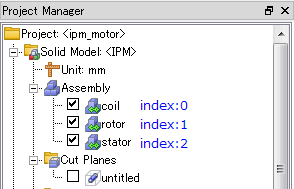
var Name or index of the part group visibility True=1 : ShowsFalse=0 : Hides
- The index in this command is in the display order of the [Project Manager] tree.
| void Model::SetModelCentering | ( | ModelCentering * | centering | ) |
Performs model centering by specify the ModelCentering object.
- Parameters
-
ModelCentering object
| void Model::SetName | ( | String & | name | ) |
Specifies a model name.
- Parameters
-
name Model name
| void Model::SetPartName | ( | Variant & | var, |
| String & | name | ||
| ) |
| void Model::SetStudyOrder | ( | Variant & | val, |
| int | position | ||
| ) |
Changes the order of studies.
- Parameters
-
val Model name or ID position Study position
| void Model::SetTransparency | ( | Variant & | var, |
| double | trans | ||
| ) |
Specifies the degree of transparency of the part.
- Parameters
-
var Part name or ID trans Transparency (0 to 1)
| void Model::SetUnitCollection | ( | Variant & | var | ) |
Applies the unit system from a specified unit name or ID.
- Parameters
-
var Unit name or ID
| void Model::SetVisibility | ( | Variant & | var, |
| bool | visibility | ||
| ) |
Displays or hides a part.
- Parameters
-
var Part name or ID visibility True=1 : ShowsFalse=0 : Hides
| void Model::SuppressPart | ( | Variant & | part, |
| int | state | ||
| ) |
Specifies suppression to part.
- Parameters
-
part Part name or ID state True=1 : Suppresses partFalse=0 : Clears part suppression
| Model * Model::UpdateCadModel | ( | bool | copyStudies = true | ) |
Updates a CAD model.
- Parameters
-
copyStudies True=1 : Copies the study to a new modelFalse=0 : Do not copy the study to a new model
- Returns
- Model object
| Model * Model::UpdateCadModelFromFile | ( | String & | filepath, |
| bool | copyStudies = true |
||
| ) |
Updates a CAD model from a file.
- Parameters
-
filepath The file path for the updated CAD file copyStudies True=1 : Copies the study to a new modelFalse=0 : Do not copy the study to a new model
- Returns
- Model object
| void Model::WriteModelOutlineJsonFile | ( | String & | filename, |
| int | divisions | ||
| ) |
Since this is an internal function, it is not officially supported.