Application class is used to operate the JMAG-Designer application.
Each class object is called from Application class.
.
More...
Inherits ApplicationBase.
Public Member Functions | |
| void | AppendScriptXML (String &xml) |
| Since this is an internal function, it is not officially supported. More... | |
| void | ApplyAnalysisTemplate (AnalysisTemplateParameter *parameter) |
| Specifies the analysis template of the tool box and associates the template with the CAD model. More... | |
| void | AttachMotorTemplate (long pid) |
| Since this is an internal function, it is not officially supported. More... | |
| void | CancelProcess () |
| Cancels a job generating mesh or running a calculation. | |
| bool | CanRedo () |
| Returns whether it is possible to redo or not. More... | |
| bool | CanUndo () |
| Returns whether it is possible to undo or not. More... | |
| void | CheckFolderResults (String &folder) |
| Imports result files (*.jplot) in a specified folder. More... | |
| void | CheckForNewResults () |
| Loads results that have not been imported for all studies included in a project. | |
| void | ClearError () |
| Clears errors. | |
| void | ClearUndoStack () |
| Clears the undo stack. | |
| void | ClearWarning () |
| Clears warnings. | |
| void | CopyToClipboard (Variant &data) |
| Copies the specified character string to the clipboard. More... | |
| TwoDFourierTransformParameter * | Create2DFourierTransformParameter (String &name) |
| Returns a TwoDFourierTransformParameter object. More... | |
| AnalysisGroup * | CreateAnalysisGroup (String &typeName, String &name=String("untitled")) |
| Creates AnalysisGroup object. More... | |
| AnalysisTemplateParameter * | CreateAnalysisTemplateParameter () |
| Returns the AnalysisTemplateParameter object. More... | |
| CircuitConditionConnector * | CreateCircuitConditionConnector (Study *study) |
| Creates a CircuitConditionConnector object. More... | |
| Model * | CreateCircuitModel (String &name=String("untitled")) |
| Creates a Model object for integration study. More... | |
| Cylinder * | CreateCylinder () |
| Creates a Cylinder object. More... | |
| DataSetParameter * | CreateDataSetParameter (String &name) |
| Returns a DataSetParameter object. More... | |
| SimpleDialogBox * | CreateDialogBox () |
| Creates a SimpleDialogBox object. More... | |
| DriveCycleResponseDataParameter * | CreateDriveCycleResponseDataParameter (String &name) |
| Creates a DriveCycleResponseDataParameter object. More... | |
| EfficiencyMapResponseDataParameter * | CreateEfficiencyMapResponseDataParameter (String &name) |
| Creates a EfficiencyMapResponseDataParameter object. More... | |
| ExtractFrequencyParameter * | CreateExtractFrequencyParameter (String &name) |
| Returns the ExtractFrequencyParameter object. More... | |
| FFTParameter * | CreateFFTParameter (String &name) |
| Returns a FFTParameter object. More... | |
| IDispatch * | CreateGeometryEditor (bool askForSave=true) |
| Starts Geometry Editor, and either creates new geometry or edits the geometry. More... | |
| TRemoteObjectProxy * | CreateGeometryEditorInternal (bool askForSave=true) |
| Since this is an internal function, it is not officially supported. More... | |
| GraphIntegralParameter * | CreateGraphIntegralParameter (String &name) |
| Returns the GraphIntegralParameter object. More... | |
| Job * | CreateJob (String array &studies) |
| Creates a Job object to perform batch execution of the all models. A “Job” is a command to run an analysis that is exchanged between machines. More... | |
| Material * | CreateMaterial (String &name) |
| Returns a Material object by specifying a name. More... | |
| IDispatch * | CreateMotorTemplate () |
| Creates an instance with JMAG-Express. More... | |
| TRemoteObjectProxy * | CreateMotorTemplateInternal () |
| Since this is an internal function, it is not officially supported. More... | |
| ParallelGroupConditionCreator * | CreateParallelConditionCreator (Study *study) |
| Creates a ParallelGroupConditionCreator object. More... | |
| Point * | CreatePoint (Variant &x, Variant &y, Variant &z) |
| Returns a Point object by specifying the coordinates (x, y, z). More... | |
| ProjectExportParameter * | CreateProjectExportParameter () |
| Creates a ProjectExportParameter object. More... | |
| ResponseDataParameter * | CreateResponseDataParameter (String &name) |
| Creates a ResponseDataParameter object. More... | |
| RotateGroupConditionCreator * | CreateRotateConditionCreator (Study *study) |
| Creates a RotateGroupConditionCreator object. More... | |
| RttFileParameter * | CreateRttFileParameter () |
| Returns a RttFileParameter object. More... | |
| IDispatch * | CreateTransformerEditor () |
| Creates an instance with the Transformer Modeling tool. | |
| TRemoteObjectProxy * | CreateTransformerEditorInternal () |
| Since this is an internal function, it is not officially supported. More... | |
| void | DeleteAnalysisGroup (Variant &val) |
| Deletes an analysis group by specifying a name or index. More... | |
| void | DeleteModel (Variant &val) |
| Deletes a model by specifying a name or index. More... | |
| void | DetachMotorTemplate () |
| Since this is an internal function, it is not officially supported. More... | |
| void | EndCommandGroup () |
| Stops grouping commands together. | |
| void | ExportAnalysisParameters (String &filename, bool exportCADParameter) |
| Exports Analysis Parameter items to designated file. More... | |
| void | ExportHoopsFile (String &filename) |
| Exports hoops file to the specified file name. More... | |
| void | ExportImage (String &filename) |
| Exports the model displayed in the graphics window as an image. More... | |
| void | ExportImageWithSize (String &filename, int width, int height) |
| Exports the model displayed in the graphics window as an image with the specified size. More... | |
| void | ExportProject (String &filename, ProjectExportParameter *parameter) |
| Exports the study set to the ProjectExportParameter object to the project file. More... | |
| void | FinishBatchMaterialUpdate () |
| Ends batch Material object update. | |
| FunctionObjectFactory * | FunctionFactory () |
| Returns the FunctionObjectFactory object. More... | |
| ResultViewItemList * | GetAllCasesResultViewItemList () |
| Returns result view list for all cases. More... | |
| Variant | GetAllMessages () |
| Returns a list of all messages. More... | |
| AnalysisGroup * | GetAnalysisGroup (Variant &val) |
| Returns an analysis group by specifying a name or index. More... | |
| String | GetAppDir () |
| Returns the installation folder of JMAG-Designer. More... | |
| String | GetCreatorName () |
| Returns the name of the creator of the project specified in the project properties. More... | |
| AnalysisGroup * | GetCurrentAnalysisGroup () |
| Returns the analysis group containing the active study. | |
| Model * | GetCurrentModel () |
| Returns an active model. More... | |
| CurrentResult * | GetCurrentResult () |
| Returns the CurrentResult object. More... | |
| Study * | GetCurrentStudy () |
| Returns the active Study object. More... | |
| DataManager * | GetDataManager () |
| Returns the DataManager object. More... | |
| String | GetDefaultModelFolderPath () |
| Since this is an internal function, it is not officially supported. More... | |
| String | GetDescription () |
| Returns the description in the project properties. More... | |
| String | GetLastMessage () |
| Returns the latest error message as a string. More... | |
| MaterialLibrary * | GetMaterialLibrary () |
| Returns the MaterialLibrary object. More... | |
| Model * | GetModel (Variant &val) |
| Returns the Model object by specifying a name or index. More... | |
| String | GetModelNameInProjectFromFilePath (String &filename) |
| Returns the project file name by specifying the file path. More... | |
| String | GetOpenFile (String &filter=String()) |
| Opens the file select dialog and opens the selected file. More... | |
| ParameterSettingStatus * | GetParameterSettingStatus () |
| Returns a ParameterSettingStatus object to specify the display status of the analysis parameter list. More... | |
| Variant | GetPreference (String &propName) |
| Returns the current settings for the items in the [Preferences] dialog (such as language, encoding, etc.). More... | |
| String | GetProjectFolderPath () |
| Returns the path for the folder (*.jfiles) as a string. More... | |
| String | GetProjectKey () |
| Returns the project key. More... | |
| String | GetProjectName () |
| Returns the name of a project as a string. More... | |
| String | GetProjectPath () |
| Returns path for project file (*.jproj) as a string. More... | |
| ResultViewItemList * | GetResultViewItemList () |
| Returns result view list. More... | |
| String | GetSaveFile (String &filter=String()) |
| Opens the save file dialog and returns the specified file name. More... | |
| Study * | GetStudy (Variant &val) |
| Returns a Study object by specifying a name or index. More... | |
| CurrentResult * | GetStudyResult (String &studyIdentifier, int caseIndex) |
| Since this is an internal function, it is not officially supported. More... | |
| UserComponentList * | GetUserComponentList () |
| Returns the UserComponentList object. More... | |
| String | GetUuid () |
| Returns the project UUID number. More... | |
| bool | HasAlreadyLoadModelInProject (String &filename) |
| Returns whether or not a specified model is loaded to the project. More... | |
| bool | HasError () |
| Returns True as a return value when errors occur. More... | |
| bool | HasRunningProcess () |
| Returns True as the return value when a job is generating mesh or running a calculation. More... | |
| bool | HasWarning () |
| Returns True as a return value when warnings occur. More... | |
| void | Hide () |
| Hides the main window. | |
| void | Import2DDataFromMotorTemplate (bool isPartial) |
| Imports the model created with JMAG-Express into JMAG-Designer as a 2D model. More... | |
| void | Import2DDataFromMotorTemplateIndex (int index, bool isPartial) |
| Imports the model created by specifying the JMAG-Express into JMAG-Designer as a 2D model. More... | |
| void | Import3DDataFromMotorTemplate (bool isPartial, bool createCoilEnd) |
| Imports the model created with JMAG-Express into JMAG-Designer after being converted to a 3D model. More... | |
| void | Import3DDataFromMotorTemplateIndex (int index, bool isPartial, bool createCoilEnd) |
| Imports the model created by specifying the JMAG-Express into JMAG-Designer after being converted to a 3D model. More... | |
| void | ImportAnalysisTemplate (AnalysisTemplateParameter *parameter) |
| Imports an analysis template (*. jtmpl) and links the template to a CAD model. More... | |
| void | ImportDataFromGeometryEditor () |
| Imports a model created with Geometry Editor into JMAG-Designer. | |
| void | ImportDataFromGeometryEditorIndex (int index) |
| Imports a model created by specifying the Geometry Editor into JMAG-Designer. More... | |
| void | ImportDataFromMotorTemplate () |
| Imports a model created with JMAG-Express into JMAG-Designer. | |
| void | ImportDataFromTransformerEditor () |
| Imports a model created with the Transformer Modeling tool into JMAG-Designer. | |
| void | ImportDataFromTransformerEditorIndex (int index) |
| Imports a model created by specifying the Transformer Modeling tool into JMAG-Designer. More... | |
| void | ImportModel (String &statorKey, String &rotorKey) |
| Imports stator and rotor models at the same time. More... | |
| bool | IsExpressMode () |
| Returns True as a return value when running in Express mode. More... | |
| bool | IsIdRecordingMode () |
| Since this is an internal function, it is not officially supported. More... | |
| bool | IsStartRecording () |
| Since this is an internal function, it is not officially supported. More... | |
| bool | IsValid () |
| Returns True as the return value if an object is valid. More... | |
| void | LaunchGeometryEditor () |
| Starts Geometry Editor, and creates new geometry or edits the geometry. | |
| void | LaunchMotorTemplate () |
| Starts JMAG-Express. | |
| void | LaunchTransformerEditor () |
| Starts the Transformer Modeling tool. | |
| void | Load (String &filename) |
| Imports data from the specified file. More... | |
| void | Load2DSAT (String &filename) |
| Imports a 2D SAT file. More... | |
| Model * | LoadCadData (String &filename, String &name) |
| Returns a Model object with the specified name by importing a CAD file. More... | |
| Model * | LoadCadDataWithOption (String &filename, String &name, bool useHealing, bool removeSheet, String &unitName="") |
| Returns the Model object with the specified name by importing a CAD file. Functions such as healing and removing sheet parts and specify unit of length can be selected as options. More... | |
| Model * | LoadCATIAV5CadData (String &filename, String &name, bool onlyVisibleSolid, bool useHealing, bool removeSheet, String &unitName="") |
| Returns the Model object with the specified name by importing a CATPart or CATProduct file. Functions such as only import visible solid, healing and removing sheet parts and specify unit of length can be selected as options. More... | |
| Model * | LoadCreoCadData (String &filename, String &name, bool onlyVisibleSolid, bool useHealing, bool removeSheet, String &unitName="") |
| Returns the Model object with the specified name by importing an asm or prt file. Functions such as only import visible solid, healing and removing sheet parts and specify unit of length can be selected as options. More... | |
| void | LoadMesh (String &filename) |
| Imports data from the specified file (mesh data). More... | |
| void | LoadNewCaseData (String &xmldata) |
| Since this is an internal function, it is not officially supported. More... | |
| void | LoadNewCaseFile (String &filename) |
| Since this is an internal function, it is not officially supported. More... | |
| Model * | LoadNXCadData (String &filename, String &name, bool onlyVisibleSolid, bool useHealing, bool removeSheet, String &unitName="") |
| Returns the Model object with the specified name by importing a CAD file. Functions such as only import visible solid, healing and removing sheet parts and specify unit of length can be selected as options. More... | |
| void | LoadRTTP (String &filename, String &password) |
| Imports data from the specified file and set password. More... | |
| String | MainWindowTitle () |
| Returns the character string displayed in the title bar of the main window. More... | |
| int | MajorVersion () |
| Returns the major version number. More... | |
| int | MinorVersion () |
| Returns a minor version number. More... | |
| void | NewProject (String &name) |
| Creates a project with the given name. More... | |
| int | NumAnalysisGroups () |
| Returns the number of analysis groups. More... | |
| int | NumModels () |
| Returns the number of models. More... | |
| int | NumStudies () |
| Returns the number of studies. More... | |
| void | OnHiddenMotorTemplate (qint64 pid) |
| Since this is an internal function, it is not officially supported. More... | |
| void | OutputLogDebugInfo (String &info) |
| Since this is an internal function, it is not officially supported. More... | |
| void | OutputLogInfo (String &info) |
| Since this is an internal function, it is not officially supported. More... | |
| void | PopUndoStack () |
| Undoes the last action and disable redo. | |
| void | Quit () |
| Exits the application. | |
| void | Raise () |
| Brings the JMAG-Designer window to the front. | |
| void | Redo () |
| Redoes the last action. | |
| void | RunScriptFile (String &filename, String &type="") |
| Runs a script file (*.vbs). More... | |
| void | Save () |
| Saves data in the user folder. | |
| void | SaveAs (String &filename) |
| Saves data to a specified path. More... | |
| void | SetCloseWithoutTermination (bool flag) |
| Since this is an internal function, it is not officially supported. More... | |
| void | SetCreatorName (String &name) |
| Specifies the name of the project creator. More... | |
| void | SetCurrentModel (Variant &val) |
| Switches an active model by specifying a name or index. More... | |
| void | SetCurrentStudy (Variant &val) |
| Switches an active study by specifying a name or index. More... | |
| void | SetDescription (String &description) |
| Specifies the description of the project. More... | |
| void | SetGeometry (int x, int y, int w, int h) |
| Determines the position and size of the window. More... | |
| void | SetMessageVisible (bool on) |
| Since this is an internal function, it is not officially supported. More... | |
| void | SetModelAsCurrent (Model *model) |
| Activates the specified Model object. More... | |
| void | SetModelOrder (Variant &val, int position) |
| Changes the order of the studies. More... | |
| void | SetPosition (int x, int y) |
| Determines the position of the window. More... | |
| void | SetPreference (String &propName, Variant &val) |
| Updates the current settings for the items in the [Preferences] dialog (such as language, encoding, etc.). More... | |
| void | SetProjectName (String &name) |
| Specifies the name of a project. More... | |
| void | SetShowProgressDialog (bool show) |
| Since this is an internal function, it is not officially supported. More... | |
| void | SetSize (int w, int h) |
| Determines the size of the window. More... | |
| void | SetStudyAsCurrent (Study *study) |
| Activates the specified Study object. More... | |
| void | SetupUserProgress (String &label) |
| This function needs to be called before starting the progress display in the progress dialog. More... | |
| void | SetUseExceptions (bool useExceptions) |
| Specifies the flag to convert errors to Python exceptions. More... | |
| void | SetUserProgressMaxSteps (int steps) |
| Specifies a progress interval on the dialog using the specified number of steps. More... | |
| void | SetUserProgressMessage (String &label) |
| Specifies a message on the progress dialog. More... | |
| void | SetUserProgressUseCancel (bool useCancel) |
| Specifies whether to use the Cancel button in the progress dialog. More... | |
| void | SetVisible (bool visible) |
| Switches between displaying and hiding the main window of the application. More... | |
| void | Show () |
| Shows the main window of the application. | |
| void | ShowCircuitGrid (bool show) |
| Switches between showing and hiding the grid of circuit editor. More... | |
| void | Sleep (int milliSeconds) |
| Specifies JMAG-Designer in sleep mode to a specified period of time. More... | |
| void | StartBatchMaterialUpdate () |
| Starts batch Material object update. More... | |
| void | StartCommandGroup (String &description) |
| Starts grouping multiple commands together as one action. More... | |
| void | SubmitAllModelsLocal () |
| Submits all studies of a project to queue on a local machine. | |
| void | SubmitAllModelsRemote (String &machine, String &cpu, Variant &keepremote) |
| Submits all studies of a project to queue on a specified machine. More... | |
| void | SubmitLocalFromJproj (String array &studies, int numOfJobs) |
| Submits selected studies to queue on a local machine. More... | |
| void | SubmitRemoteFromJproj (String array &studies, int numOfJobs, String &machine, String &cpu, Variant &keepremote) |
| Submits selected studies to queue on a specified machine. More... | |
| int | SubVersion () |
| Returns the subversion number. More... | |
| void | SwitchLicense () |
| Switches to JMAG-Designer license. | |
| String | Translate (String &value, String &context) |
| Translates a string. More... | |
| void | Undo () |
| Undoes the last action. | |
| void | UserProgressFinish () |
| Finishes displaying the progress dialog. | |
| void | UserProgressStart () |
| Starts displaying the progress dialog. | |
| void | UserProgressStep () |
| Progresses 1 step on the progress dialog. | |
| bool | UserProgressWasCanceled () |
| Returns True as a return value if the progress dialog is canceled. More... | |
| String | VersionString (bool includeSub) |
| Returns the version number as a string. More... | |
| ViewController * | View () |
| Returns a ViewController object. More... | |
| bool | visible () |
| Returns True as the return value if the main window of application is displayed. More... | |
Detailed Description
Application class is used to operate the JMAG-Designer application.
Each class object is called from Application class.
.
Use application name "designer" to obtain an Application class object.
- Example of calling in Python
- app = designer.GetApplication()
- Example of calling in VBScript
- When starting up as an external application:app = designerapp = CreateObject("designer.Application")
- Example of calling in JScript
- When starting up as an external application:app = designerapp = new ActiveXObject("designer.Application")
Member Function Documentation
| void Application::AppendScriptXML | ( | String & | xml | ) |
Since this is an internal function, it is not officially supported.
| void Application::ApplyAnalysisTemplate | ( | AnalysisTemplateParameter * | parameter | ) |
Specifies the analysis template of the tool box and associates the template with the CAD model.
- Parameters
-
AnalysisTemplateParameter object
| void Application::AttachMotorTemplate | ( | long | pid | ) |
Since this is an internal function, it is not officially supported.
| bool Application::CanRedo | ( | ) |
Returns whether it is possible to redo or not.
- Returns
- Whether it is possible to redo or not.
| bool Application::CanUndo | ( | ) |
Returns whether it is possible to undo or not.
- Returns
- Whether it is possible to undo or not.
| void Application::CheckFolderResults | ( | String & | folder | ) |
Imports result files (*.jplot) in a specified folder.
- Parameters
-
folder Folder path
| void Application::CopyToClipboard | ( | Variant & | data | ) |
Copies the specified character string to the clipboard.
- Parameters
-
data Data to be copied
| TwoDFourierTransformParameter * Application::Create2DFourierTransformParameter | ( | String & | name | ) |
Returns a TwoDFourierTransformParameter object.
- Parameters
-
name Title of dataset to be created
- Returns
- TwoDFourierTransformParameter object
| AnalysisGroup * Application::CreateAnalysisGroup | ( | String & | typeName, |
| String & | name = String("untitled") |
||
| ) |
Creates AnalysisGroup object.
- Parameters
-
typeName Calculation type name"sequential"=Selected study is calculated sequentially"coupled"=Direct coupled analysis is run from the selected studyname Analysis group name
- Returns
- AnalysisGroup object
| AnalysisTemplateParameter * Application::CreateAnalysisTemplateParameter | ( | ) |
Returns the AnalysisTemplateParameter object.
- Returns
- AnalysisTemplateParameter object
| CircuitConditionConnector * Application::CreateCircuitConditionConnector | ( | Study * | study | ) |
Creates a CircuitConditionConnector object.
- Parameters
-
study Study object
- Returns
- CircuitConditionConnector object
| Model * Application::CreateCircuitModel | ( | String & | name = String("untitled") | ) |
| DataSetParameter * Application::CreateDataSetParameter | ( | String & | name | ) |
Returns a DataSetParameter object.
- Parameters
-
name Title of dataset to be created
- Returns
- DataSetParameter object
| SimpleDialogBox * Application::CreateDialogBox | ( | ) |
Creates a SimpleDialogBox object.
- Returns
- SimpleDialogBox object
| DriveCycleResponseDataParameter * Application::CreateDriveCycleResponseDataParameter | ( | String & | name | ) |
Creates a DriveCycleResponseDataParameter object.
- Parameters
-
name Name of the response value
- Returns
- DriveCycleResponseDataParameter object
| EfficiencyMapResponseDataParameter * Application::CreateEfficiencyMapResponseDataParameter | ( | String & | name | ) |
Creates a EfficiencyMapResponseDataParameter object.
- Parameters
-
name Name of the response value
- Returns
- EfficiencyMapResponseDataParameter object
| ExtractFrequencyParameter * Application::CreateExtractFrequencyParameter | ( | String & | name | ) |
Returns the ExtractFrequencyParameter object.
- Parameters
-
name Dataset title to be created
- Returns
- ExtractFrequencyParameter object
| FFTParameter * Application::CreateFFTParameter | ( | String & | name | ) |
Returns a FFTParameter object.
- Parameters
-
name Title of dataset to be created
- Returns
- FFTParameter object
| IDispatch * Application::CreateGeometryEditor | ( | bool | askForSave = true | ) |
Starts Geometry Editor, and either creates new geometry or edits the geometry.
- Returns
- GeomApplication object
For more information about GeomApplication class command, see Geometry Editor Script Help "GeomApplication."
| TRemoteObjectProxy * Application::CreateGeometryEditorInternal | ( | bool | askForSave = true | ) |
Since this is an internal function, it is not officially supported.
| GraphIntegralParameter * Application::CreateGraphIntegralParameter | ( | String & | name | ) |
Returns the GraphIntegralParameter object.
- Parameters
-
name Dataset title to be created
- Returns
- GraphIntegralParameter object
| Job * Application::CreateJob | ( | String array & | studies | ) |
| Material * Application::CreateMaterial | ( | String & | name | ) |
Returns a Material object by specifying a name.
- Parameters
-
name Material name
- Returns
- Material object
Create a material using the command of the MaterialLibrary class when using JMAG-Designer 10.0 or later.
An object needs to be created and assigned to a part when specifying a material that exists in the material list to a part with a script.
The CreateMaterial() command is used to obtain the object for the material in the material list. The command is not used to define a new material.
| IDispatch * Application::CreateMotorTemplate | ( | ) |
Creates an instance with JMAG-Express.
- Precondition
- Before executing this function, launch JMAG-Express using the LaunchMotorTemplate function.
| TRemoteObjectProxy * Application::CreateMotorTemplateInternal | ( | ) |
Since this is an internal function, it is not officially supported.
| ParallelGroupConditionCreator * Application::CreateParallelConditionCreator | ( | Study * | study | ) |
Creates a ParallelGroupConditionCreator object.
- Parameters
-
study Study object
- Returns
- ParallelGroupConditionCreator object
| Point * Application::CreatePoint | ( | Variant & | x, |
| Variant & | y, | ||
| Variant & | z | ||
| ) |
| ProjectExportParameter * Application::CreateProjectExportParameter | ( | ) |
Creates a ProjectExportParameter object.
- Returns
- ProjectExportParameter object
| ResponseDataParameter * Application::CreateResponseDataParameter | ( | String & | name | ) |
Creates a ResponseDataParameter object.
- Parameters
-
name Name of the response value
- Returns
- ResponseDataParameter object
| RotateGroupConditionCreator * Application::CreateRotateConditionCreator | ( | Study * | study | ) |
Creates a RotateGroupConditionCreator object.
- Parameters
-
study Study object
- Returns
- RotateGroupConditionCreator object
| RttFileParameter * Application::CreateRttFileParameter | ( | ) |
Returns a RttFileParameter object.
- Returns
- RttFileParameter object
| TRemoteObjectProxy * Application::CreateTransformerEditorInternal | ( | ) |
Since this is an internal function, it is not officially supported.
| void Application::DeleteAnalysisGroup | ( | Variant & | val | ) |
Deletes an analysis group by specifying a name or index.
- Parameters
-
val Name or index
| void Application::DeleteModel | ( | Variant & | val | ) |
Deletes a model by specifying a name or index.
- Parameters
-
val Model name or index
| void Application::DetachMotorTemplate | ( | ) |
Since this is an internal function, it is not officially supported.
| void Application::ExportAnalysisParameters | ( | String & | filename, |
| bool | exportCADParameter | ||
| ) |
Exports Analysis Parameter items to designated file.
- Parameters
-
filename Export file name exportCADParameter Whether to output CAD parameters
| void Application::ExportHoopsFile | ( | String & | filename | ) |
Exports hoops file to the specified file name.
- Parameters
-
filename Full path name of the Hoops file to export
| void Application::ExportImage | ( | String & | filename | ) |
Exports the model displayed in the graphics window as an image.
- Parameters
-
filename File path
| void Application::ExportImageWithSize | ( | String & | filename, |
| int | width, | ||
| int | height | ||
| ) |
Exports the model displayed in the graphics window as an image with the specified size.
- Parameters
-
filename Full path name of the image file to export width Width height Height
| void Application::ExportProject | ( | String & | filename, |
| ProjectExportParameter * | parameter | ||
| ) |
Exports the study set to the ProjectExportParameter object to the project file.
- Parameters
-
filename Project file name parameter ProjectExportParameter object
| FunctionObjectFactory * Application::FunctionFactory | ( | ) |
Returns the FunctionObjectFactory object.
- Returns
- FunctionObjectFactory object
| ResultViewItemList * Application::GetAllCasesResultViewItemList | ( | ) |
Returns result view list for all cases.
- Returns
- ResultViewItemList object
| Variant Application::GetAllMessages | ( | ) |
Returns a list of all messages.
- Returns
- List of all messages
| AnalysisGroup * Application::GetAnalysisGroup | ( | Variant & | val | ) |
Returns an analysis group by specifying a name or index.
- Parameters
-
val Name or index
- Returns
- AnalysisGroup object
| String Application::GetAppDir | ( | ) |
Returns the installation folder of JMAG-Designer.
- Returns
- Installation folder of JMAG-Designer
| String Application::GetCreatorName | ( | ) |
Returns the name of the creator of the project specified in the project properties.
- Returns
- Name of the creator
| CurrentResult * Application::GetCurrentResult | ( | ) |
Returns the CurrentResult object.
- Returns
- CurrentResult object
| DataManager * Application::GetDataManager | ( | ) |
Returns the DataManager object.
- Returns
- DataManager object
| String Application::GetDefaultModelFolderPath | ( | ) |
Since this is an internal function, it is not officially supported.
| String Application::GetDescription | ( | ) |
Returns the description in the project properties.
- Returns
- Description for the project
| String Application::GetLastMessage | ( | ) |
Returns the latest error message as a string.
- Returns
- Latest error message
| MaterialLibrary * Application::GetMaterialLibrary | ( | ) |
Returns the MaterialLibrary object.
- Returns
- MaterialLibrary object
| Model * Application::GetModel | ( | Variant & | val | ) |
| String Application::GetModelNameInProjectFromFilePath | ( | String & | filename | ) |
Returns the project file name by specifying the file path.
- Parameters
-
filename File path
- Returns
- Project file name
| String Application::GetOpenFile | ( | String & | filter = String() | ) |
Opens the file select dialog and opens the selected file.
- Parameters
-
filter Filter when a file is selected
- Returns
- File name selected in the dialog
| ParameterSettingStatus * Application::GetParameterSettingStatus | ( | ) |
Returns a ParameterSettingStatus object to specify the display status of the analysis parameter list.
- Returns
- ParameterSettingStatus object
| Variant Application::GetPreference | ( | String & | propName | ) |
Returns the current settings for the items in the [Preferences] dialog (such as language, encoding, etc.).
- Parameters
-
propName Type of properties to obtain
Language:Language
Encoding:Encoding
- Returns
- Value of properties
For more information about the condition type name that can be specified as propName , see Preferences . The value "System," "Japanese," "English," or "zh_CN" is returned when "Language" is selected.
The value "utf8," "utf16," "Big5," "Latin1," or "Shift-JIS" is returned when "Encoding" is selected.
| String Application::GetProjectFolderPath | ( | ) |
Returns the path for the folder (*.jfiles) as a string.
- Returns
- Folder path
| String Application::GetProjectKey | ( | ) |
Returns the project key.
- Returns
- Project Key
Returns the Project Key for the project. This is used for the Power Simulation License.
| String Application::GetProjectName | ( | ) |
Returns the name of a project as a string.
- Returns
- Project name
| String Application::GetProjectPath | ( | ) |
Returns path for project file (*.jproj) as a string.
- Returns
- Project file path
| ResultViewItemList * Application::GetResultViewItemList | ( | ) |
Returns result view list.
- Returns
- ResultViewItemList object
| String Application::GetSaveFile | ( | String & | filter = String() | ) |
Opens the save file dialog and returns the specified file name.
The file does not need to exist.
- Parameters
-
filter Filter when a file is selected
- Returns
- File name selected in the dialog
| Study * Application::GetStudy | ( | Variant & | val | ) |
| CurrentResult * Application::GetStudyResult | ( | String & | studyIdentifier, |
| int | caseIndex | ||
| ) |
Since this is an internal function, it is not officially supported.
| UserComponentList * Application::GetUserComponentList | ( | ) |
Returns the UserComponentList object.
- Returns
- UserComponentList object
| String Application::GetUuid | ( | ) |
Returns the project UUID number.
- Returns
- Unique Identifier
Returns an unique ID for the project.
| bool Application::HasAlreadyLoadModelInProject | ( | String & | filename | ) |
Returns whether or not a specified model is loaded to the project.
- Parameters
-
filename Model file name
- Returns
- Loaded state
| bool Application::HasError | ( | ) |
Returns True as a return value when errors occur.
- Returns
- Whether or not there are errors
| bool Application::HasRunningProcess | ( | ) |
Returns True as the return value when a job is generating mesh or running a calculation.
- Returns
- Job status (whether or not a mesh is generating or a calculation is running)
| bool Application::HasWarning | ( | ) |
Returns True as a return value when warnings occur.
- Returns
- Whether or not there are warnings
| void Application::Import2DDataFromMotorTemplate | ( | bool | isPartial | ) |
Imports the model created with JMAG-Express into JMAG-Designer as a 2D model.
- Parameters
-
isPartial True=1 : Import as a partial modelFalse=0 : Import as a full model
| void Application::Import2DDataFromMotorTemplateIndex | ( | int | index, |
| bool | isPartial | ||
| ) |
Imports the model created by specifying the JMAG-Express into JMAG-Designer as a 2D model.
- Parameters
-
index Number of JMAG-Express isPartial True=1 : Import as a partial modelFalse=0 : Import as a full model
| void Application::Import3DDataFromMotorTemplate | ( | bool | isPartial, |
| bool | createCoilEnd | ||
| ) |
Imports the model created with JMAG-Express into JMAG-Designer after being converted to a 3D model.
- Parameters
-
isPartial True=1 : Imports as a partial modelFalse=0 : Imports as a full modelcreateCoilEnd True=1 : Create coil endsFalse=0 : Do not create coil ends
| void Application::Import3DDataFromMotorTemplateIndex | ( | int | index, |
| bool | isPartial, | ||
| bool | createCoilEnd | ||
| ) |
Imports the model created by specifying the JMAG-Express into JMAG-Designer after being converted to a 3D model.
- Parameters
-
index Number of JMAG-Express isPartial True=1 : Import as a partial modelFalse=0 : Import as a full modelcreateCoilEnd True=1 : Create coil endsFalse=0 : Do not create coil ends
| void Application::ImportAnalysisTemplate | ( | AnalysisTemplateParameter * | parameter | ) |
Imports an analysis template (*. jtmpl) and links the template to a CAD model.
- Parameters
-
AnalysisTemplateParameter object
| void Application::ImportDataFromGeometryEditorIndex | ( | int | index | ) |
Imports a model created by specifying the Geometry Editor into JMAG-Designer.
- Parameters
-
index Number of Geometry Editor
| void Application::ImportDataFromTransformerEditorIndex | ( | int | index | ) |
Imports a model created by specifying the Transformer Modeling tool into JMAG-Designer.
- Parameters
-
index Number of Transformer Modeling tool
| void Application::ImportModel | ( | String & | statorKey, |
| String & | rotorKey | ||
| ) |
Imports stator and rotor models at the same time.
- Parameters
-
statorKey Stator model key rotorKey Rotor model key
| bool Application::IsExpressMode | ( | ) |
Returns True as a return value when running in Express mode.
- Returns
- Express mode
| bool Application::IsIdRecordingMode | ( | ) |
Since this is an internal function, it is not officially supported.
| bool Application::IsStartRecording | ( | ) |
Since this is an internal function, it is not officially supported.
| bool Application::IsValid | ( | ) |
Returns True as the return value if an object is valid.
- Returns
- Whether or not the Application object is valid
| void Application::Load | ( | String & | filename | ) |
Imports data from the specified file.
- Parameters
-
filename File path
| void Application::Load2DSAT | ( | String & | filename | ) |
Imports a 2D SAT file.
- Parameters
-
filename File path
| Model * Application::LoadCadData | ( | String & | filename, |
| String & | name | ||
| ) |
| Model * Application::LoadCadDataWithOption | ( | String & | filename, |
| String & | name, | ||
| bool | useHealing, | ||
| bool | removeSheet, | ||
| String & | unitName = "" |
||
| ) |
Returns the Model object with the specified name by importing a CAD file. Functions such as healing and removing sheet parts and specify unit of length can be selected as options.
- Parameters
-
filename Path to the CAD file name Specified name useHealing True=1 : Use healingFalse=0 : Do not use healingremoveSheet True=1 : Remove sheet partsFalse=0 : Do not remove sheet partsunitName Specified unit of length
- Returns
- Model object
| Model * Application::LoadCATIAV5CadData | ( | String & | filename, |
| String & | name, | ||
| bool | onlyVisibleSolid, | ||
| bool | useHealing, | ||
| bool | removeSheet, | ||
| String & | unitName = "" |
||
| ) |
Returns the Model object with the specified name by importing a CATPart or CATProduct file. Functions such as only import visible solid, healing and removing sheet parts and specify unit of length can be selected as options.
- Parameters
-
filename Path to the CATPart or CATProduct file name Specified name onlyVisibleSolid True=1 : Import only visible solidsFalse=0 : Import all solidsuseHealing True=1 : Use healingFalse=0 : Do not use healingremoveSheet True=1 : Remove sheet partsFalse=0 : Do not remove sheet partsunitName Specified unit of length
- Returns
- Model object
| Model * Application::LoadCreoCadData | ( | String & | filename, |
| String & | name, | ||
| bool | onlyVisibleSolid, | ||
| bool | useHealing, | ||
| bool | removeSheet, | ||
| String & | unitName = "" |
||
| ) |
Returns the Model object with the specified name by importing an asm or prt file. Functions such as only import visible solid, healing and removing sheet parts and specify unit of length can be selected as options.
- Parameters
-
filename Path to the asm or prt file name Specified name onlyVisibleSolid True=1 : Import only visible solidsFalse=0 : Import all solidsuseHealing True=1 : Use healingFalse=0 : Do not use healingremoveSheet True=1 : Remove sheet partsFalse=0 : Do not remove sheet partsunitName Specified unit of length
- Returns
- Model object
| void Application::LoadMesh | ( | String & | filename | ) |
Imports data from the specified file (mesh data).
- Parameters
-
filename File path
| void Application::LoadNewCaseData | ( | String & | xmldata | ) |
Since this is an internal function, it is not officially supported.
| void Application::LoadNewCaseFile | ( | String & | filename | ) |
Since this is an internal function, it is not officially supported.
| Model * Application::LoadNXCadData | ( | String & | filename, |
| String & | name, | ||
| bool | onlyVisibleSolid, | ||
| bool | useHealing, | ||
| bool | removeSheet, | ||
| String & | unitName = "" |
||
| ) |
Returns the Model object with the specified name by importing a CAD file. Functions such as only import visible solid, healing and removing sheet parts and specify unit of length can be selected as options.
- Parameters
-
filename Path to the CAD file name Specified name onlyVisibleSolid True=1 : Import only visible solidsFalse=0 : Import all solidsuseHealing True=1 : Use healingFalse=0 : Do not use healingremoveSheet True=1 : Remove sheet partsFalse=0 : Do not remove sheet partsunitName Specified unit of length
- Returns
- Model object
| void Application::LoadRTTP | ( | String & | filename, |
| String & | password | ||
| ) |
Imports data from the specified file and set password.
- Parameters
-
filename File path password Password
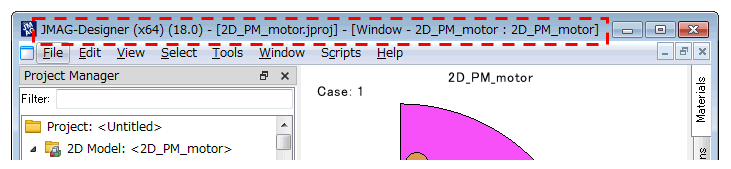
| String Application::MainWindowTitle | ( | ) |
Returns the character string displayed in the title bar of the main window.
- Returns
- The character string displayed in the title bar of the main window
| int Application::MajorVersion | ( | ) |
Returns the major version number.
- Returns
- Version number
If the version number is "1.2.5", "1" is returned.
| int Application::MinorVersion | ( | ) |
Returns a minor version number.
- Returns
- Version number
If the version number is "1.2.5", "2" is returned.
| void Application::NewProject | ( | String & | name | ) |
Creates a project with the given name.
- Parameters
-
name Project name
| int Application::NumAnalysisGroups | ( | ) |
Returns the number of analysis groups.
- Returns
- Number of analysis groups
| int Application::NumModels | ( | ) |
Returns the number of models.
- Returns
- Number of models
| int Application::NumStudies | ( | ) |
Returns the number of studies.
- Returns
- Number of studies
| void Application::OnHiddenMotorTemplate | ( | qint64 | pid | ) |
Since this is an internal function, it is not officially supported.
| void Application::OutputLogDebugInfo | ( | String & | info | ) |
Since this is an internal function, it is not officially supported.
| void Application::OutputLogInfo | ( | String & | info | ) |
Since this is an internal function, it is not officially supported.
| void Application::RunScriptFile | ( | String & | filename, |
| String & | type = "" |
||
| ) |
Runs a script file (*.vbs).
- Parameters
-
filename File path type User : User folderSystem : Installation folder
| void Application::SaveAs | ( | String & | filename | ) |
Saves data to a specified path.
- Parameters
-
filename File path
| void Application::SetCloseWithoutTermination | ( | bool | flag | ) |
Since this is an internal function, it is not officially supported.
| void Application::SetCreatorName | ( | String & | name | ) |
Specifies the name of the project creator.
- Parameters
-
name Name of the project creator
| void Application::SetCurrentModel | ( | Variant & | val | ) |
Switches an active model by specifying a name or index.
- Parameters
-
val Model name or index
| void Application::SetCurrentStudy | ( | Variant & | val | ) |
Switches an active study by specifying a name or index.
- Parameters
-
val Study name or index
| void Application::SetDescription | ( | String & | description | ) |
Specifies the description of the project.
- Parameters
-
description Description for the project
| void Application::SetGeometry | ( | int | x, |
| int | y, | ||
| int | w, | ||
| int | h | ||
| ) |
Determines the position and size of the window.
- Parameters
-
x The horizontal position of the top left-hand corner of the window (pixel) y The vertical position of the top left-hand corner of the window (pixel) w Width of the window (pixel) h Height of the window (pixel)
A value smaller than the minimum size of the window cannot be applied even if such a value is specified.
| void Application::SetMessageVisible | ( | bool | on | ) |
Since this is an internal function, it is not officially supported.
| void Application::SetModelAsCurrent | ( | Model * | model | ) |
| void Application::SetModelOrder | ( | Variant & | val, |
| int | position | ||
| ) |
Changes the order of the studies.
- Parameters
-
val Model name or model ID position Model position
| void Application::SetPosition | ( | int | x, |
| int | y | ||
| ) |
Determines the position of the window.
- Parameters
-
x The horizontal position of the top left-hand corner of the window (pixel) y The vertical position of the top left-hand corner of the window (pixel)
| void Application::SetPreference | ( | String & | propName, |
| Variant & | val | ||
| ) |
Updates the current settings for the items in the [Preferences] dialog (such as language, encoding, etc.).
- Parameters
-
propName Property name val Property value
For more information about the condition type name that can be specified as propName , see Preferences .
| void Application::SetProjectName | ( | String & | name | ) |
Specifies the name of a project.
- Parameters
-
name Project name
| void Application::SetShowProgressDialog | ( | bool | show | ) |
Since this is an internal function, it is not officially supported.
| void Application::SetSize | ( | int | w, |
| int | h | ||
| ) |
Determines the size of the window.
- Parameters
-
w Width of the window (pixel) h Height of the window (pixel)
A value smaller than the minimum size of the window cannot be applied even if such a value is specified.
| void Application::SetStudyAsCurrent | ( | Study * | study | ) |
| void Application::SetupUserProgress | ( | String & | label | ) |
This function needs to be called before starting the progress display in the progress dialog.
- Parameters
-
label Message displayed on the dialog
| void Application::SetUseExceptions | ( | bool | value | ) |
Specifies the flag to convert errors to Python exceptions.
- Parameters
-
value True=1 : Use exceptionsFalse=0 : Do not use exceptions
| void Application::SetUserProgressMaxSteps | ( | int | steps | ) |
Specifies a progress interval on the dialog using the specified number of steps.
- Parameters
-
steps Number of steps
| void Application::SetUserProgressMessage | ( | String & | label | ) |
Specifies a message on the progress dialog.
- Parameters
-
label Message displayed on the dialog
| void Application::SetUserProgressUseCancel | ( | bool | useCancel | ) |
Specifies whether to use the Cancel button in the progress dialog.
- Parameters
-
useCancel Number of steps True=1 : UseFalse=0 : Do not use
| void Application::SetVisible | ( | bool | visible | ) |
Switches between displaying and hiding the main window of the application.
- Parameters
-
visible True=1 : DisplaysFalse=0 : Hides
| void Application::ShowCircuitGrid | ( | bool | show | ) |
Switches between showing and hiding the grid of circuit editor.
- Parameters
-
show True=1 : ShowsFalse=0 : Hides
| void Application::Sleep | ( | int | milliSeconds | ) |
Specifies JMAG-Designer in sleep mode to a specified period of time.
- Parameters
-
milliSeconds Sleep mode
- Returns
- Property values
The time period for sleep mode is specified in milliseconds. For example, specify "1000" in "milliSeconds" to set a wait time of 1 second.
| void Application::StartBatchMaterialUpdate | ( | ) |
Starts batch Material object update.
This is used to prevent the display from being updated after every material update.
| void Application::StartCommandGroup | ( | String & | description | ) |
Starts grouping multiple commands together as one action.
- Parameters
-
description Action description
| void Application::SubmitAllModelsRemote | ( | String & | machine, |
| String & | cpu, | ||
| Variant & | keepremote | ||
| ) |
Submits all studies of a project to queue on a specified machine.
- Parameters
-
machine Control server name of the remote system cpu CPU group to use for calculation keepremote Saves / doed not save results in the control serverOn : Leaves results on remote machineOff : Moves results to local machineBoth : Copies to local and deletes on server
| void Application::SubmitLocalFromJproj | ( | String array & | studies, |
| int | numOfJobs | ||
| ) |
Submits selected studies to queue on a local machine.
- Parameters
-
studies Study index numOfJobs Number of jobs
| void Application::SubmitRemoteFromJproj | ( | String array & | studies, |
| int | numOfJobs, | ||
| String & | machine, | ||
| String & | cpu, | ||
| Variant & | keepremote | ||
| ) |
Submits selected studies to queue on a specified machine.
- Parameters
-
studies Study index numOfJobs Number of jobs machine Control server name of a remote system cpu CPU group to use for calculation keepremote Saves / does not save results to a control serverOn : Leaves results on remote machineOff : Moves results to local machineBoth : Copies to local and deletes on server
| int Application::SubVersion | ( | ) |
Returns the subversion number.
- Returns
- Version number
If the version number is "1.2.5", "5" is returned.
| String Application::Translate | ( | String & | value, |
| String & | context | ||
| ) |
Translates a string.
- Parameters
-
value String to be translated context Category
- Returns
- Translated string
| bool Application::UserProgressWasCanceled | ( | ) |
Returns True as a return value if the progress dialog is canceled.
- Returns
- Whether or not the progress dialog was canceled
| String Application::VersionString | ( | bool | includeSub | ) |
Returns the version number as a string.
- Parameters
-
includeSub True=1 : Include subversionFalse=0 : Exclude subversion
- Returns
- Version number
| ViewController * Application::View | ( | ) |
Returns a ViewController object.
- Returns
- ViewController object
| bool Application::visible | ( | ) |
Returns True as the return value if the main window of application is displayed.
- Returns
- Show / hide window