GeomApplication Class
The commands in the GeomApplication class are described below.
.
More...
Public Member Functions | |
| void | ClearError () |
| Deletes an error message in the message list. | |
| void | ClearMessage () |
| Deletes all of the messages on the message list. | |
| void | ClearWarning () |
| Deletes all of the warning messages on the message list. | |
| Point * | CreatePoint (double x, double y, double z) |
| Returns a Point object by specifying the coordinates (x, y, z). More... | |
| void | ExportCurrentData (String &filename, bool forceUseKeepMeshId=false) |
| Exports the current data. More... | |
| void | ExportGeometryAndMesh (String &filename, bool forceUseKeepMeshId=false) |
| Exports the current geometry and mesh to JCF file. More... | |
| void | ExportImage (String &filename) |
| Exports the image of a window. More... | |
| void | ExportImageWithSize (String &filename, int width, int height) |
| Exports the image of a window by specifying the size. The size is specified in pixel. More... | |
| String | GetAllErrors () |
| Returns a list of all error messages related to the script. More... | |
| String | GetAllMessages () |
| Returns a list of all messages related to the script. More... | |
| String | GetAllWarning () |
| Returns a list of all warning messages related to the script. More... | |
| String | GetAppDir () |
| Returns the Geometry Editor installation folder path. More... | |
| GeomDocument * | GetDocument () |
| Returns the reference of the document. More... | |
| String | GetLastError () |
| Returns the last error message related to the script as a string. More... | |
| String | GetLastMessage () |
| Returns the latest error message related to the script as a string. More... | |
| String | GetLastWarning () |
| Returns the last warning message related to the script as a string. More... | |
| bool | HasError () |
| Returns True when an error related to the script occurs. More... | |
| bool | HasWarning () |
| Returns True as a return value if there is a warning message for a script used previously. More... | |
| void | Hide () |
| Minimizes the work plane. | |
| GeomDocument * | InsertGeometryLibrary (String &libraryKey, Variant &renameVariant=Variant()) |
| Adds model data from the geometry library to the assembly being edited. More... | |
| GeomDocument * | Load (String &filename) |
| Imports 2D CAD data from specified file. More... | |
| GeomDocument * | Load3DCad (String &filename) |
| Imports 3D CAD data from specified file. More... | |
| GeomDocument * | Load3DCadWithOption (String &filename, bool useHealing, bool removeSheet) |
| Imports 3D CAD data from specified file (specifies healing option and sheet body option). More... | |
| int | MajorVersion () |
| Returns the major version number of Geometry Editor. More... | |
| GeomDocument * | Merge (String &filename) |
| Imports 2D CAD data from a specified file, to merge with the assembly which is being edited. More... | |
| GeomDocument * | Merge3DCad (String &filename) |
| Imports 3D CAD data from a specified file, to merge with the assembly which is being edited. More... | |
| GeomDocument * | Merge3DCadWithOption (String &filename, bool useHealing, bool removeSheet) |
| Imports 3D CAD data from specified file to merge (specifies healing option and sheet body option). More... | |
| GeomDocument * | MergeJmdl (String &filename, Variant &renameVariant=Variant()) |
| Merges model data from the specified file into the assembly being edited. More... | |
| int | MinorVersion () |
| Returns a minor version number of Geometry Editor. More... | |
| GeomDocument * | NewDocument () |
| Creates a new geometry with Geometry Editor. This operation is the same when the [New] button is clicked. More... | |
| void | Quit () |
| Exits Geometry Editor. | |
| void | Raise () |
| Brings the Geometry Editor window to the front. | |
| void | SaveCurrent () |
| Saves the current data. | |
| void | SaveCurrentAs (String &filename) |
| Saves the current data. More... | |
| void | SetBlockUpdate (bool block) |
| Specifies whether or not to stop shape rebuild processing in Geometry Editor. More... | |
| void | SetBlockViewUpdate (bool block) |
| Specifies whether or not to stop updating the model view of Geometry Editor. More... | |
| void | SetFileSaveConfirmation (bool flag) |
| Specifies whether or not to display or hide the dialog confirming whether or not to save a file after the Geometry Editor has ended. More... | |
| void | SetVersion (double version) |
| Specifies the version number of Geometry Editor. More... | |
| void | Show () |
| Displays the work plane. | |
| int | SubVersion () |
| Returns the sub version number of Geometry Editor. More... | |
| String | VersionString (bool includeSub) |
| Returns the version number of Geometry Editor as a string. More... | |
| GeomViewController * | View () |
| Returns the GeomViewController object. More... | |
Detailed Description
GeomApplication Class
The commands in the GeomApplication class are described below.
.
The GeomApplication class includes the commands for the following operation.
- Commands related to basic operation such as window display
- Commands related to the import and export of a file
- Commands used to obtain the attribute information of a model and study
- Commands used to change the settings of attributes
Member Function Documentation
| Point * GeomApplication::CreatePoint | ( | double | x, |
| double | y, | ||
| double | z | ||
| ) |
| void GeomApplication::ExportCurrentData | ( | String & | filename, |
| bool | forceUseKeepMeshId = false |
||
| ) |
Exports the current data.
- Parameters
-
filename File path
| void GeomApplication::ExportGeometryAndMesh | ( | String & | filename, |
| bool | forceUseKeepMeshId = false |
||
| ) |
Exports the current geometry and mesh to JCF file.
- Parameters
-
filename File path
| void GeomApplication::ExportImage | ( | String & | filename | ) |
Exports the image of a window.
- Parameters
-
filename File path
| void GeomApplication::ExportImageWithSize | ( | String & | filename, |
| int | width, | ||
| int | height | ||
| ) |
Exports the image of a window by specifying the size. The size is specified in pixel.
- Parameters
-
filename File path width Width height Height
| String GeomApplication::GetAllErrors | ( | ) |
Returns a list of all error messages related to the script.
- Returns
- All of the list for error messages
| String GeomApplication::GetAllMessages | ( | ) |
Returns a list of all messages related to the script.
- Returns
- List of all messages
| String GeomApplication::GetAllWarning | ( | ) |
Returns a list of all warning messages related to the script.
- Returns
- All of the list for warning messages
| String GeomApplication::GetAppDir | ( | ) |
Returns the Geometry Editor installation folder path.
- Returns
- Installation folder
| GeomDocument * GeomApplication::GetDocument | ( | ) |
Returns the reference of the document.
- Returns
- GeomDocument object
| String GeomApplication::GetLastError | ( | ) |
Returns the last error message related to the script as a string.
- Returns
- Last error message
| String GeomApplication::GetLastMessage | ( | ) |
Returns the latest error message related to the script as a string.
- Returns
- Latest error message
| String GeomApplication::GetLastWarning | ( | ) |
Returns the last warning message related to the script as a string.
- Returns
- Last warning message
| bool GeomApplication::HasError | ( | ) |
Returns True when an error related to the script occurs.
- Returns
- Whether or not an error occurred
| bool GeomApplication::HasWarning | ( | ) |
Returns True as a return value if there is a warning message for a script used previously.
- Returns
- Existence of a warning
| GeomDocument * GeomApplication::InsertGeometryLibrary | ( | String & | libraryKey, |
| Variant & | renameVariant = Variant() |
||
| ) |
Adds model data from the geometry library to the assembly being edited.
- Parameters
-
libraryKey library key renameVariant variable name resolution map (optional)
libraryKey specifies the geometry data path under the [Geometry Library] tab in [Toolbox] in Geometry Editor. For example, in the figure below "Custom Geometry\stator" is specified.
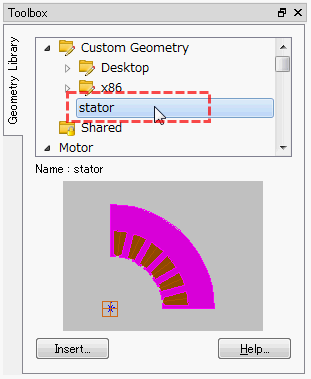
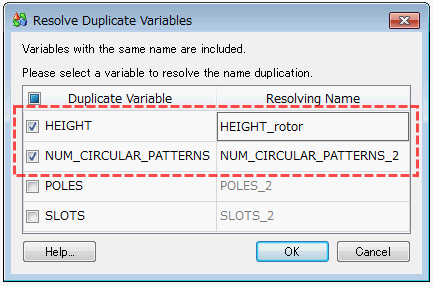
The renameVariant is set to eliminate duplicates of the same variable name when there is a variable of the same name in both the model data newly added from the geometry library and the assembly being edited.
Create a table (refarray) that defines "1: names of the duplicate variables, 2: new names for model data variables from the geometry library to eliminate duplication" and reference it from InsertGeometryLibrary.
If it is not necessary to eliminate duplicate variable names, omit renameVariant.
Examples are shown below. In this example, duplication of names is eliminated for two variables among the variables displayed in the [Resolve Duplicate Variables] dialog shown below.
| GeomDocument * GeomApplication::Load | ( | String & | filename | ) |
Imports 2D CAD data from specified file.
- Parameters
-
filename File path
The following file formats can be imported.
- JMAG Model Files (*.jmdl)
- ACIS Files (*.sat, *.sab)
- DXF Files (*.dxf)
- IGES Files (2D Entity) (*.iges, *.igs)
- CATIA V4 Files (*.model)
- CATIA V5 Files (*.CATPart, *.CATProduct)
- Creo Parametric (Pro/ENGINEER) Files (*.prt, *.asm, *.prt.*, *.asm.*)
- NX Files (*.prt)
- Parasolid Files (*.x_t, *.xmt_txt, *.x_b, *.xmt_bin)
- SOLIDWORKS Files (*.sldprt, *.sldasm)
- SolidEdge Files (*.par, *.asm, *.psm)
- Inventor Files (*.ipt, *.iam)
- STEP Files (*.stp, *.step)
- Nastran Files (*.nas, *.bdf)
- Universal Files (*.unv)
Use the Load() when importing 2D IGES files, and Load3DCad() when importing 3D IGES files.
| GeomDocument * GeomApplication::Load3DCad | ( | String & | filename | ) |
Imports 3D CAD data from specified file.
- Parameters
-
filename File path
The following file formats can be imported.
- JMAG Model Files (*.jmdl)
- ACIS Files (*.sat, *.sab)
- IGES Files (3D Solid)(*.iges, *.igs)
- CATIA V4 Files (*.model)
- CATIA V5 Files (*.CATPart, *.CATProduct)
- Creo Parametric (Pro/ENGINEER) Files (*.prt, *.asm, *.prt.*, *.asm.*)
- NX Files (*.prt)
- Parasolid Files (*.x_t, *.xmt_txt, *.x_b, *.xmt_bin)
- SOLIDWORKS Files (*.sldprt, *.sldasm)
- SolidEdge Files (*.par, *.asm, *.psm)
- Inventor Files (*.ipt, *.iam)
- STEP Files (*.stp, *.step)
Use the Load() when importing 2D IGES files, and Load3DCad() when importing 3D IGES files.
| GeomDocument * GeomApplication::Load3DCadWithOption | ( | String & | filename, |
| bool | useHealing, | ||
| bool | removeSheet | ||
| ) |
Imports 3D CAD data from specified file (specifies healing option and sheet body option).
- Parameters
-
filename useHealing True=1 : Run healing functionFalse=0 : Do not run healing functionremoveSheet True=1 : Do not delete sheet bodyFalse=0 : Delete sheet body
| int GeomApplication::MajorVersion | ( | ) |
Returns the major version number of Geometry Editor.
For example: if the version number of Geometry Editor is 1.2.5, '1' is returned.
- Returns
- Version number
| GeomDocument * GeomApplication::Merge | ( | String & | filename | ) |
Imports 2D CAD data from a specified file, to merge with the assembly which is being edited.
- Parameters
-
filename File path
The following file formats can be imported.
- JMAG Model Files (*.jmdl)
- ACIS Files (*.sat, *.sab)
- DXF Files (*.dxf)
- IGES Files (2D Entity) (*.iges, *.igs)
- CATIA V4 Files (*.model)
- CATIA V5 Files (*.CATPart, *.CATProduct)
- Creo Parametric (Pro/ENGINEER) Files (*.prt, *.asm, *.prt.*, *.asm.*)
- NX Files (*.prt)
- Parasolid Files (*.x_t, *.xmt_txt, *.x_b, *.xmt_bin)
- SOLIDWORKS Files (*.sldprt, *.sldasm)
- SolidEdge Files (*.par, *.asm, *.psm)
- Inventor Files (*.ipt, *.iam)
- STEP Files (*.stp, *.step)
- Nastran Files (*.nas, *.bdf)
- Universal Files (*.unv)
Use the Merge() when importing 2D IGES files, and Merge3DCad() when importing 3D IGES files.
| GeomDocument * GeomApplication::Merge3DCad | ( | String & | filename | ) |
Imports 3D CAD data from a specified file, to merge with the assembly which is being edited.
- Parameters
-
filename File path
The following file formats can be imported.
- JMAG Model Files (*.jmdl)
- ACIS Files (*.sat, *.sab)
- IGES Files (3D Solid)(*.iges, *.igs)
- CATIA V4 Files (*.model)
- CATIA V5 Files (*.CATPart, *.CATProduct)
- Creo Parametric (Pro/ENGINEER) Files (*.prt, *.asm, *.prt.*, *.asm.*)
- NX Files (*.prt)
- Parasolid Files (*.x_t, *.xmt_txt, *.x_b, *.xmt_bin)
- SOLIDWORKS Files (*.sldprt, *.sldasm)
- SolidEdge Files (*.par, *.asm, *.psm)
- Inventor Files (*.ipt, *.iam)
- STEP Files (*.stp, *.step)
Use the Merge() when importing 2D IGES files, and Merge3DCad() when importing 3D IGES files.
| GeomDocument * GeomApplication::Merge3DCadWithOption | ( | String & | filename, |
| bool | useHealing, | ||
| bool | removeSheet | ||
| ) |
Imports 3D CAD data from specified file to merge (specifies healing option and sheet body option).
- Parameters
-
filename useHealing True=1 : Run healing functionFalse=0 : Do not run healing functionremoveSheet True=1 : Do not delete sheet bodyFalse=0 : Delete sheet body
| GeomDocument * GeomApplication::MergeJmdl | ( | String & | filename, |
| Variant & | renameVariant = Variant() |
||
| ) |
Merges model data from the specified file into the assembly being edited.
- Parameters
-
filename File name renameVariant variable name resolution map (optional)
| int GeomApplication::MinorVersion | ( | ) |
Returns a minor version number of Geometry Editor.
For example: if the version number of Geometry Editor is 1.2.5, '2' is returned.
- Returns
- Version number
| GeomDocument * GeomApplication::NewDocument | ( | ) |
Creates a new geometry with Geometry Editor. This operation is the same when the [New] button is clicked.
- Returns
- GeomDocument object
| void GeomApplication::SaveCurrentAs | ( | String & | filename | ) |
Saves the current data.
- Parameters
-
filename File path
| void GeomApplication::SetBlockUpdate | ( | bool | block | ) |
Specifies whether or not to stop shape rebuild processing in Geometry Editor.
Geometry Editor becomes slower when complicated geometry with multiple shapes, such as vertices and lines, are created.
In this case, the shape rebuild processing can stop running if necessary.
- Parameters
-
block True=on : Stop rebuildingFalse=off : Start rebuilding
The rebuilding must be started after stop.
Please call SetBlockUpdate function to set False after creating the geometry.
| void GeomApplication::SetBlockViewUpdate | ( | bool | block | ) |
Specifies whether or not to stop updating the model view of Geometry Editor.
When set to True, the model shape displayed in the model view is not updated, but internally the geometry is rebuilt.
- Parameters
-
block True=on : Stop updating the model viewFalse=off : Start updating the model view
The updating the model view must be started after stop.
Please call SetBlockViewUpdate function to set False.
| void GeomApplication::SetFileSaveConfirmation | ( | bool | flag | ) |
Specifies whether or not to display or hide the dialog confirming whether or not to save a file after the Geometry Editor has ended.
- Parameters
-
flag True=on : Displays dialog confirming whether or not to save a fileFalse=off : Does not display dialog confirming whether or not to save a file
| void GeomApplication::SetVersion | ( | double | version | ) |
Specifies the version number of Geometry Editor.
- Parameters
-
version Version number
If the script that was created in an earlier version does not work, please set the version number of when created the script.
| int GeomApplication::SubVersion | ( | ) |
Returns the sub version number of Geometry Editor.
For example: if the version number of Geometry Editor is 1.2.5, '5' is returned.
- Returns
- Version number
| String GeomApplication::VersionString | ( | bool | includeSub | ) |
Returns the version number of Geometry Editor as a string.
- Parameters
-
includeSub True=1 : Includes the sub versionFalse=0 : Exclude the sub version
- Returns
- Version number
| GeomViewController * GeomApplication::View | ( | ) |
Returns the GeomViewController object.
- Returns
- GeomViewController object