ViewController class along with changing the pan, zoom, and orientation of the model display, this controls such things as the display status of analysis results.
It can be called from Application class.
.
More...
Public Member Functions | |
| int | ActiveSubWindowIndex () |
| Returns an index for the active window. More... | |
| bool | CaptureResultView (String &title, String &comment) |
| Captures the result view. More... | |
| void | CascadeSubWindows () |
| Cascades windows. | |
| void | ClearSelect () |
| Clears the selection of an object. | |
| void | CloseActiveSubWindow () |
| Closes the active window. | |
| void | CloseNotActiveSubWindows () |
| Closes all windows except for the active window. | |
| double | ContourMaxValue () |
| Returns the maximum value of contour displayed in the window. More... | |
| double | ContourMinValue () |
| Returns the minimum value of contour displayed in the window. More... | |
| int | CreateView (String &name) |
| Creates a viewpoint to add to the view list. More... | |
| void | DeleteView (String &name) |
| Deletes the viewpoint specified by the name from the view list. More... | |
| void | DeleteViewByIndex (int index) |
| Deletes the viewpoint specified by the index from the view list. More... | |
| void | ExportViewpoints (String &filename, String array &viewpoints) |
| Exports viewpoints to a file. More... | |
| void | Fit () |
| Fits the size of the model to the size of the window. | |
| bool | GetCompositeView () |
| Returns True as the return value if the composite result is displayed. More... | |
| bool | GetContourLabelView () |
| Returns True as the return value if a contour max position label is displayed. More... | |
| bool | GetContourView () |
| Returns True as the return value if a contour plot is displayed. More... | |
| int | GetCurrentCase () |
| Returns the current case ID. More... | |
| Selection * | GetCurrentSelection () |
| Returns the selection object for the current view. | |
| bool | GetCutPlanesOutLinesView () |
| Returns True as the return value when [Show Only Cut Faces] is enabled. More... | |
| bool | GetFluxLineView () |
| Returns True as the return value if a flux line plot is displayed. More... | |
| bool | GetModelCopyView () |
| Returns True as the return value if a model copy is displayed. More... | |
| bool | GetOnlyCutFacesView () |
| Returns True as the return value when [Show Model in Front/Behind Plane] is active. More... | |
| bool | GetOriginalModelView () |
| Returns True as the return value if a original model is displayed. More... | |
| double | GetPhase () |
| Returns the current phase as a real number. More... | |
| bool | GetScaledDisplacementView () |
| Returns True as the return value if the scale is applied to the result display. More... | |
| int | GetStep () |
| Returns the current step number as an integer. More... | |
| bool | GetVectorView () |
| Returns True as the return value if a vector plot is displayed. More... | |
| void | Hiddenline () |
| Switches to the hides lines display. | |
| void | HideAll () |
| Hides all regions. | |
| void | HideAllAirRegions () |
| Hides all air regions. | |
| void | HideAllShells () |
| Hides all shells. | |
| void | HideMorphing () |
| Hides morphing. | |
| void | ImportViewpoints (String &filename) |
| Imports viewpoints from files. More... | |
| void | Iso () |
| Displays an isometric view of the model. | |
| bool | IsSingleton () |
| Since this is an internal function, it is not officially supported. More... | |
| bool | IsValid () |
| Returns True if an object is valid. More... | |
| void | MaximizeActiveSubWindow () |
| Maximizes the active window. | |
| void | NewSubWindow () |
| Duplicates the active window and a new window is opened. | |
| int | NumSubWindows () |
| Returns the number of open windows. | |
| void | Pan (double deltax, double deltay) |
| Controls the panning of a camera. More... | |
| void | Roll (double degree) |
| Rotates the viewpoint of the model on the fixed plane. More... | |
| void | Rotate (double degree_x, double degree_y) |
| Rotates the viewpoint by the specified angle. More... | |
| void | RotateTo (double degree_x, double degree_y, double degree_z) |
| Controls the rotation of a camera. More... | |
| void | SelectByCirclePixelPos (int x1, int y1, int x2, int y2, int type) |
| Uses the pixel coordinate system to make a circular selection. More... | |
| void | SelectByCircleWorldPos (double x1, double y1, double z1, double x2, double y2, double z2, int type) |
| Uses the world coordinate system to make a circular selection. More... | |
| void | SelectByCylinder (Cylinder *cylinder, bool visible) |
| Selects object included in an area by specifying an area in a circle or cylinder. More... | |
| void | SelectByID (int index) |
| Selects object by specifying an ID. More... | |
| void | SelectByPolylinePixelPos (String array &pos, int type) |
| Uses the pixel coordinate system to make a polygonal selection. More... | |
| void | SelectByPolylineWorldPos (String array &pos, int type) |
| Uses geometry obtained from converting a polyhedron in a world coordinate system to a pixel coordinate system to select a range. More... | |
| void | SelectByPosition (double x, double y, double z, bool visible) |
| Selects object in position by specifying coordinates. More... | |
| void | SelectByRange (Point *lower, Point *upper, bool visible) |
| Selects object included in an area by specifying a rectangle or parallelepiped. More... | |
| void | SelectByRectanglePixelPos (int x1, int y1, int x2, int y2, int type) |
| Uses the pixel coordinate system to make a rectangular selection. More... | |
| void | SelectByRectangleWorldPos (double x1, double y1, double z1, double x2, double y2, double z2, int type) |
| Uses geometry obtained from converting a cuboid in a world coordinate system to a pixel coordinate system to select a range. More... | |
| void | SelectEdge () |
| Switches to the edge selection mode. | |
| void | SelectElement () |
| Switches to the element selection mode. | |
| void | SelectElementEdge () |
| Switches to the element edge selection mode. | |
| void | SelectElementFace () |
| Switches to the element face selection mode. | |
| void | SelectElementVertex () |
| Switches to the node selection mode. | |
| void | SelectFace () |
| Switches to the face selection mode. | |
| void | SelectPart () |
| Switches to the the part selection mode. | |
| void | SelectPixelPos (int x, int y, int type) |
| Selects object in position by specifying pixel coordinates. More... | |
| void | SelectVertex () |
| Switches to the vertex selection mode. | |
| void | SelectWorldPos (double x, double y, double z, int type) |
| Selects object in position by specifying world coordinates. More... | |
| void | SetActiveSubWindow (int index) |
| Switches another window to active. More... | |
| void | SetActiveSubWindowSize (int width, int height) |
| Specifies window size. More... | |
| void | SetAllView (String &name) |
| Changes the view of all windows by selecting the viewpoint from the view list. More... | |
| void | SetAllViewByIndex (int index) |
| Changes the view of all windows by specifying view with index in the view list. More... | |
| void | SetCamera (double pos_x, double pos_y, double pos_z, double tar_x, double tar_y, double tar_z, double up_x, double up_y, double up_z, double width, double height) |
| Specifies the camera position. More... | |
| void | SetCompositeView (bool flag) |
| Specifies the flag for displaying the composite result. More... | |
| void | SetContourLabelView (bool flag) |
| Specifies the flag for displaying a contour max position label. More... | |
| void | SetContourView (bool flag) |
| Specifies the flag for displaying a contour plot. More... | |
| void | SetCurrentCase (int currentCase) |
| Specifies the current case ID. More... | |
| void | SetCutPlanesOutLinesView (bool flag) |
| Specifies a flag for enabling [Show Cut Plane Outlines]. More... | |
| void | SetExtendedSelection (bool flag) |
| Switches to the surface selection mode. More... | |
| void | SetFluxLineView (bool flag) |
| Specifies the flag for displaying a flux line plot. More... | |
| void | SetModelCopyView (bool flag) |
| Specifies the flag for displaying a model copy. More... | |
| void | SetOnlyCutFacesView (bool flag) |
| Specifies a flag to set [Show Model in Front/Behind Plane] as active. More... | |
| void | SetOriginalModelView (bool flag) |
| Specifies a flag for displaying the original model. More... | |
| void | SetPhase (double phase) |
| Specifies the current phase. More... | |
| void | SetScaledDisplacementView (bool flag) |
| Specifies a flag for applying the scale to the result display. More... | |
| void | SetSightThrough (bool flag) |
| Switches to the sight through mode. More... | |
| void | SetStep (int step) |
| Specifies the current step number. More... | |
| void | SetVectorView (bool flag) |
| Specifies the flag for displaying a vector plot. More... | |
| void | SetVertexVisibility (bool flag) |
| Displays or hides a vertex. More... | |
| void | SetView (String &name) |
| Changes the view by specifying the viewpoint from the view list. More... | |
| void | SetViewByIndex (int index) |
| Changes the view by specifying the index in the view list. More... | |
| void | Shaded () |
| Switches to the shading display. | |
| void | ShowAll () |
| Shows all regions. | |
| void | ShowAllAirRegions () |
| Shows all air regions. | |
| void | ShowAllShells () |
| Displays all shells. More... | |
| void | ShowMesh () |
| Displays the mesh model. | |
| void | ShowMeshGeometry () |
| Displays the mesh model outline. | |
| void | ShowModel () |
| Displays a solid/region model. | |
| void | ShowMorphing () |
| Displays morphing. | |
| void | TileSubWindows () |
| Displays windows side by side. | |
| void | UpdateView () |
| Redraws the graphics window. More... | |
| double | VectorMaxValue () |
| Returns the maximum value of vector displayed in the window. More... | |
| double | VectorMinValue () |
| Returns the minimum value of vector displayed in the window. More... | |
| void | Wireframe () |
| Switches to the wireframe display. | |
| void | Xy () |
| Rotates the model to display the XY plane. | |
| void | Xz () |
| Rotates the model to display the XZ plane. | |
| void | Yx () |
| Rotates the model to display the YZ plane. | |
| void | Yz () |
| Rotates the model to display the YX plane. | |
| void | Zoom (double zoomfactor) |
| Controls the zoom of a camera. More... | |
| void | Zx () |
| Rotates the model to display the ZX plane. | |
| void | Zy () |
| Rotates the model to display the ZY plane. | |
Detailed Description
ViewController class along with changing the pan, zoom, and orientation of the model display, this controls such things as the display status of analysis results.
It can be called from Application class.
.
Example of calling the class object:
The following coordinate system is used to explain some of the commands
- Pixel coordinate system:
Coordinate system for displaying a 2D plane. The position is expressed by a pixel. The upper-left corner of the display is specified as the point of origin (0,0), the right-side is defined as the X-axis, and the downward direction is defined as the Y-axis.
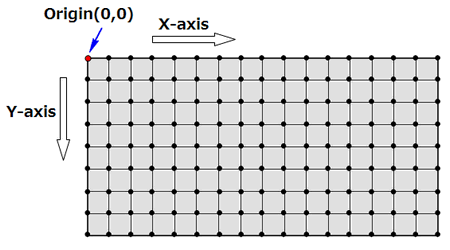
- World Coordinate System:
Coordinate system of the 3D space shown in the display. This has the same origin point and axis definition (X-axis, Y-axis, Z-axis) as all of the coordinate systems in JMAG-Designer.
Member Function Documentation
| int ViewController::ActiveSubWindowIndex | ( | ) |
Returns an index for the active window.
- Returns
- Index for active window
| bool ViewController::CaptureResultView | ( | String & | title, |
| String & | comment | ||
| ) |
Captures the result view.
- Parameters
-
title Title comment Comment
| double ViewController::ContourMaxValue | ( | ) |
Returns the maximum value of contour displayed in the window.
- Returns
- Maximum value of contour
| double ViewController::ContourMinValue | ( | ) |
Returns the minimum value of contour displayed in the window.
- Returns
- Minimum value of contour
| int ViewController::CreateView | ( | String & | name | ) |
Creates a viewpoint to add to the view list.
- Parameters
-
name Name of the view point
| void ViewController::DeleteView | ( | String & | name | ) |
Deletes the viewpoint specified by the name from the view list.
- Parameters
-
name Name of the view point
| void ViewController::DeleteViewByIndex | ( | int | index | ) |
Deletes the viewpoint specified by the index from the view list.
- Parameters
-
index Viewpoint index
| void ViewController::ExportViewpoints | ( | String & | filename, |
| String array & | viewpoints | ||
| ) |
Exports viewpoints to a file.
- Parameters
-
filename File path viewpoints List of viewpoint names for exporting
| bool ViewController::GetCompositeView | ( | ) |
Returns True as the return value if the composite result is displayed.
- Returns
- Whether or not the composite result is displayed
| bool ViewController::GetContourLabelView | ( | ) |
Returns True as the return value if a contour max position label is displayed.
- Returns
- Whether or not a contour max position label is displayed
| bool ViewController::GetContourView | ( | ) |
Returns True as the return value if a contour plot is displayed.
- Returns
- Whether or not a contour plot is displayed
| int ViewController::GetCurrentCase | ( | ) |
Returns the current case ID.
- Returns
- Current case ID
The currentCase is numbered from 1.
| bool ViewController::GetCutPlanesOutLinesView | ( | ) |
Returns True as the return value when [Show Only Cut Faces] is enabled.
- Returns
- [Show Cut Plane Outlines] is enabled or disabled
| bool ViewController::GetFluxLineView | ( | ) |
Returns True as the return value if a flux line plot is displayed.
- Returns
- Whether or not a flux line plot is displayed
| bool ViewController::GetModelCopyView | ( | ) |
Returns True as the return value if a model copy is displayed.
- Returns
- Whether or not a copy of the model is displayed
| bool ViewController::GetOnlyCutFacesView | ( | ) |
Returns True as the return value when [Show Model in Front/Behind Plane] is active.
- Returns
- Whether or not [Show Model in Front/Behind Plane] is active
| bool ViewController::GetOriginalModelView | ( | ) |
Returns True as the return value if a original model is displayed.
- Returns
- Whether or not a original model is displayed
| double ViewController::GetPhase | ( | ) |
Returns the current phase as a real number.
- Returns
- Current phase
| bool ViewController::GetScaledDisplacementView | ( | ) |
Returns True as the return value if the scale is applied to the result display.
- Returns
- Whether or not a scaling factor is applied
| int ViewController::GetStep | ( | ) |
Returns the current step number as an integer.
- Returns
- Current step number
| bool ViewController::GetVectorView | ( | ) |
Returns True as the return value if a vector plot is displayed.
- Returns
- Whether or not a vector plot is displayed
| void ViewController::ImportViewpoints | ( | String & | filename | ) |
Imports viewpoints from files.
- Parameters
-
filename File path
| bool ViewController::IsSingleton | ( | ) |
Since this is an internal function, it is not officially supported.
| bool ViewController::IsValid | ( | ) |
Returns True if an object is valid.
- Returns
- Whether or not the ViewController object is valid
| void ViewController::Pan | ( | double | deltax, |
| double | deltay | ||
| ) |
Controls the panning of a camera.
- Parameters
-
deltax Horizontal displacement deltay Vertical displacement
| void ViewController::Roll | ( | double | degree | ) |
Rotates the viewpoint of the model on the fixed plane.
- Parameters
-
degree Angle
| void ViewController::Rotate | ( | double | degree_x, |
| double | degree_y | ||
| ) |
Rotates the viewpoint by the specified angle.
- Parameters
-
degree_x Angle from the X-axis degree_y Angle from the Y-axis
| void ViewController::RotateTo | ( | double | degree_x, |
| double | degree_y, | ||
| double | degree_z | ||
| ) |
Controls the rotation of a camera.
- Parameters
-
degree_x X angle degree_y Y angle degree_z Z angle
| void ViewController::SelectByCirclePixelPos | ( | int | x1, |
| int | y1, | ||
| int | x2, | ||
| int | y2, | ||
| int | type | ||
| ) |
Uses the pixel coordinate system to make a circular selection.
- Parameters
-
x1 First point of the circle (center of the circle) - X-axis y1 First point of the circle (center of the circle) - Y-axis x2 Second point of the circle (a point on the circumference) - X-axis y2 Second point of the circle (a point on the circumference) - Y-axis type 0x01:Shift0x02:Control0x03:Shift&Control
The JMAG-Designer window must be dislayed prior to using these commands.
These are keyboard commands.
- Add to the selection by making a selection while holding down the Shift key.
- Deselect an area by clicking the area while holding down the Ctrl key.
- Holding down the Shift and Ctrl keys is the same as only holding down the Ctrl key.
| void ViewController::SelectByCircleWorldPos | ( | double | x1, |
| double | y1, | ||
| double | z1, | ||
| double | x2, | ||
| double | y2, | ||
| double | z2, | ||
| int | type | ||
| ) |
Uses the world coordinate system to make a circular selection.
- Parameters
-
x1 First point of the circle (center of the circle) - X-axis y1 First point of the circle (center of the circle) - Y-axis z1 First point of the sphere (center of the sphere) - Z-axis x2 Second point of the circle (a point on the circumference) - X-axis y2 Second point of the circle (a point on the circumference) - Y-axis z2 Second point of the sphere (a point on the spherical surface) - Z-axis type 0x01:Shift0x02:Control0x03:Shift&Control
The JMAG-Designer window must be dislayed prior to using these commands.
These are keyboard commands.
- Add to the selection by making a selection while holding down the Shift key.
- Deselect an area by clicking the area while holding down the Ctrl key.
- Holding down the Shift and Ctrl keys is the same as only holding down the Ctrl key.
| void ViewController::SelectByCylinder | ( | Cylinder * | cylinder, |
| bool | visible | ||
| ) |
Selects object included in an area by specifying an area in a circle or cylinder.
- Parameters
-
cylinder Definition for cylinder area visible 0 : Selects hidden targets1 : Selects only visible targets
| void ViewController::SelectByID | ( | int | index | ) |
Selects object by specifying an ID.
- Parameters
-
index ID
| void ViewController::SelectByPolylinePixelPos | ( | String array & | pos, |
| int | type | ||
| ) |
Uses the pixel coordinate system to make a polygonal selection.
- Parameters
-
pos Polygonal vertex coordinate (x,y) table (2 row arrangement) type 0x01:Shift0x02:Control0x03:Shift&Control
The JMAG-Designer window must be dislayed prior to using these commands.
These are keyboard commands.
- Add to the selection by making a selection while holding down the Shift key.
- Deselect an area by clicking the area while holding down the Ctrl key.
- Holding down the Shift and Ctrl keys is the same as only holding down the Ctrl key.
| void ViewController::SelectByPolylineWorldPos | ( | String array & | pos, |
| int | type | ||
| ) |
Uses geometry obtained from converting a polyhedron in a world coordinate system to a pixel coordinate system to select a range.
- Parameters
-
pos type 0x01:Shift0x02:Control0x03:Shift&Control
The JMAG-Designer window must be dislayed prior to using these commands.
These are keyboard commands.
- Add to the selection by making a selection while holding down the Shift key.
- Deselect an area by clicking the area while holding down the Ctrl key.
- Holding down the Shift and Ctrl keys is the same as only holding down the Ctrl key.
| void ViewController::SelectByPosition | ( | double | x, |
| double | y, | ||
| double | z, | ||
| bool | visible | ||
| ) |
Selects object in position by specifying coordinates.
- Parameters
-
x X-coordinate y Y-coordinate z Z-coordinate visible 0 : Selects hidden targets1 : Selects only visible targets
Selects object included in an area by specifying a rectangle or parallelepiped.
- Parameters
-
lower Point sequence coordinate of first point (x, y, z) upper Point sequence coordinate of second point (x, y, z) visible 0 : Selects hidden targets1 : Selects only visible targets
| void ViewController::SelectByRectanglePixelPos | ( | int | x1, |
| int | y1, | ||
| int | x2, | ||
| int | y2, | ||
| int | type | ||
| ) |
Uses the pixel coordinate system to make a rectangular selection.
- Parameters
-
x1 First point of the rectangular selection - X-coordinate y1 First point of the rectangular selection - Y-coordinate x2 Second point of rectangular selection (The diagonal line of the first point) - X-coordinate y2 Second point of rectangular selection (The diagonal line of the first point) - Y-coordinate type 0x01:Shift0x02:Control0x03:Shift&Control
The JMAG-Designer window must be dislayed prior to using these commands.
These are keyboard commands.
- Add to the selection by making a selection while holding down the Shift key.
- Deselect an area by clicking the area while holding down the Ctrl key.
- Holding down the Shift and Ctrl keys is the same as only holding down the Ctrl key.
| void ViewController::SelectByRectangleWorldPos | ( | double | x1, |
| double | y1, | ||
| double | z1, | ||
| double | x2, | ||
| double | y2, | ||
| double | z2, | ||
| int | type | ||
| ) |
Uses geometry obtained from converting a cuboid in a world coordinate system to a pixel coordinate system to select a range.
- Parameters
-
x1 First point of the cuboid - X-coordinate y1 First point of the cuboid - Y-coordinate z1 First point of the cuboid - Z-coordinate y2 Second point of the cuboid - y-coordinate x2 Second point of the cuboid - X-coordinate z2 Second point of the cuboid - Z-coordinate type 0x01:Shift0x02:Control0x03:Shift&Control
The JMAG-Designer window must be dislayed prior to using these commands.
These are keyboard commands.
- Add to the selection by making a selection while holding down the Shift key.
- Deselect an area by clicking the area while holding down the Ctrl key.
- Holding down the Shift and Ctrl keys is the same as only holding down the Ctrl key.
| void ViewController::SelectPixelPos | ( | int | x, |
| int | y, | ||
| int | type | ||
| ) |
Selects object in position by specifying pixel coordinates.
- Parameters
-
x X-coordinate of selection y Y-coordinate of selection z Z-coordinate of selection type 0x01:Shift0x02:Control0x03:Shift&Control
The JMAG-Designer window must be dislayed prior to using these commands.
These are keyboard commands.
- Add to the selection by making a selection while holding down the Shift key.
- Deselect an area by clicking the area while holding down the Ctrl key.
- Holding down the Shift and Ctrl keys is the same as only holding down the Ctrl key.
| void ViewController::SelectWorldPos | ( | double | x, |
| double | y, | ||
| double | z, | ||
| int | type | ||
| ) |
Selects object in position by specifying world coordinates.
- Parameters
-
x X-coordinate of selection y Y-coordinate of selection z Z-coordinate of selection type 0x01:Shift0x02:Control0x03:Shift&Control
The JMAG-Designer window must be dislayed prior to using these commands.
These are keyboard commands.
- Add to the selection by making a selection while holding down the Shift key.
- Deselect an area by clicking the area while holding down the Ctrl key.
- Holding down the Shift and Ctrl keys is the same as only holding down the Ctrl key.
| void ViewController::SetActiveSubWindow | ( | int | index | ) |
Switches another window to active.
- Parameters
-
index Index for the created window (in order of old to new windows)
| void ViewController::SetActiveSubWindowSize | ( | int | width, |
| int | height | ||
| ) |
Specifies window size.
- Parameters
-
width Window width height Window height
| void ViewController::SetAllView | ( | String & | name | ) |
Changes the view of all windows by selecting the viewpoint from the view list.
- Parameters
-
name Name of the viewpoint
| void ViewController::SetAllViewByIndex | ( | int | index | ) |
Changes the view of all windows by specifying view with index in the view list.
- Parameters
-
index Viewpoint index
| void ViewController::SetCamera | ( | double | pos_x, |
| double | pos_y, | ||
| double | pos_z, | ||
| double | tar_x, | ||
| double | tar_y, | ||
| double | tar_z, | ||
| double | up_x, | ||
| double | up_y, | ||
| double | up_z, | ||
| double | width, | ||
| double | height | ||
| ) |
Specifies the camera position.
- Parameters
-
pos_x Camera position - X-coordinate pos_y Camera position - Y-coordinate pos_z Camera position - Z-coordinate tar_x Image capture - X-coordinate tar_y Image capture - Y-coordinate tar_z Image capture - Z-coordinate up_x Upper direction of image capture - X-component up_y Upper direction of image capture - Y-component up_z Upper direction of image capture - Z-component width Image capture width height Image capture height
| void ViewController::SetCompositeView | ( | bool | flag | ) |
Specifies the flag for displaying the composite result.
- Parameters
-
flag True=1 : Displays composite resultFalse=0 : Hides the composite result
| void ViewController::SetContourLabelView | ( | bool | flag | ) |
Specifies the flag for displaying a contour max position label.
- Parameters
-
flag True=1 : Displays a labelFalse=0 : Hides a label
| void ViewController::SetContourView | ( | bool | flag | ) |
Specifies the flag for displaying a contour plot.
- Parameters
-
flag True=1 : Displays a contour plotFalse=0 : Hides a contour plot
| void ViewController::SetCurrentCase | ( | int | currentCase | ) |
Specifies the current case ID.
- Parameters
-
currentCase Current case ID
The currentCase is numbered from 1.
| void ViewController::SetCutPlanesOutLinesView | ( | bool | flag | ) |
Specifies a flag for enabling [Show Cut Plane Outlines].
- Parameters
-
flag True=1 : Displays cut geometry outlineFalse=0 : Hides cut geometry outline
| void ViewController::SetExtendedSelection | ( | bool | flag | ) |
Switches to the surface selection mode.
- Parameters
-
flag True=1 : Starts surface selection modeFalse=0 : Exits surface selection mode
| void ViewController::SetFluxLineView | ( | bool | flag | ) |
Specifies the flag for displaying a flux line plot.
- Parameters
-
flag True=1 : Displays flux linesFalse=0 : Hides flux lines
| void ViewController::SetModelCopyView | ( | bool | flag | ) |
Specifies the flag for displaying a model copy.
- Parameters
-
flag True=1 : Displays a model copyFalse=0 : Hides a model copy
| void ViewController::SetOnlyCutFacesView | ( | bool | flag | ) |
| void ViewController::SetOriginalModelView | ( | bool | flag | ) |
Specifies a flag for displaying the original model.
- Returns
- flag True=1 : Display the original modelFalse=0 : Hides the original model
| void ViewController::SetPhase | ( | double | phase | ) |
Specifies the current phase.
- Parameters
-
phase Phase
| void ViewController::SetScaledDisplacementView | ( | bool | flag | ) |
Specifies a flag for applying the scale to the result display.
- Parameters
-
flag True=1 : Applies the scaling factorFalse=0 : Does not apply the scaling factor
| void ViewController::SetSightThrough | ( | bool | flag | ) |
Switches to the sight through mode.
- Parameters
-
flag True=1 : Starts sight through modeFalse=0 : Exits sight through mode
| void ViewController::SetStep | ( | int | step | ) |
Specifies the current step number.
- Parameters
-
step Step number
| void ViewController::SetVectorView | ( | bool | flag | ) |
Specifies the flag for displaying a vector plot.
- Parameters
-
flag True=1 : Displays a vector plotFalse=0 : Hides a vector plot
| void ViewController::SetVertexVisibility | ( | bool | flag | ) |
Displays or hides a vertex.
- Parameters
-
flag True=1 : Highlights verticesFalse=0 : Does not highlight vertices
| void ViewController::SetView | ( | String & | name | ) |
Changes the view by specifying the viewpoint from the view list.
- Parameters
-
name Name of the viewpoint
| void ViewController::SetViewByIndex | ( | int | index | ) |
Changes the view by specifying the index in the view list.
- Parameters
-
index Viewpoint index
| void ViewController::ShowAllShells | ( | ) |
Displays all shells.
Shows all beams for 2D models.
| void ViewController::UpdateView | ( | ) |
Redraws the graphics window.
Changes are not reflected in the graphics window until a script with a step or a phase is modified and all process for scripts have ended.
The model in the graphics window is redrawn immediately when running this command.
| double ViewController::VectorMaxValue | ( | ) |
Returns the maximum value of vector displayed in the window.
- Returns
- Maximum value of vector
| double ViewController::VectorMinValue | ( | ) |
Returns the minimum value of vector displayed in the window.
- Returns
- Minimum value of vector
| void ViewController::Zoom | ( | double | zoomfactor | ) |
Controls the zoom of a camera.
- Parameters
-
zoomfactor Magnification