


New JMAG Ver.25.1 Out Now
We are pleased to announce the release of JMAG-Designer Ver.25.1 in June 2026.
JMAG continues to advance development toward the automation of design. To this end, Ver.25.1 brings further functionality enhancements in the areas of Fast Global Exploration, Multi-disciplinary Evaluation, Open to Designers (JMAG-Express), System Integration, High-speed Calculation, and Materials.
Here, we introduce some of the functional improvements and new features in Ver.25.1.
Key Highlights of Ver.25.1
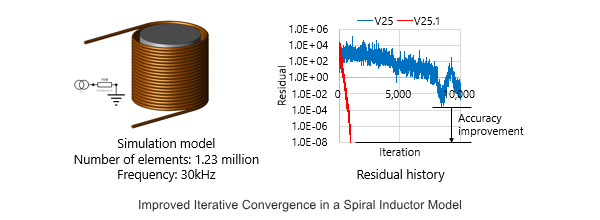
Reduction of simulation time when using FEM conductor
The convergence of ICCG in 3D analysis using FEM conductors has been significantly improved. Calculations that previously failed to converge, such as detailed modeling of wires, can now be solved within a practical timeframe.
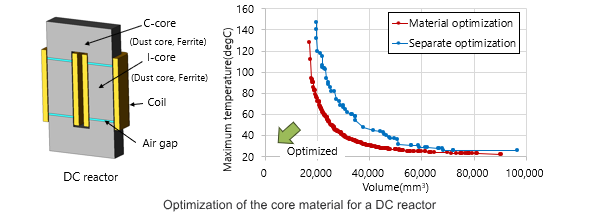
Expanding the Scope of Multi-disciplinary Optimization
Version 25.1 further accelerates optimization using surrogate models. The newly added random sampling function efficiently generates the required number of samples while evaluating the validity of the generated geometries. This allows users to prepare training data for surrogate models without concern for geometry validity. Online optimization now reduces calculation time by 30% compared to Version 25.0 through enhanced processing and the introduction of an automatic method for determining the number of surrogate model generations. In addition, multi-disciplinary optimization supports optimization for analysis groups with different model geometries in magnetic field, structural, electric field, and thermal analyses, avoiding geometry failures while accelerating convergence.
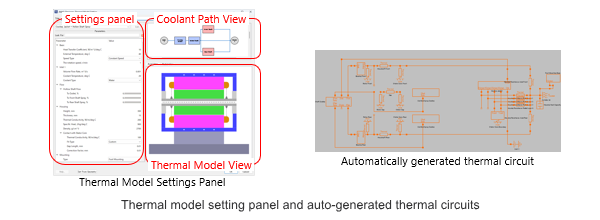
Thermal Analysis View for Motors
The new thermal model setting panel consists of a setting panel, coolant path view, and thermal model view, enabling users to model cooling mechanisms while visually checking them. The custom function in the coolant path editor covers a wide variety of cooling mechanisms.
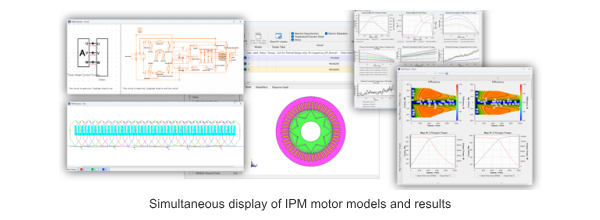
Updates to JMAG-Express, a Tool for Motor Design
With multi-window display, users can view the model, circuit, winding specifications, and results at a glance. In the graph window, users can customize graphs to match their evaluation style..
System Integration
In System Integration, by reducing and asynchronously processing file I/O during RTT file generation in JMAG-RT, the generation time for a six-phase PMSM model has been shortened by approximately 20%, while the instantaneous maximum disk usage during generation has been reduced by half.
Materials
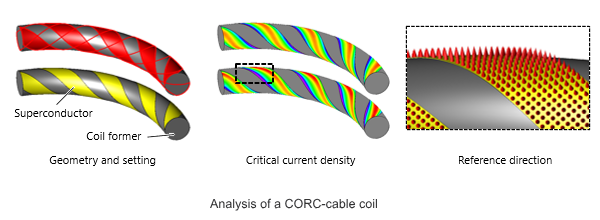
In the area of Materials, the anisotropy of high-temperature superconductors can now be defined directly from surface geometry. Even for complex helical geometries such as CORC cable coils, the anisotropic direction of the critical current density can be accurately defined simply by selecting the wire surface, enabling analysis that more faithfully represents actual phenomena.
For a comprehensive list of features and technical details, please visit our official release page:
- Learning How to Use JMAG
Are you interested in JMAG, but don’t know where to start? Want to find out more?
"Learning how to use JMAG" is an introductory guide that will take you through a step-by-step process on how to start and use JMAG for the first time.

