
JMAG-Designer Ver.25.1 was released in June 2026.
JMAG continues to advance development toward the automation of design. To this end, Ver.25.1 brings further functionality enhancements in the areas of Fast Global Exploration, Multi-disciplinary Evaluation, Open to Designers (JMAG-Express), System Integration, High-speed Calculation, and Materials.
Here, we introduce some of the functional improvements and new features in Ver.25.1.
In Fast Global Exploration, optimization calculations assisted by surrogate models have been further accelerated. The newly added random sample generation function efficiently generates the required number of samples while checking shape validity, allowing users to prepare training data for surrogate models without worrying about whether the model geometry is valid. Online optimization with the surrogate model has been improved through enhanced processing and the introduction of an automatic method for determining the number of generations executed by the surrogate model, reducing calculation time by 30% compared with Ver.25.0. Multi-disciplinary optimization now supports optimization for analysis groups with different model geometries in magnetic field, structural, electric field, and thermal analyses, avoiding geometry failures while accelerating convergence. In addition, material discrete optimization is now available for analysis groups, reducing the number of calculation cases compared with performing individual optimization for each material by optimizing both material and dimensions simultaneously. In JMAG Design Explorer, clustering and parallel coordinate plot analysis are now available, enabling intuitive understanding of the relationships between design variables and objective functions from large numbers of designs obtained through optimization calculations.
In Multi-disciplinary Evaluation, the functions for motor thermal design have been significantly enhanced. The new thermal model setting panel consists of a setting panel, coolant path view, and thermal model view, enabling users to model cooling mechanisms while visually checking them. The custom function in the coolant path editor covers a wide variety of cooling mechanisms.
JMAG-Express, which enables motor design and evaluation, has also seen further improvements in usability. With multi-window display, users can view the model, circuit, winding specifications, and results at a glance. In the graph window, users can customize graphs to match their evaluation style, such as extracting a maximum torque-current graph from current-torque graphs for each current phase.
In System Integration, by reducing and asynchronously processing file I/O during RTT file generation in JMAG-RT, the generation time for a six-phase PMSM model has been shortened by approximately 20%, while the instantaneous maximum disk usage during generation has been reduced by half.
For detailed design phase, the convergence of ICCG solving in 3D analysis using FEM conductors has been significantly improved. As a result, calculations that previously could not be solved due to lack of convergence, such as detailed modeling of wires, can now be solved within a practical timeframe.
In the area of Materials, the anisotropy of high-temperature superconductors can now be defined directly from surface geometry. Even for complex helical geometries such as CORC cable coils, the anisotropic direction of the critical current density can be accurately defined simply by selecting the wire surface, enabling analysis that more faithfully represents actual phenomena.
Many other functional improvements and new features have also been added, including rerunning error cases, HTML help, and Chinese GUI support for JMAG-Express. We encourage you to make full use of the new JMAG.
What is JMAG-Designer Ver.25.1 ?
INDEX
- Reduction of simulation time when using FEM conductor
- Thermal Analysis View for Motors
- Speed-up of Online Optimization with Surrogate Model
- Support Creation of Training Data for Surrogate Models
- Expanding the Scope of Multi-disciplinary Optimization
- Data Analysis in JMAG Design Explorer
- Updates to JMAG-Express, a Tool for Motor Design
- Improvement of Anisotropy Definition in Superconductors
1. Reduction of simulation time when using FEM conductor
Improving solver convergence when using FEM conductor in 3D simulation
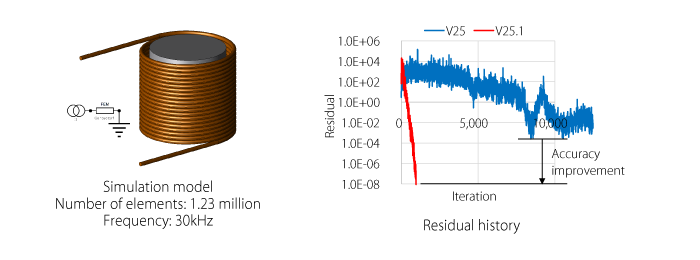 Improved Iterative Convergence in a Spiral Inductor Model
This example demonstrates the recovery of poor convergence behavior in ICCG solver that occurred in a 3D model using FEM conductors. Even analyses that failed to converge with conventional methods now converge in a small number of iterations. This method is effective for both frequency response and transient response analyses.
2. Thermal Analysis View for Motors
Modeling cooling while visually checking the configuration
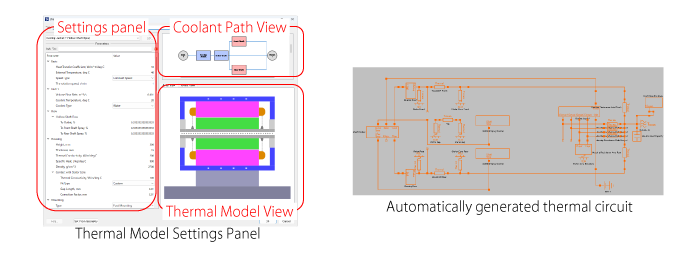 Thermal model setting panel and auto-generated thermal circuits
The thermal model setting panel consists of a setting panel, a cooling path view, and a thermal model view. The contents of the setting panel are reflected in the cooling path view and thermal model view, and conditions and thermal circuits are automatically generated.
Custom features support various coolant systems
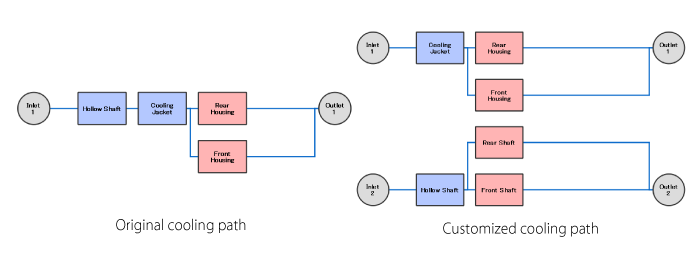 Customizing the Coolant Path
The original coolant path has a single inlet that flows through the cooling jacket after shaft cooling and leads to the housing spray. In the updated coolant path, the inlet is separated, and it flows to the outlet after housing spray and shaft spray.
3. Speed-up of Online Optimization with Surrogate Model
Reducing the computation time of online optimization with surrogate model
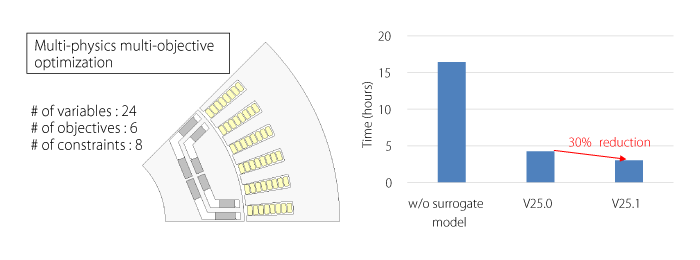 Reduction in time required to achieve Pareto-front with same-level quality
Online optimization reaches Pareto front with same-level quality in less time than optimization without surrogate model. In Ver.25.1, the process of online optimization was improved, further reducing time compared to Ver.25.0. In addition, a method for automatically determining the number of surrogate model generations is introduced.
4. Support Creation of Training Data for Surrogate Models
Generate samples (training data) of the required size without worrying about validity of the model geometry
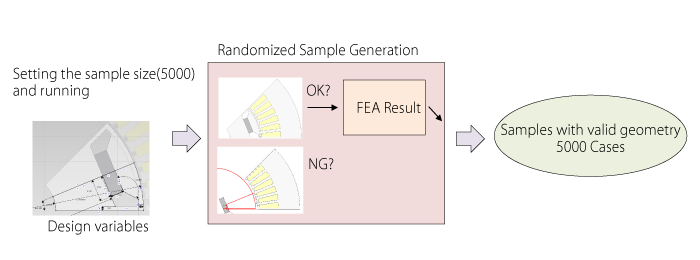 Random sampling considering geometry verification
In conventional sample generation using the case addition function, it was difficult to obtain samples of the required size because the created cases included invalid geometry. The randomized sample generation function generates samples of the required size while performing geometry verification.
5. Expanding the Scope of Multi-disciplinary Optimization
Supports optimization calculations with different model geometries for magnetic field, structural, electric field, and thermal analyses…
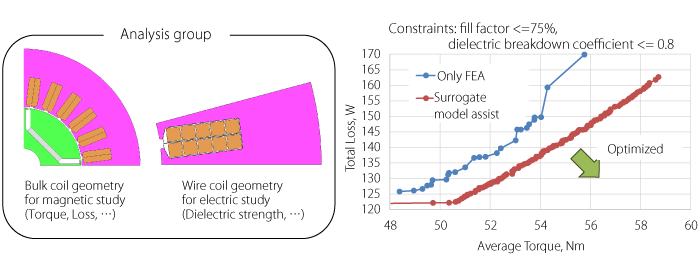 Optimization using the surrogate model for the magnetic and electric study group
By checking feasible geometries of both the magnetic and electric studies using the surrogate model, more feasible solutions have been found.
Material optimization with multi-physics analyses
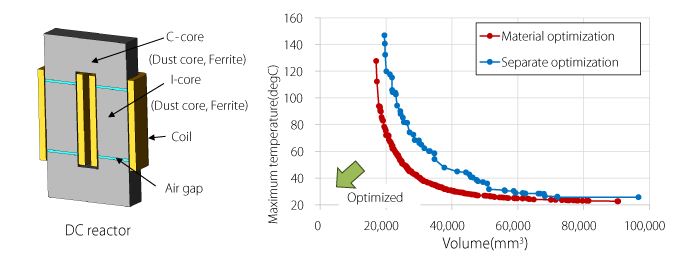 Optimization of the core material for a DC reactor
The core material and geometry were optimized while simultaneously evaluating inductance and temperature. This achieved a better design than conducting shape optimization for each material separately, without increasing the computational cost.
6. Data Analysis in JMAG Design Explorer
Efficient analysis of massive parametric and optimization results
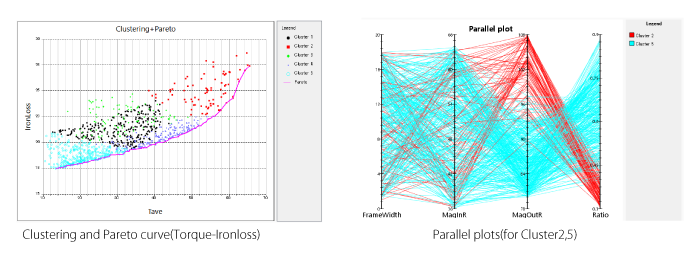 Analysis using clustering and parallel coordinates plot
The left figure shows the clustering results and the Pareto curve. The right figure displays each cluster using a parallel coordinates plot. For example, comparing Cluster 2 (red), which has high torque and high iron loss, with Cluster 5 (light blue), which has low torque and low iron loss, it can be seen that the design variables “MagOutR” and “Ratio” exhibit an inverse correlation.
7. Updates to JMAG-Express, a Tool for Motor Design
Check models and results at a glance with multi-window display
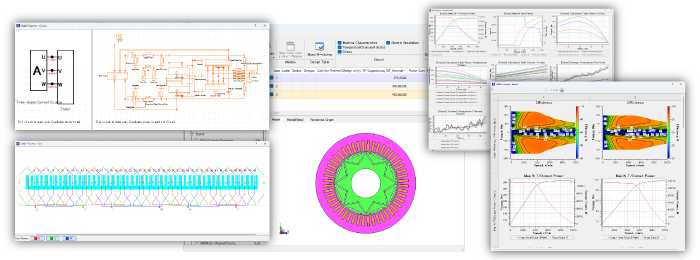 Simultaneous display of IPM motor models and results
The model shape is opened in the main window, circuit, winding specification, and results are arranged in a separate window
Output plots tailored to the designer’s preferred evaluation style
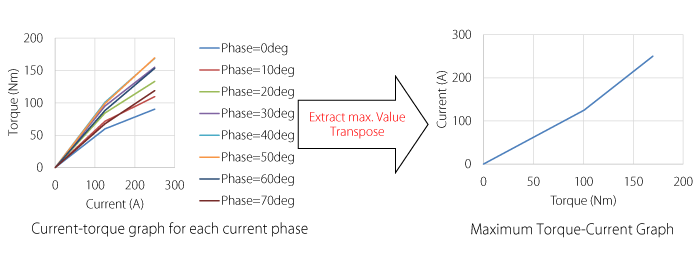 Evaluation of motor characteristics using maximum torque‐current graphs
From the current-torque graph for each current phase, only the maximum torque for each current is extracted. By transposing the X and Y axes, the maximum torque-current graph is drawn. By expressing the characteristics of the motor in a single line, it can be expected to improve visibility when comparing models.
8. Improvement of Anisotropy Definition in Superconductors
Define high-temperature superconductivity anisotropy directly from surface geometry
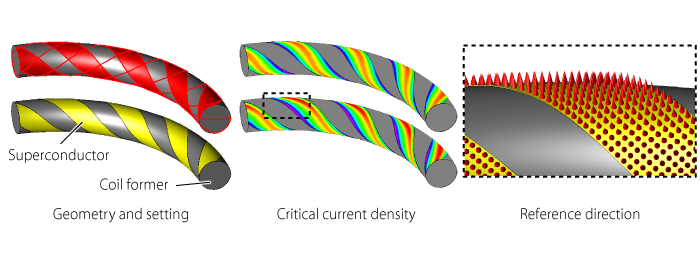 Analysis of a CORC-cable coil
Field-angle dependent material properties (anisotropy) can now be assigned simply by selecting the wire surfaces. This enables accurate and collective definition, even for complex helical geometries. The reference direction for anisotropic material properties is automatically calculated from the specified surfaces.
The new functions and Features
For details, please see the following function introduction. (PDF, 2.44 MB: User authentication)
Introducing New Functions of JMAG-Designer Ver. 25.1
Documents
These are created using the functions in JMAG-Designer Ver.25.1 and later. Please feel free to use them.
Fast Global Exploration
- [JFT213] Offline Optimization Using Response Value Surrogate Model and Geometry Check Surrogate Model
- [JFT219] Simulation Database Visualization Using JMAG Design Explorer
- [JAC293] Axial Gap Motor Geometry Optimization Using Surrogate Models
- [JAC297] Geometry Optimization of a Wound-field Synchronous Motor Including Efficiency Map, Part Temperature, Stress, and Electric Breakdown Evaluations
- [JAC324] Optimization of iron core materials for DC reactors
Multi-disciplinary Evaluation
- [JFT217] Motor Thermal Analysis Model Configuration Using the Thermal Modeling Feature
- [JAC308] Thermal Analysis of a Three-phase Induction Motor Accounting for Ventilation Cooling
- [JAC318] Vent Duct Design Optimization of a Three-phase Induction Motor
Material
Module Download
The latest version of JMAG modules are available.
In addition, version information, release notes, manuals, etc. can be used. ( User authentication)
Update to LM-X license server 5.5.11 or later when using JMAG-Designer Version 24.0 or later.
Click here for more information on LM-X License Server Installer and License Update Manual ( User authentication)
Introducing JMAG-Designer Ver.17.0 – Ver.25.2
Articles about JMAG-Designer that have been released previously are available.- JMAG-Designer Ver.25.0 / Ver.25.1 / Ver.25.2
- JMAG-Designer Ver.24.0 / Ver.24.1 / Ver.24.2
- JMAG-Designer Ver.23.0 / Ver.23.1 / Ver.23.2
- JMAG-Designer Ver.22.0 / Ver.22.1 / Ver.22.2
- JMAG-Designer Ver.21.0 / Ver.21.1 / Ver.21.2
- JMAG-Designer Ver.20.0 / Ver.20.1 / Ver.20.2
- JMAG-Designer Ver.19.0 / Ver.19.1
- JMAG-Designer Ver.18.0 / Ver.18.1
- JMAG-Designer Ver.17.0 / Ver.17.1