
Overview
The JMAG Script Library provides open access to a diverse codebase that gives AI precise context to get the most out of JMAG.
Engineering departments notoriously face serious resources shortages. A rapid shift to electric alternatives heightens pressure to shorten development timeline for electrical machines. AI has been highlighted as the solution to respond to this demand.
JMAG aims to cultivate a world where AI rather than the user runs the analyses to discover optimal designs. Workflow automation does not simply enhance productivity but also increases development flexibility and builds an environment where engineers can focus on design decisions.
JMAG Script can automate almost every function in JMAG. The JMAG Script Library makes sample scripts for the various operational procedures to use for AI training or reference. The codebase also offers a JMAG Script Help to ensure AI grasps the significance of each feature and parameter to enable context-driven settings.
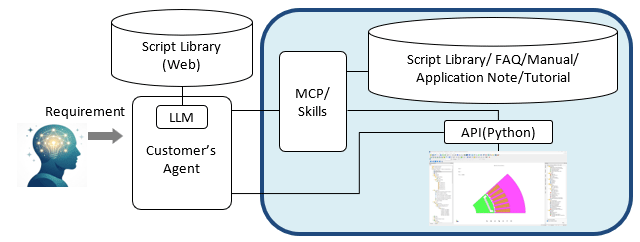
Fig 1. System Configuration
Users can use generative AI prompts to fully leverage the various JMAG features. The full or partial automation of analysis workflows via scripts allows even first-time users to run simulations in JMAG.
You need to sign in as a Regular JMAG Software User (paid user) or JMAG WEB MEMBER (free membership).
By registering as a JMAG WEB MEMBER, you can browse technical materials and other member-only contents for free.
If you are not registered, click the “Create an Account” button.
Create an Account Sign in