Overview
MATLAB is widely used in the engineering field, and the MATLAB Global Optimization Toolbox is often used for optimization calculations also. JMAG's optimization calculation interface enables linking with MATLAB to be carried out with ease—all that needs to be done is to simply select "Matlab Global Optimization" as the engine for optimization calculations.
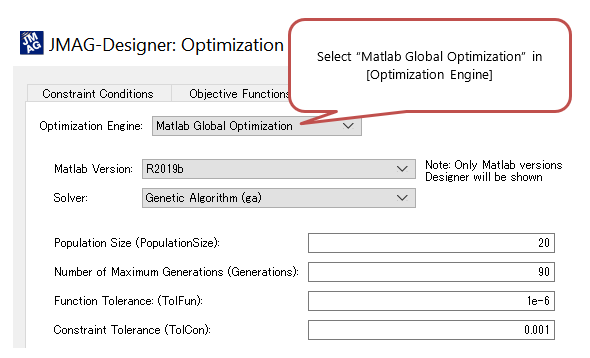
Fig. 1 Selecting MATLAB in the JMAG-Designer optimization setting panel
Having a Global Optimization Toolbox license allows MATLAB's various optimization engines to be used in JMAG. Input parameters needed for the engine can also be set in JMAG-Designer, thereby eliminating the need to operate MATLAB directly.
To continue, please sign-in.
Protected content here, for members only.You need to sign in as a Regular JMAG Software User (paid user) or JMAG WEB MEMBER (free membership).
By registering as a JMAG WEB MEMBER, you can browse technical materials and other member-only contents for free.
If you are not registered, click the “Create an Account” button.
Create an Account Sign in
Please enter your username and password to sign in.