解析の設定において部品をグループ化したり、条件の設定をするなどの際、部品、面、エッジなどの対象を選択することがあります。
IDや名前などで意図する対象を選択できますが、モデル空間の領域を指定して範囲内にある対象を選択する方法もあります。
範囲選択においては、指定された範囲に完全に属する対象が選択されます。
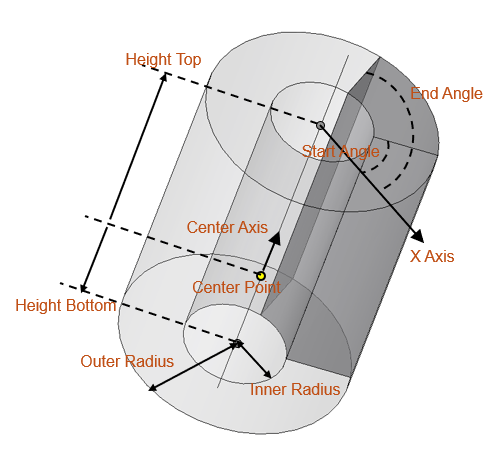
このスクリプトでは円筒の範囲を指定し、範囲内の面のうち法線方向がZ軸と平行な面を選択します。
円筒範囲の指定パラメータの意味は図を参照してください。
IDや名前などで意図する対象を選択できますが、モデル空間の領域を指定して範囲内にある対象を選択する方法もあります。
範囲選択においては、指定された範囲に完全に属する対象が選択されます。
このスクリプトでは円筒の範囲を指定し、範囲内の面のうち法線方向がZ軸と平行な面を選択します。
円筒範囲の指定パラメータの意味は図を参照してください。
前提条件
- 3次元モデルが1つ以上作成されていること
このスクリプト例では、プロジェクトツリー上でアクティブなモデルに対して実行している - 非ウィンドウモードではないこと。非ウィンドウモードでは領域を座標で指定する選択はできない
スクリプトにおける実行内容
- 選択したい円筒範囲を定義するCylinderオブジェクトを作成する
- 円筒範囲内の面を選択する
- 選択された面のうち、法線方向がZ軸と平行な面のみに絞り、選択しなおす
# Copyright (c) 2026 JSOL CORPORATION
#
# 本スクリプトはMITライセンスのもとで公開しています。
# ライセンス全文は以下を参照してください。
# https://www.jmag-international.com/jp/scriptlibrary/jmag_script_library_mit/


app = designer.GetApplication()

def createCylinderAreaToSelect():
    """Cylinderオブジェクトで円筒領域を定義する """
    pointOnCenterAxis = app.CreatePoint(0, 0, 0)
    centerAxisDirection = app.CreatePoint(0, 0, 1)
    InnerR = 20
    OuterR = 50
    HTop = 70
    HBottom = 0
    XAxisDirection = app.CreatePoint(1, 0, 0)
    startAngle = 0
    endAngle = 90

    cyl = app.CreateCylinder()
    cyl.SetCenterPointByPoint(pointOnCenterAxis)
    cyl.SetCenterAxisByPoint(centerAxisDirection)
    cyl.SetOuterRadius(OuterR)
    cyl.SetInnerRadius(InnerR)
    cyl.SetUseHeight(True)
    cyl.SetHeightTop(HTop)
    cyl.SetHeightBottom(HBottom)

    cyl.SetUseAngle(True)
    cyl.SetXAxisByPoint(XAxisDirection)
    cyl.SetStartAngle(startAngle)
    cyl.SetEndAngle(endAngle)

    return cyl

def getFacesInCylinderArea(model, cylinder):
    """円筒領域の範囲内にある面を選択する """
    sel = model.CreateSelection()
    sel.Clear()
    sel.Attach()

    # The 2rd argumet of SelectFaceByCylinderObject
    # False: Select all parts in the range
    # True: Select only visible parts in the range
    sel.SelectFaceByCylinderObject(cylinder, False)

    return sel

def filterFacesByNormalToZAxis(model, faceSelection):
    """選択された面のうち法線がZ軸と平行な面だけを選択しなおす """
    roundDigits = 7
    faceSelection.Detach()
    newSel = model.CreateSelection()
    newSel.Clear()
    for i in range(faceSelection.NumFaces()):
        fid = faceSelection.FaceID(i)
        nv = model.GetFaceNormalVector(fid)
        if round(nv.GetX(), roundDigits) == 0.0 and round(nv.GetY(), roundDigits) == 0.0:
            newSel.SelectFace(fid)

    return newSel


cylinderArea = createCylinderAreaToSelect()
model = app.GetCurrentModel()
selFaces = getFacesInCylinderArea(model, cylinderArea)
filteredFaces = filterFacesByNormalToZAxis(model, selFaces)

print(filteredFaces.NumFaces())