When configuring analysis settings —such as grouping parts or applying conditions— it often needs to select specific targets like parts, faces, or edges.
While the intended targets can be selected by using IDs or names, another method involves specifying a region in model space to select all targets contained within that area.
With range selection, only targets that lie entirely within the specified range are selected.
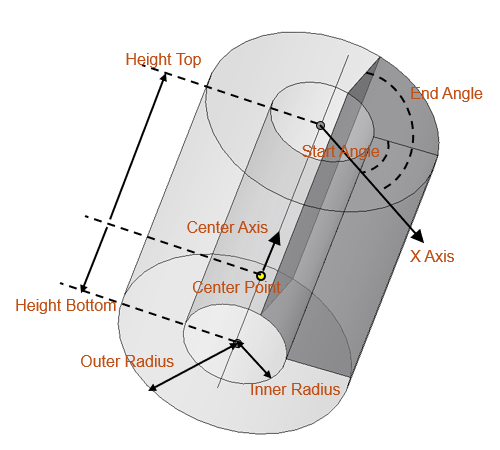
This script specifies a cylindrical range and selects faces within that range whose normal direction is parallel to the Z-axis.
Please refer to the diagram for the meaning of the parameters specifying the cylindrical range.
While the intended targets can be selected by using IDs or names, another method involves specifying a region in model space to select all targets contained within that area.
With range selection, only targets that lie entirely within the specified range are selected.
This script specifies a cylindrical range and selects faces within that range whose normal direction is parallel to the Z-axis.
Please refer to the diagram for the meaning of the parameters specifying the cylindrical range.
Preconditions
- One or more 3D models have been created.
This script runs on the active model in the project tree. - JMAG-Designer is not running in no-window mode. Selecting a region by specifying coordinates cannot be performed in no-window mode.
Script Function
- Create a Cylinder object to define the cylindrical region for selection.
- Select the faces within the cylindrical region.
- Refine the selection to include only those faces whose normal direction is parallel to the Z-axis.
# Copyright (c) 2026 JSOL CORPORATION
#
# This script is released under the MIT License.
# See the full license text at:
# https://www.jmag-international.com/scriptlibrary/jmag_script_library_mit/


app = designer.GetApplication()

def createCylinderAreaToSelect():
    """Define a cylindrical region using a Cylinder object """
    pointOnCenterAxis = app.CreatePoint(0, 0, 0)
    centerAxisDirection = app.CreatePoint(0, 0, 1)
    InnerR = 20
    OuterR = 50
    HTop = 70
    HBottom = 0
    XAxisDirection = app.CreatePoint(1, 0, 0)
    startAngle = 0
    endAngle = 90

    cyl = app.CreateCylinder()
    cyl.SetCenterPointByPoint(pointOnCenterAxis)
    cyl.SetCenterAxisByPoint(centerAxisDirection)
    cyl.SetOuterRadius(OuterR)
    cyl.SetInnerRadius(InnerR)
    cyl.SetUseHeight(True)
    cyl.SetHeightTop(HTop)
    cyl.SetHeightBottom(HBottom)

    cyl.SetUseAngle(True)
    cyl.SetXAxisByPoint(XAxisDirection)
    cyl.SetStartAngle(startAngle)
    cyl.SetEndAngle(endAngle)

    return cyl

def getFacesInCylinderArea(model, cylinder):
    """Select faces located within the cylindrical region """
    sel = model.CreateSelection()
    sel.Clear()
    sel.Attach()

    # The 2rd argumet of SelectFaceByCylinderObject
    # False: Select all parts in the range
    # True: Select only visible parts in the range
    sel.SelectFaceByCylinderObject(cylinder, False)

    return sel

def filterFacesByNormalToZAxis(model, faceSelection):
    """From the selected faces, re-select only those with normals parallel to the Z-axis """
    roundDigits = 7
    faceSelection.Detach()
    newSel = model.CreateSelection()
    newSel.Clear()
    for i in range(faceSelection.NumFaces()):
        fid = faceSelection.FaceID(i)
        nv = model.GetFaceNormalVector(fid)
        if round(nv.GetX(), roundDigits) == 0.0 and round(nv.GetY(), roundDigits) == 0.0:
            newSel.SelectFace(fid)

    return newSel


cylinderArea = createCylinderAreaToSelect()
model = app.GetCurrentModel()
selFaces = getFacesInCylinderArea(model, cylinderArea)
filteredFaces = filterFacesByNormalToZAxis(model, selFaces)

print(filteredFaces.NumFaces())