
Overview
Thermal designs are becoming more important than ever as motors become smaller with higher power densities. JMAG offers thermal analyses that leverage equivalent thermal circuits to account for cooling and the thermal resistance between parts. Designers can create thermal analysis models that consist of equivalent thermal circuits manually or through a Thermal Modeling feature.
The Thermal Modeling feature configures an equivalent thermal circuit and specifies the heat transfer conditions through simple parameter settings. Anyone new to thermal analysis or those dealing with complex cooling channels can effortlessly create thermal analysis models thanks to the visual platform for configuring cooling channels and components.
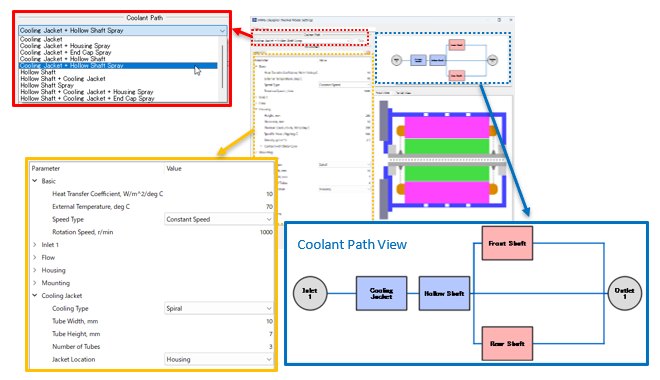
Fig. 1 Coolant Path Settings
The Thermal Modeling feature provides cooling jackets, sprays, and other components necessary to configure cooling channels. Users simply select the specific components
to display in the Coolant Path View. The setting panel even lists all
heat transfer conditions and dimensions necessary for anyone to specify
the various parameters to complete the settings. Once set, the Thermal Modeling feature automatically creates an equivalent thermal circuit. Customization functions also give users the power to create their own original cooling channels.
You need to sign in as a Regular JMAG Software User (paid user) or JMAG WEB MEMBER (free membership).
By registering as a JMAG WEB MEMBER, you can browse technical materials and other member-only contents for free.
If you are not registered, click the “Create an Account” button.
Create an Account Sign in